Publish and Manage a Legacy Salesforce Archive Policy
To add your Legacy Salesforce Archive policy to the job queue, publish it. You can
also edit, delete, or immediately run a policy.
Required Editions
Available in: Developer, Enterprise, Performance, and
Unlimited Editions. Requires the Salesforce Archive license.
User Permissions Needed
To create, edit, and schedule Archive Policies:
Manage Archive Policies
Note This content relates to Legacy Salesforce Archive. Read
about the Archive managed package in Own from Salesforce.
Tip Make sure to publish your policy each time you update its object configuration.
Otherwise, your changes aren't saved.
From the Archive Policies page, select the policy that you want to manage.
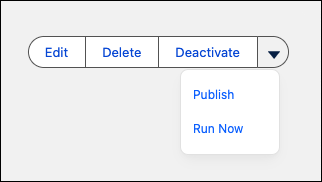
Select an option for your policy.
Edit opens a window where you can change the policy name,
description, and run frequency.
Publish saves any recent changes to your policy and puts it
in the job queue. Make sure to publish your policy each time you update it. Publishing also
reactivates policies that were previously deactivated.
Deactivate removes the policy from the job queue. The policy
doesn't execute until you republish it. You can only deactivate policies that are
published.
Delete removes the policy from your org. Deleted policies can't
be recovered.
Run Now creates a new job session for
the policy with an immediate runtime. If there's no other job in progress, the new job
runs within five minutes after it's created. If another job is already in progress, the
new job starts running afterwards.
Did this article solve your issue?
Let us know so we can improve!
Loading
Salesforce Help | Article
Cookie Consent Manager
Cookie Consent Manager
General Information
Required Cookies
Functional Cookies
Advertising Cookies
General Information
We use three kinds of cookies on our websites: required, functional, and advertising. You can choose whether functional and advertising cookies apply. Click on the different cookie categories to find out more about each category and to change the default settings.
Privacy Statement
Required Cookies
Always Active
Required cookies are necessary for basic website functionality. Some examples include: session cookies needed to transmit the website, authentication cookies, and security cookies.
Functional Cookies
Functional cookies enhance functions, performance, and services on the website. Some examples include: cookies used to analyze site traffic, cookies used for market research, and cookies used to display advertising that is not directed to a particular individual.
Advertising Cookies
Advertising cookies track activity across websites in order to understand a viewer’s interests, and direct them specific marketing. Some examples include: cookies used for remarketing, or interest-based advertising.