
You are here:
Promote My Business
Salesforce Suites bring powerful tools into one marketing experience, where you can make the most of customer data and engage the people who follow your brand. A streamlined campaign experience brings contacts and content together, while flows enhance and automate your daily tasks.
Required Editions
| Available in: Lightning Experience |
| Available in: Free, Starter and Pro Suite Editions. |


Get Started with Email
With your leads and contacts gathered in one place, it’s easy to carve out your intended audience and get started sending emails. From the list view in either the Contacts or Lead page, select the recipients you want to target, either by selecting individuals or by creating a filtered list view.
To open the email composer from there, click Send Email. Confirm the recipient list, and behind the scenes, the Send List feature automatically generates a corresponding, reusable segment based on your filters. Then explore templates and craft your email content. When you've finished composing your email, send it directly from the composer.
Campaigns Are Key
In addition to providing the tools to send emails, Salesforce Starter and Pro Suite also provide access to the full functionality of the Marketing app. The Marketing app provides streamlined access to powerful platform tools from other parts of Salesforce. You get power with less complexity, and the campaign record helps guide you as you build a marketing plan.
Let’s look at the parts of a campaign.
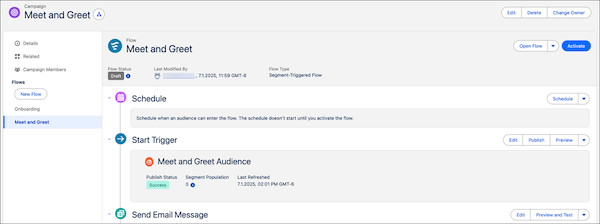
- You can choose to open campaign content immediately or schedule it for later. Use Einstein Send Time Optimization to automatically send each message when its recipient is most likely to open it.
- To target your ideal campaign audience, create a segment. You can easily build your audience with preconfigured filters or with campaign members. See Marketing Segments.
- Build emails and landing pages in the Salesforce CMS content builder. Drag components into the layout, and then edit text and insert images. To maintain a consistent style for your emails, select a brand. Use preview and test options to make sure your content looks great before you open.
Choosing a Starting Point
Instead of building a campaign from scratch, you have options for campaigns that make it easy to get started. Your edition determines which options you have.
A campaign starts with a flow, which visualizes and automates multistep processes and connects data and publishing pipelines behind the scenes. Campaign flows come configured with one or more elements, or automated actions, to get you started. You can add and edit flows from the campaign record. See How Campaigns and Flows Work Together.
Tracking Success
Monitor the success of your campaigns so you can set marketing goals and refine your marketing strategy. Salesforce Suites come with engagement reports, dashboards, and folders to get you started. Starter and Pro Suite also make it possible to share reports and dashboards, a user with the System Administrator profile can grant users access to engagement folders from the Browse tab in Analytics.

- Marketing Considerations for Salesforce Small Business Suites
The marketing tools and objects that you use in Salesforce Small Business Suites have some nuances to understand. - Consent Management
Before you send promotional emails, make sure that you’re in compliance with regulations such as CAN-SPAM. After you update consent data, allow time for your data to sync before you send messages. - Marketing Segments
When you target a group within your audience, we call that a segment. In email campaigns, you can easily build an audience segment with common filters or from a list of campaign members. - Test Segments in Small Business Suites
Review email personalization and email delivery in the real world with test segments. A test segment contains your or your colleagues’ contact information so that you can review personalized, draft emails in your own inboxes. - Segment Examples
The quickest way to get started with segments is to use the quick filters or send to campaign members options. But if you want to further customize your audience segments, use Segment Builder. For best results, verify field values on corresponding records, and copy and paste those values into the segment canvas.
