
Create Lightweight Contactless Users
Reduce the overhead of managing customers and partners by creating users without contact information. You can add contacts later if you decide that you want them—like when you upgrade to a more full-featured Identity license.
Required Editions
| Available in: Salesforce Classic and Lightning Experience |
| Available in: Professional, Enterprise, Performance, Unlimited, and Developer Editions |
| User Permissions Needed | |
|---|---|
| To create contactless Partner users: | Manage Internal Users AND Manage External Users |
| To create contactless Customer users: | Manage Internal Users AND Manage Customer Users |

Typically, when Salesforce creates a user for a site, it adds the user’s contact information. But if your implementation doesn’t require contact information for these users, consider going contactless. Without contacts, you don’t have to worry about keeping user and contact records in sync. You can simply maintain a user database for identity purposes. For example, you can delay creating contacts for the guests registering for your site until after they’re qualified.
You can add contactless users to a new or existing site.
To create a contactless user, you create a user record using Apex, SOAP, or Bulk API 2.0.
User u = new User();
    u.FirstName = 'Jane';
    u.LastName = 'Doe';
    u.Email = 'janedoe@test.com';
    u.Alias = 'jane';
    u.Username = 'janedoe@test.com';
    u.CommunityNickname = 'Jane';
    u.LocaleSidKey = 'en_US';
    u.TimeZoneSidKey = 'GMT';
    u.ProfileID = '00exx000000jvN4'; // Profile that's associated with the EI license
    u.LanguageLocaleKey = 'en_US';
    u.EmailEncodingKey = 'UTF-8';
    insert u;
To handle self-registration for contactless users, create a custom self-registration page and create contactless users through the API. Then enable self-registration for your site by selecting Allow customers and partners to self-register from the site’s Login & Registration page.
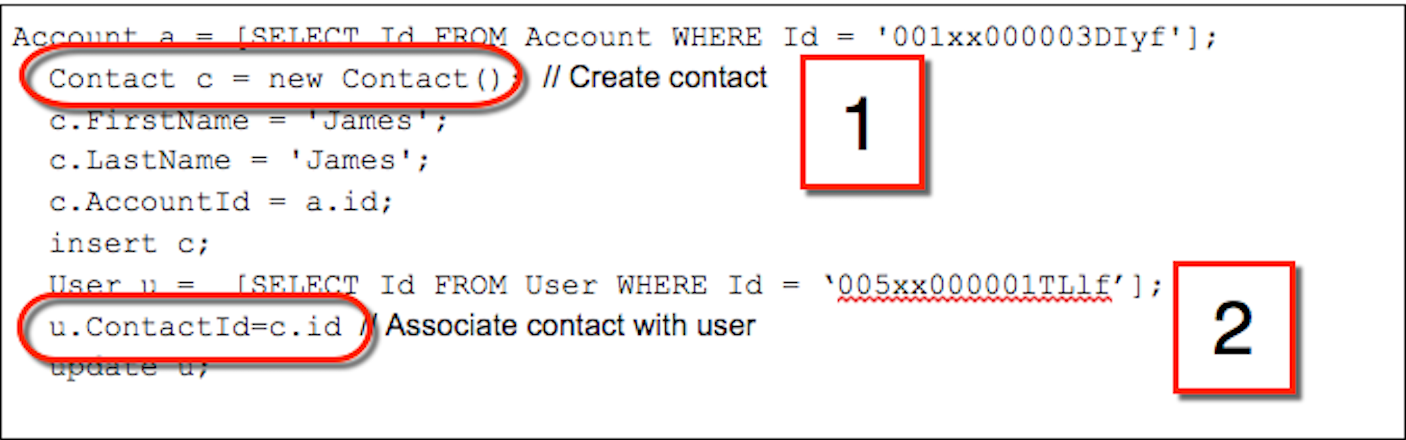
To add a contact to the contactless user, create a contact (1), and associate the contact with the user (2).
Considerations
- The Login As feature isn’t supported for contactless users because contacts are required.
- Delegated admins can’t manage contactless users.
- System for Cross-Domain Identity Management (SCIM) isn’t supported for contactless user creation.
- Contactless users have the same access to objects as users with contact information.
