
You are here:
Translate Custom Labels for Date and Time Components
Define custom label translations for date and time pickers using JSON strings and Omniscript custom labels. For example, if a Spanish translation is defined, the date picker displays Spanish translations for the months and days of the week.
Learn how to translate custom labels in Salesforce. See Translate Custom Labels.
- Go to Day.js, click List of supported locales, and choose a language file.
-
In the language's JavaScript file, within the
localeobject, copy the outer braces and everything in between.For example, in the es-us.js file, copy the highlighted text:
// Spanish (United States) [es-us] import dayjs from 'dayjs' const locale = { name: 'es-us', weekdays: 'domingo_lunes_martes_miércoles_jueves_viernes_sábado'.split('_'), weekdaysShort: 'dom._lun._mar._mié._jue._vie._sáb.'.split('_'), weekdaysMin: 'do_lu_ma_mi_ju_vi_sá'.split('_'), months: 'enero_febrero_marzo_abril_mayo_junio_julio_agosto_septiembre_octubre_noviembre_diciembre'.split('_'), monthsShort: 'ene_feb_mar_abr_may_jun_jul_ago_sep_oct_nov_dic'.split('_'), relativeTime: { future: 'en %s', past: 'hace %s', s: 'unos segundos', m: 'un minuto', mm: '%d minutos', h: 'una hora', hh: '%d horas', d: 'un día', dd: '%d días', M: 'un mes', MM: '%d meses', y: 'un año', yy: '%d años' }, ordinal: n => `${n}º`, formats: { LT: 'h:mm A', LTS: 'h:mm:ss A', L: 'MM/DD/YYYY', LL: 'D [de] MMMM [de] YYYY', LLL: 'D [de] MMMM [de] YYYY h:mm A', LLLL: 'dddd, D [de] MMMM [de] YYYY h:mm A' } } dayjs.locale(locale, null, true) export default locale -
Paste the JavaScript code you copied into a JavaScript-to-JSON converter such as
https://www.convertsimple.com/convert-javascript-to-json/, and convert it.
The converted JSON code looks like this:
{ "name": "es-us", "weekdays": [ "domingo", "lunes", "martes", "miércoles", "jueves", "viernes", "sábado" ], "weekdaysShort": [ "dom.", "lun.", "mar.", "mié.", "jue.", "vie.", "sáb." ], "weekdaysMin": [ "do", "lu", "ma", "mi", "ju", "vi", "sá" ], "months": [ "enero", "febrero", "marzo", "abril", "mayo", "junio", "julio", "agosto", "septiembre", "octubre", "noviembre", "diciembre" ], "monthsShort": [ "ene", "feb", "mar", "abr", "may", "jun", "jul", "ago", "sep", "oct", "nov", "dic" ], "relativeTime": { "future": "en %s", "past": "hace %s", "s": "unos segundos", "m": "un minuto", "mm": "%d minutos", "h": "una hora", "hh": "%d horas", "d": "un día", "dd": "%d días", "M": "un mes", "MM": "%d meses", "y": "un año", "yy": "%d años" }, "formats": { "LT": "h:mm A", "LTS": "h:mm:ss A", "L": "MM/DD/YYYY", "LL": "D [de] MMMM [de] YYYY", "LLL": "D [de] MMMM [de] YYYY h:mm A", "LLLL": "dddd, D [de] MMMM [de] YYYY h:mm A" } } Note Some JavaScript-to-JSON converters don't support functions such as
relativeTimeFormatter. If a locale usesrelativeTimeFormatter, either remove therelativeTimekey and everything within its braces, or add values formm,hh, and so on. Or if you're familiar with JavaScript, you can run the .js file, run theJSON.stringify(locale)command, and skip the next step. -
Remove line breaks and extra white space using a JSON formatter with a Compact JSON
or Minify JSON feature, such as https://jsoneditoronline.org/.
The compacted JSON code looks like this:
{"name": "es-us", "weekdays": ["domingo", "lunes", "martes",
"miércoles", "jueves", "viernes", "sábado"], "weekdaysShort": ["dom.",
"lun.", "mar.", "mié.", "jue.", "vie.", "sáb."], "weekdaysMin": ["do",
"lu", "ma", "mi", "ju", "vi", "sá"], "months": ["enero", "febrero",
"marzo", "abril", "mayo", "junio", "julio", "agosto", "septiembre",
"octubre", "noviembre", "diciembre"], "monthsShort": ["ene", "feb",
"mar", "abr", "may", "jun", "jul", "ago", "sep", "oct", "nov", "dic"],
"relativeTime": {"future": "en %s", "past": "hace %s", "s":
"unos segundos", "m": "un minuto", "mm": "%d minutos", "h": "una hora",
"hh": "%d horas", "d": "un día", "dd": "%d días", "M": "un mes", "MM":
"%d meses", "y": "un año", "yy": "%d años"}, "formats": {"LT": "h:mm A",
"LTS": "h:mm:ss A", "L": "MM/DD/YYYY", "LL": "D [de] MMMM [de] YYYY",
"LLL": "D [de] MMMM [de] YYYY h:mm A",
"LLLL": "dddd, D [de] MMMM [de] YYYY h:mm A"}}
(A few line breaks have been added to wrap the text in this Guide.)
NoteCustom labels accept valid JSON strings only.
- Copy the compacted JSON code.
-
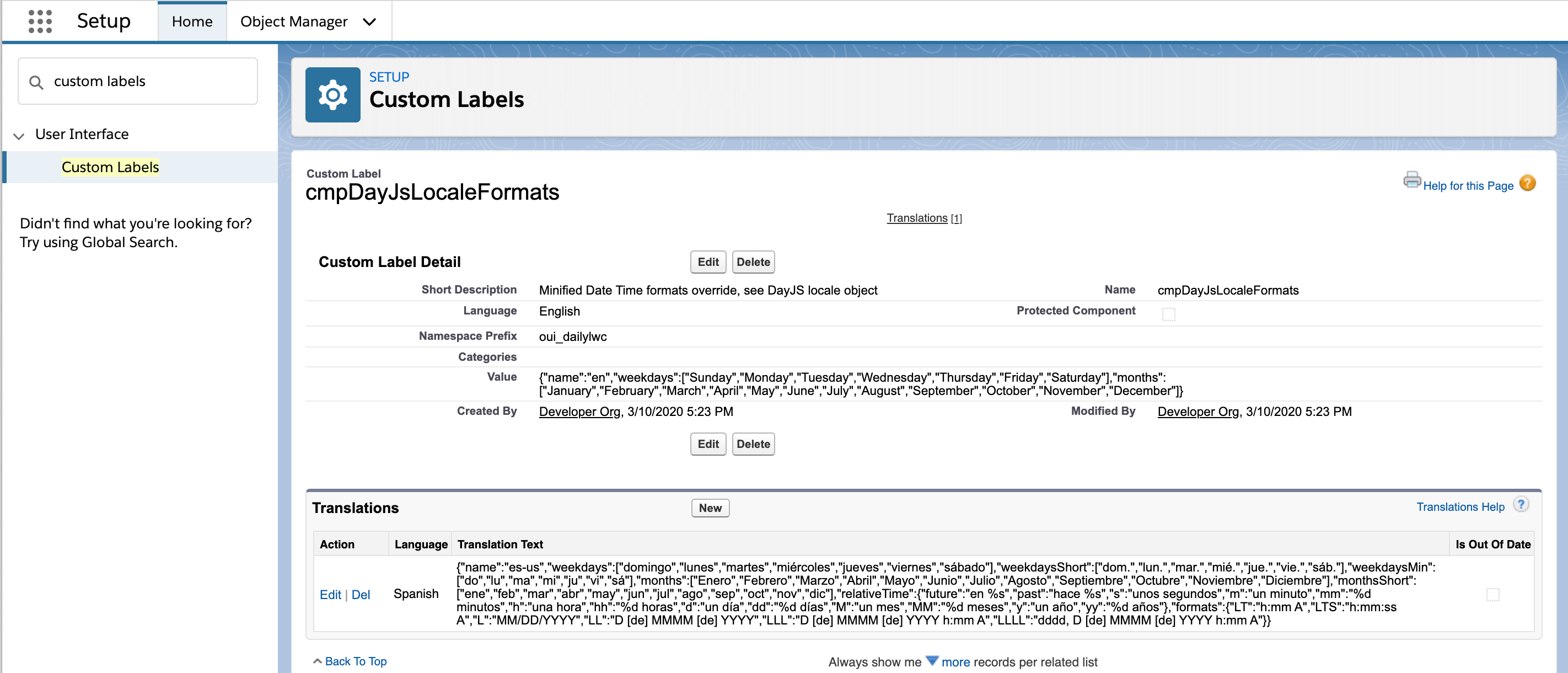
In Setup, go to Custom Labels, and open a custom label that
meets your requirements.
The following custom labels are recommended:
Custom Label
Description
cmpDayJsLocaleFormats
Applies translations to LWC date components and Omniscript date elements. The cmpDayJsLocaleFormats label doesn’t apply translations to Omniscripts if the OmniDayJSLocaleFormats label has translations defined.
OmniDayJsLocaleFormats
Applies translations to Omniscript date and time elements only. Overrides the cmpDayJsLocaleFormats label in Omniscripts if both custom labels have translations defined.
- In the custom label, click New to add a translation.
- Select the Language.
- In the Translation field, paste in the compacted JSON code.
-
Click Save.
-
Open an Omniscript that includes a Date or Date/Time element, go to Preview, select
the language, and open the date picker.
If you've followed the example and selected Spanish, the date picker displays Spanish translations for the months and days of the week.
