
Headless Identity APIs: Extending the Headless Guest Flow into a Named User Flow
When you complete a headless guest flow in your off-platform app, you get a guest JWT-based access token with the user’s unique visitor ID (UVID) minted into it. To bring the UVID and all of its associated context into a named user session, you can pass the UVID into a new authorization flow, like a headless login or registration flow.
Required Editions
| Available in: both Salesforce Classic (not available in all orgs) and Lightning Experience |
| Available in: Enterprise, Unlimited, and Developer Editions |
By maintaining context for your users, you open your apps to powerful capabilities. For example, you host an ecommerce app outside of the Salesforce platform. In your app, users must log in to save and purchase items. You want to attract more shoppers by making it possible to save items to a cart without logging in. With the guest user flow, you configure your app to generate a UVID that uniquely identifies the user before they log in. With a few changes to your app, users can now browse your products and save items to their cart without logging in. When they go to purchase items, your app prompts them to log in or register. During the login process, the app passes the UVID into a named user version of the Authorization Code and Credentials Flow. Because the UVID is tied to the cart, the user can see their saved cart items after logging in, providing a better user experience.
You can apply this same process to other use cases, like cookie consent. For example, a user visits your app and accepts a cookie consent banner, creating another cookie. You can tie this cookie to the UVID and use it to store information about the user, such as their consent preferences and that they already accepted the banner. When the user logs in, you can carry the UVID forward and remember their preferences, creating a more customized and less noisy experience.
By carrying context for guest users, you can construct a complete picture of their entire journey through your app, from the time they first visit until they register. With the help of an app analytics tool, this information can help you understand what kinds of experiences your users prefer and what drives them to make accounts.
You can pass the UVID into all variations of the Authorization Code and Credentials Flow and the OAuth 2.0 web server flow. These flows share a common pattern of the OAuth 2.0 authorization code grant type, where the app requests an authorization code from Salesforce and exchanges it for an access token. Here’s a complete list of named user flows where you can use a UVID.
- Headless username-password login with the Authorization Code and Credentials Flow
- Headless Registration Flow
- Headless Passwordless Login Flow
- Web server flow
- Hybrid web server flow
- Hybrid app refresh token flow
Only the first three flows can be used headlessly, so if you want to keep your implementation headless, avoid the web server flow variations.
This diagram shows you a high-level overview of how you can pass a JWT-based access token with a UVID into a named user authorization flow.
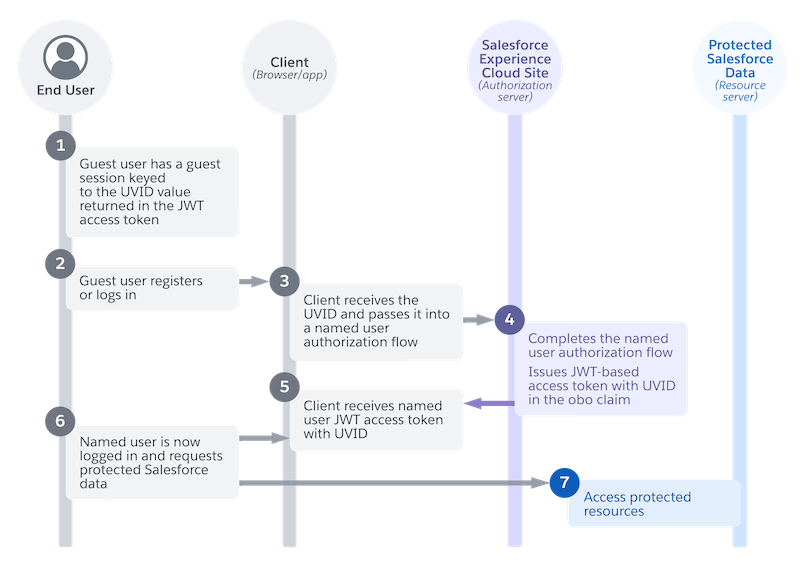
- At the point where the diagram starts, the guest flow has already been completed. For example, the user has been browsing the app but hasn’t logged in yet. The user has a guest session tied to the UVID value returned in the JWT-based access token (1).
- The guest user decides to register or log in. For example, they want to buy something, so your app prompts them to register. Or they click a button that requires access to protected data, like their order history (2).
- Your app has the UVID value from the guest session, so when the user logs in, it passes the
UVID into a named user authorization flow, like headless login with the Authorization Code and
Credentials Flow. The app has three options for passing the UVID.
- Include a guest JWT-based access token with a UVID in the
Uvid-Hintheader. For tokens issued from the guest flow, the UVID is in the subject (sub) claim. - Include a plain UVID value in the
Uvid-Hintheader - Include a plain UVID value in the
uvid-hintbody parameter
- Include a guest JWT-based access token with a UVID in the
- Salesforce completes the named user flow and issues a JWT-based access token with the UVID.
Unlike a guest token, where the UVID is in the subject claim, the named user token has the UVID
in the on-behalf-of (
obo) claim. In a named user JWT-based token, the subject claim stores the user ID. At this point, the UVID has persisted from the time the user first visited the app, to when they logged in (4). - Your app receives the access token with the UVID (5),
- The named user is now logged in and requests access to protected Salesforce data (6).
- With the JWT-based access token, the user can access protected Salesforce resources (7).
