
Headless Identity APIs: Headless Guest Flow for Private Clients
For users who interact with your off-platform app but aren’t necessarily logged in, you can use the Headless Guest Flow to identify users with a unique visitor ID (UVID). When the user logs in or registers, you can carry the UVID forward and maintain any contextual information associated with it, like a user’s preferences. This flow is a variation of the Authorization Code and Credentials Flow.
Required Editions
| Available in: both Salesforce Classic (not available in all orgs) and Lightning Experience |
| Available in: Enterprise, Unlimited, and Developer Editions |
Before setting up this flow, complete these steps.
- Complete Prerequisites for Headless Identity
- Integrate your off-platform app with Salesforce using one of these options. Make sure that you configure additional policies for the guest flow.
For example, you host an ecommerce app outside of the Salesforce platform. You want users to be able to save items to a cart without logging in. You can use the guest user flow to generate a UVID for the user, and you can store the user’s cart information and tie it to the UVID. When the user eventually logs in or registers, you pass the UVID into a headless login or registration flow. Because you have the cart context from the UVID, you can save the user’s items, giving them a better experience.
The shopping cart example is just one of many possibilities when it comes to the UVID and guest flow. Other possibilities include understanding what makes your users want to sign up for your app and remembering their preferences.
The guest flow and UVID are supported only for JSON Web Token (JWT)-based access tokens. To connect the UVID to a named user, you must configure the named user flow to issue JWT-based access tokens too.
These instructions tell you how to implement the flow for a private client with its own backend. Private clients have a secure place to store your app’s consumer secret, which functions as a password for the code exchange, so we recommend sending the consumer secret when you request an access token.
We also recommend that you further protect your flow by implementing the OAuth 2.0 Proof Key for Code Exchange (PKCE) extension. PKCE helps ensure that the client that initiates the flow is the same client that completes it. For more information about how PKCE works and how you can enforce it, see Build the PKCE Extension into Your Implementations.
Here’s an overview of the guest flow. These steps cover the flow up to the point when the guest user is identified, but not logged in.
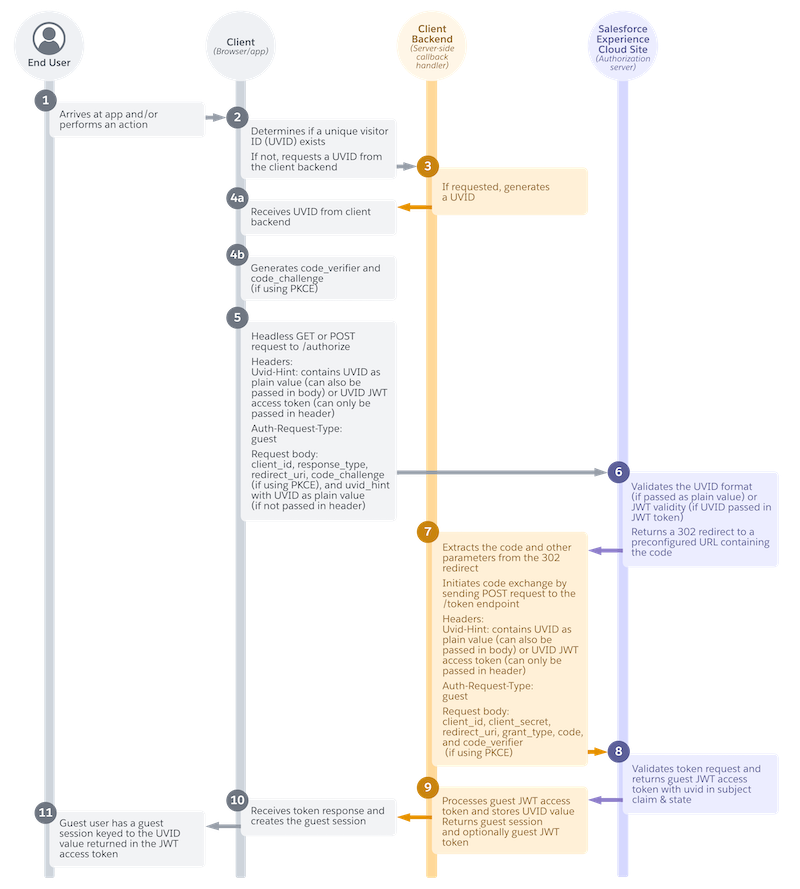
- The unknown visitor arrives at the app, or performs an action like clicking a button (1).
- The app looks for a UVID. If it can’t find one, it requests a UVID from its client backend (2).
- If requested, the client backend generates a UVID and sends it to your app (3).
- Your app receives the UVID (4a).
- If you’re using PKCE, your app generates PKCE parameters (4b).
- To get an authorization code, your app sends the UVID in a headless GET or POST request to
the authorization endpoint (
services/oauth2/authorize) (5). - Salesforce validates the UVID and returns a 302 redirect to a preconfigured URL containing the authorization code (6).
- Your app’s client backend extracts the code and other parameters from the 302 redirect and
exchanges the code for an access token with a request to the Salesforce token endpoint
(
services/oauth2/token) (7). - Salesforce returns a guest JWT-based access token with the UVID in the subject claim (8).
- Your app’s client backend processes the guest JWT-based access token and stores the UVID value, which it can keep private. It returns a guest session, and optionally, the guest token (9).
- Your app receives the token response and creates the guest session (10).
- The previously unknown visitor now has a guest session tied to the UVID value in the access token (11).
As mentioned in step 7 for a private client, your build a server-side callback handler that can extract the 302 redirect and return an authorization code to your app. To see how you can build this handler, see Authorization Code and Credentials Flow for Private Clients, which includes an example Apex handler exposed as a REST resource.
Unknown End User Arrives at Your App
The flow starts when an end user visits your app. You can also configure it to start when the user performs an action, such as saving an item to a cart.
App Requests a UVID If Necessary
Your app tries to find a UVID from previous visits to the app. For example, it determines if it can pull the UVID from a cookie or from local storage in the browser. If the app can’t find a UVID, it requests one from its client backend.
Client Backend Generates a UVID
If requested, the client backend generates a UVID value. Salesforce isn’t involved in generating, storing, or maintaining the UVID. It’s entirely up to your app. The only requirement is that the UVID must be a Version 4 universally unique identifier (v4 UUID).
App Receives UVID
Your app receives the UVID from the client backend.
App Generates PKCE Parameters
If you’re using PKCE, your app generates code_verifier
and code_challenge parameters.
The PKCE specification defined in RFC 7636 also includes an optional code_challenge_method parameter that you can send in the
authorization request. Salesforce ignores any value that you send in this parameter and
defaults to SHA256.
App Exchanges the UVID for an Authorization Code
Your app headlessly sends a GET or POST request to the Salesforce authorization endpoint on your Experience Cloud site. The request contains the UVID and other parameters to identify the app and specify the type of request.
You have two options for how you send the UVID in this request. You can either send a plain UVID value, or send a JWT-based access token with the UVID minted into it. For example, if you have a JWT-based access token from a previous session, sending the token to the authorization endpoint is an easy way to reuse it without specifically parsing it for the UVID.
Include these headers in your request.
| Header | Required? | Description |
|---|---|---|
Uvid-Hint
|
Required if you don’t send the UVID in the request body. You must always include a UVID—whether it’s sent in the header or in the request body. | Contains either the UVID as a plain value or a JWT-based access token with a UVID minted into it. If you send the UVID as a plain value, include a If you send a JWT-based access token with a UVID, include a
|
Auth-Request-Type
|
Yes. | Specifies the type of request you want to make to Salesforce. For headless
passwordless login, this value must be set to guest. |
Include these parameters in the request body.
| Parameter | Required? | Description |
|---|---|---|
uvid_hint
|
Required if you don’t include the UVID in the header. | Contains either the UVID as a plain value or a JWT-based access token with a UVID minted into it. If you send the UVID as a plain value, include a If you send a JWT-based access token with a UVID, include a
|
client_id
|
Yes. | The consumer key of the external client app or connected app. |
response_type
|
Yes. | The OAuth 2.0 grant type that your app requests. Because this flow is a
variation of the Authorization Code and Credentials Flow, this value must be code_credentials. |
redirect_uri
|
Yes. | The URL where users are redirected after successful authentication. The For private clients, use a |
code_challenge
|
Only if you’re using PKCE, which we always recommend, especially for a public client. | Specifies the SHA256 hash value of the If a If the |
scope
|
Yes. | Permissions that define the type of protected resources the app can access. The values that you send in this request must match or be a subset of the scopes assigned to your external client app or connected app. For more information about each scope and its purpose, see OAuth Tokens and Scopes. |
These example authorization requests all implement PKCE.
Here’s an example request where the UVID is passed as a plain value in the request header.
POST /services/oauth2/authorize? HTTP 1.1
Host: MyExperienceCloudSite.my.site.com
Uvid-Hint: UVID abcd-1234-efgh
Auth-Request-Type: guest

response_type=code_credentials&
client_id=***********&
redirect_uri=https://www.MyExperienceCloudSite.my.site.com/services/oauth2/echo&
code_challenge=********&
scope=openid
Here’s an example request where the UVID is passed in a JWT-based access token in the header.
POST /services/oauth2/authorize? HTTP 1.1
Host: MyExperienceCloudSite.my.site.com
Uvid-Hint: JWT **************
Auth-Request-Type: guest

response_type=code_credentials&
client_id=***********&
redirect_uri=https://www.MyDomainName.my.site.com/services/apexrest/code/exchange&
code_challenge=********
scope=openid
In this example, the UVID is passed as a plain value in the request body.
POST /services/oauth2/authorize? HTTP 1.1
Host: MyExperienceCloudSite.my.site.com
Auth-Request-Type: guest

uvid_hint=UVID abcd-1234-efgh&
response_type=code_credentials&
client_id=***********&
redirect_uri=https://www.MyDomainName.my.site.com/services/apexrest/code/exchange&
code_challenge=********
scope=openid
Salesforce Returns a 302 Redirect
Salesforce validates the UVID. If the UVID was passed as a plain value, Salesforce validates its format. If it was passed as a JWT-based access token, Salesforce checks the validity of the token.
Salesforce then returns an HTTP 302 redirect to a preconfigured URL containing the authorization code. If the flow is happening in the browser, the 302 redirect is processed in the browser and Salesforce automatically sends the redirect response to the redirect URL, which points to the server-side callback handler on the client backend. Here’s an example preconfigured URL.
https://www.MyDomainName.my.site.com/services/apexrest/code/exchange?code=aPrxC1*******
&sfdc_community_url=https%3A%2F%2FMyDomainName.my.site.com&sfdc_community_id=0DBxxxxxxxxxxxx
Client Backend Extracts the Code and Exchanges It for an Access Token
The client backend extracts the authorization code and other parameters from the
preconfigured URL. It then initiates a code exchange by sending the code and other
parameters in a headless POST request to the /services/oauth2/token endpoint.
Include these headers in the request.
| Parameter | Required? | Description |
|---|---|---|
Uvid-Hint
|
Yes. | Contains either the UVID as a plain value or a JWT-based access token with a UVID minted into it. For the code exchange, don’t include a prefix for the UVID.
For example, if you pass the UVID as a plain value, the header is just |
Auth-Request-Type
|
Yes. | Specifies the type of request you want to make to Salesforce. For headless
passwordless login, this value must be set to guest. |
Include these parameters in the request body.
| Parameter | Required? | Description |
|---|---|---|
code
|
Yes. | The authorization server creates an authorization code, which is a short-lived token, and passes it to the client after successful authentication. The client sends the authorization code to the authorization server to obtain an access token and, optionally, a refresh token. |
client_id
|
Yes. | The consumer key of the external client app or connected app. |
client_secret
|
Yes. | The consumer secret of the external client app or connected app. |
redirect_uri
|
Yes. | The URL where users are redirected after a successful authentication. The redirect URI must match one of the values in the external client app or connected app Callback URL field. Otherwise, the approval fails. This value must be URL encoded. For private clients, use a |
grant_type
|
Yes. | The type of validation that the app can provide to prove it’s a safe visitor.
Because this flow is a variation of the Authorization Code and Credentials Flow, the
value must be authorization_code. |
code_verifier
|
Only if you’re using PKCE. | Specifies 128 bytes of random data with high entropy to make guessing the code value difficult. Set this parameter to help prevent authorization code interception attacks. The value must be base64url-encoded as defined in https://datatracker.ietf.org/doc/html/rfc4648#section-5. If there’s a If the
|
Here’s an example token request that implements PKCE. In this example, the UVID is sent as a plain value.
POST services/oauth2/token? HTTP 1.1
Host: MyExperienceCloudSite.my.site.com
Auth-Request-Type: guest
Uvid_Hint: abcd-1234-efgh

code=********&
client_id=**********&
client_secret=*********&
redirect_uri=https://www.MyDomainName.my.site.com/services/apexrest/code/exchange&
grant_type=authorization_code&
code_verifier=*******
Salesforce Grants a JWT-Based Access Token
After validating the app’s credentials. Salesforce returns a guest JWT-based access token
and a state to the client backend. The guest access token contains the UVID in the subject
(sub) claim. Here’s an example snippet of a JWT-based
access token. As a reminder, these tokens have three components: a header, payload, and
signature. This example shows you the payload. As you can see, the UVID value in the sub claim is prefixed with uvid.
{
  "tnk": "example/00XXXXXX",
  "ver": "1.0",
  "kid": "CORE_ATJWT************",
  "tty": "sfdc-core-token",
  "typ": "JWT",
  "alg": "RS256"
}

{
  "scp": "open_id",
  "aud": [
    "https://example.com"
  ],
  "sub": "uvid:abcd-1234-efgh",
  "nbf": "1675197036",
  "iss": "https://MyExperienceCloudSite.my.site.com",
  "exp": "1675198836",
  "iat": "1675197036",
   jti”: xRb**********”
  "client_id": "**********"
}
For a full explanation of each claim in a JWT-based access token, see JWT-Based Access Tokens in Salesforce Help.
Client Backend Processes Access Token Response
The client back-end processes the access token response and stores the UVID value. It returns a guest session to your app. It can also return the JWT-based access token, but it isn’t required.
App Creates the Guest Session
Your app receives the token response from its client back end and creates a guest session.
Unknown User Is Now Identified
The unknown end user now has a guest session tied to the UVID value returned in the JWT-based access token. At this point, it’s up to you what you want to do with the UVID. To learn how to pass it into a named user authorization flow, see Extending the Guest User Flow into a Named User Flow.
