
OAuth Authorization Flows
OAuth authorization flows grant a client application restricted access to protected resources on a resource server. Each OAuth flow offers a different process for approving access to a client app, but in general the flows consist of three main steps. To initiate an authorization flow, a client app requests access to a protected resource. In response, an authorizing server grants access tokens to the client app. A resource server then validates these access tokens and approves access to the protected resource.
Required Editions
| Available in: both Salesforce Classic and Lightning Experience |
| Available in: All Editions |

See New connected apps can no longer be created in Spring ‘26 for more details.
For example, when you open the Salesforce mobile app to access your Salesforce data, you initiate an OAuth 2.0 authorization flow. In this flow, your Salesforce org is the resource server that hosts the protected resource. The Salesforce mobile app is the client requesting access. You’re the resource owner, who allows the Salesforce mobile app to access and manage your Salesforce data over the web at any time. Your Salesforce org, acting as the authorization server, grants access to the Salesforce mobile app by issuing an access token. Let’s go over the flow step by step.
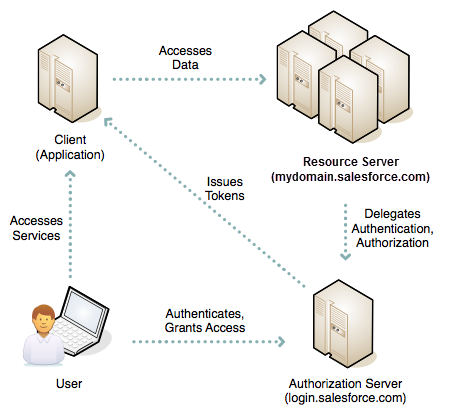
- You open the Salesforce mobile app.
- An authentication prompt displays, in which you enter your username and password.
- The Salesforce mobile app sends your credentials to Salesforce and initiates the OAuth authorization flow.
- Salesforce sends the mobile app access and refresh tokens as confirmation of a successful validation of the user and the mobile app.
- You approve the request to grant access to the Salesforce mobile app.
- The Salesforce mobile app starts.
After this initial flow, the Salesforce mobile app starts immediately when the session is active. If the session is stale, the Salesforce mobile app uses the refresh token from its initial authorization to get an updated session.
Contrast this approach with giving your username and password to a client app to access a resource server on your behalf. The client app effectively impersonates you, with precisely the same access to your data. If you no longer trust the client app, you must change your password at the resource server, which is an inconvenience and a security risk. For this reason, OAuth authorization is a better solution.
OAuth Authorization Flows and Connected Apps
All OAuth authorization flows, except for the SAML Assertion flow, require you to define a connected app. The connected app framework enables an external client application to integrate with Salesforce using APIs and standard protocols, such as SAML, OAuth, and OpenID Connect. Connected apps use these protocols to authenticate, authorize, and integrate external apps and service providers. The external apps that are integrated with Salesforce can run on the customer success platform, other platforms, devices, or SaaS subscriptions. In the example above, the Salesforce mobile app integrates with your org using a connected app.
OAuth Authorization Flow Use Cases
As a Salesforce developer, you can choose from several OAuth authorization flows. When selecting the correct flow for your app, consider these use cases.

- OAuth 2.0 Web Server Flow for Web App Integration
To integrate an external web app with the Salesforce API, use the OAuth 2.0 web server flow, which implements the OAuth 2.0 authorization code grant type. With this flow, the server hosting the web app must be able to protect the connected app’s identity, defined by the client ID and client secret. - OAuth 2.0 User-Agent Flow for Desktop or Mobile App Integration
With the OAuth 2.0 user-agent flow, users authorize a desktop or mobile app to access data by using an external or embedded browser. Client apps running in a browser using a scripting language such as JavaScript can also use this flow. This flow uses the OAuth 2.0 implicit grant type. - OAuth 2.0 Refresh Token Flow for Renewed Sessions
The OAuth 2.0 refresh token flow renews access tokens issued by the OAuth 2.0 web server flow or the OAuth 2.0 user-agent flow. - OAuth 2.0 Authorization and Session Management for Hybrid Apps
Managing web sessions for hybrid apps is complex with a typical user-agent or refresh token flow. In these flows, a hybrid app sets requested domain cookies and bridges an access token into a web session. But the access token and web session aren’t connected in these flows. Instead you must track when the access and refresh tokens expire and when the web session expires, and then manually rebridge the session to avoid interrupted service. To avoid this complex process, use the OAuth 2.0 hybrid app flows. These flows connect the access and refresh tokens with the web session to give hybrid apps direct web session management. - OAuth 2.0 JWT Bearer Flow for Server-to-Server Integration
Sometimes you want to authorize servers to access data without interactively logging in each time the servers exchange information. For these cases, you can use the OAuth 2.0 JSON Web Token (JWT) bearer flow. This flow uses a certificate to sign the JWT request and doesn’t require explicit user interaction. However, this flow does require prior approval of the client app. - OAuth 2.0 Client Credentials Flow for Server-to-Server Integration
Sometimes you want to directly share information between two applications without a user getting in the way. For these scenarios, you can use the OAuth 2.0 client credentials flow. In this flow, the client app exchanges its client credentials defined in the connected app—its consumer key and consumer secret—for an access token. This flow eliminates the need for explicit user interaction, though it does require you to specify an integration user to run the integration. You can use this flow as a more secure alternative to the OAuth 2.0 username-password flow. - OpenID Connect Dynamic Client Registration for External API Gateways
Although not a typical authorization flow, you can use OpenID Connect dynamic client registration to enable your Salesforce instance as an independent OAuth authorization server to protect resources hosted on an external API gateway. - OAuth 2.0 Device Flow for IoT Integration
To integrate apps that run on devices with limited input or display capabilities, such as Smart TVs, appliances, and other IoT devices, use the OAuth 2.0 device flow. Command-line apps can also use this flow. Users can connect these apps to Salesforce by accessing a browser on a device with more advanced input capabilities, such as a desktop or mobile device. - OAuth 2.0 Asset Token Flow for Securing Connected Devices
To integrate IoT devices with the Salesforce API, use the OAuth 2.0 asset token flow. Asset tokens are an open-standards-based JWT authentication token for verifying and securing requests from connected devices. Asset tokens identify the device to a backend service that processes the stream of data and events from the device. These tokens allow registration of device data with the Salesforce platform and linking the device to Salesforce CRM data about the customer, account, or contact. - Demo the Asset Token Flow
For a quick demo of asset tokens, you can use the Asset Token Explorer demo app. The demo app simplifies your initial experience of getting an access token and exchanging it for the asset token. - OAuth 2.0 Username-Password Flow for Special Scenarios
You can use the username-password flow to authorize a client via a connected app that already has the user’s credentials. However, we recommend avoiding this flow because it passes credentials back and forth. Use it only if there’s a high degree of trust between the resource owner and the client, the client is a first-party app, Salesforce is hosting the data, and other grant types aren’t available. In these cases, set user permissions to minimize access and protect stored credentials from unauthorized access. - Block Authorization Flows to Improve Security
The OAuth 2.0 user-agent and username-password flows are considered insecure and aren’t recommended. For better security, we strongly recommend that you block these flows in Salesforce to prevent developers from using them to build new integrations. If your org is created in Summer ‘23 or later, the username-password flow is blocked by default. You can enable the username-password flow if needed. If you have existing integrations that use the user-agent or username-password flow, update them to a more secure OAuth 2.0 flow. You can also block the Authorization Code and Credentials Flow, which is used to securely configure a headless login process. And you can block certain flows that don’t use the PKCE extension. - Connected App and OAuth Terminology
What’s a token? Consumer? Callback URL? To better understand OAuth-enabled connected apps, familiarize yourself with a few terms.
