
OAuth 2.0 Hybrid Web Server Flow
Use the OAuth 2.0 hybrid web server flow to give hybrid apps direct management of web sessions. When the authorizing server grants an access token, it includes session IDs (SID) for the requested domains in its response. The hybrid app can then set Lightning, Visualforce, and content domain cookies and bridge an access token into a web session, providing uninterrupted service.
Required Editions
| Available in: both Salesforce Classic (not available in all orgs) and Lightning Experience |
| Available in: All Editions |
The hybrid web server flow follows the same authorization steps used in the OAuth 2.0 User-Agent Flow for Desktop or Mobile App Integration, with the exception that the hybrid web server flow uses a hybrid_auth_code as its grant type. For example, you build a hybrid app for your
sales department to access information on the go, including a dashboard that tracks top sales
prospects. This app implements the hybrid user-agent token flow, which follows these steps.
- To integrate the hybrid app with the Salesforce API, create an external client app. Enable OAuth settings, and assign these OAuth scopes to the external client app.
-
-
lightning -
content -
refresh_token -
visualforce -
web
-
- The end user opens the app and is directed to Salesforce to authenticate and authorize the app.
- After the user approves access for this authorization flow, the app receives the
callback from Salesforce to the redirect URL, which extracts the access and refresh
tokens. The Visualforce, Lightning, and content SIDs for the respective domains are also
included, along with session cookies that allow the app to directly bridge a web
session.
 Note This flow supports JWT-based access tokens only if the external client app doesn't have refresh token rotation enabled. If refresh token rotation is enabled, the token request returns an
invalid_granterror. - The app sets the Lightning, Visualforce, and content domains’ session cookies and bridges an access token into a web session.
- The user can access the top sales prospects dashboard without interrupted sessions.
Request an Authorization Code
To initiate the OAuth 2.0 hybrid web server flow, the external web service—via the external client app—posts an authorization code request using the authorization code grant type to the Salesforce authorization endpoint. With an authorization code, the external client app can prove that it’s been authorized as a safe visitor to the site and that it has permission to request an access token.
The authorization code is made in the form of an HTTP redirect, such as this example.
https://MyDomainName.my.salesforce.com/services/oauth2/authorize?
client_id=3MVG9IHf89I1t8hrvswazsWedXWY0i1qK20PSFaInvUgLFB6vrcb9bbWFTSIHpO8G2jxBLJA6uZGyPFC5Aejq&
redirect_uri=https://www.mycustomerorderstatus.com/oauth2/callback&
response_type=code
Include these parameters in an authorization code request.
| Parameter | Description |
|---|---|
Request Header
|
The Salesforce OAuth 2.0 authorization endpoint. External client apps send OAuth authorization requests to this endpoint. |
client_id
|
The consumer key of the external client app. To access the consumer key, from the External Client App Manager, find the external client app and select Edit Settings from the dropdown. Then expand the OAuth Settings section and click Consumer Key and Secret. You're sometimes prompted to verify your identity before you can view the consumer key. |
redirect_uri
|
The URL where users are redirected after a successful authentication. The redirect URI must match one of the values in the external client app’s Callback URL field. Otherwise, the approval fails. You can find the redirect URI on the external client app’s OAuth Settings page. This value must be URL encoded. |
response_type
|
The OAuth 2.0 grant type that the external client app requests. The value for
this flow must be code to indicate that the external client app is
requesting an authorization code. |
You can also include these parameters in an authorization code request.
| Parameter | Description |
|---|---|
scope
|
Permissions that define the type of protected resources an external client app can access. You assign scopes to an external client app when you build it, and they’re included with the OAuth tokens during the authorization flow. If you don’t include this parameter, all scopes assigned to the external client app are requested. The scopes passed in this parameter must be a subset of the registered scopes. For valid parameters, see OAuth Tokens and Scopes. |
state
|
Any state that the external web service requests to be sent to the callback URL. This value must be URL encoded. |
immediate
|
A boolean value to determine whether the user is prompted for login and approval. The
default value is
The |
code_challenge
|
Specifies the SHA256 hash value of the This
parameter is required if a
|
display
|
Changes the display type of the login and authorization pages. Salesforce supports these values.
|
login_hint
|
Provides a valid username value to prepopulate the login page with the username, such
as To pass the |
nonce
|
Use with the openid scope to request a user
ID token. The user ID token is returned in the response. This parameter is optional, but it
helps to detect replay attacks.
|
prompt
|
Specifies how the authorization server prompts the user for reauthentication and reapproval. Salesforce supports these values.
You can pass |
Uvid-Hint header |
Optionally, to connect this flow to the headless guest flow, you can include a
If you implement the guest user flow on your app, you can optionally use this header to pass in a JSON Web Token (JWT)-based access token containing a unique visitor ID (UVID) tied to a guest user’s identity. By passing the UVID into a named user flow, you can carry contextual information from a guest user session, like the user’s cookie preferences, into a named user session. |
uvid_hint body parameter |
A plain Instead of passing the UVID in the request body, you
can also pass it in a JWT-based token with a UVID via the
|
User Authenticates and Authorizes Access
Before Salesforce provides authorization codes to external client apps, the authenticating users are asked to log in to Salesforce.
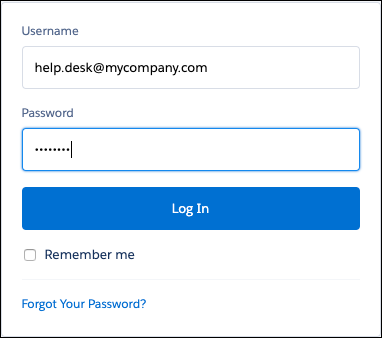
After a successful login, Salesforce redirects users to the approval page to grant access to the app.
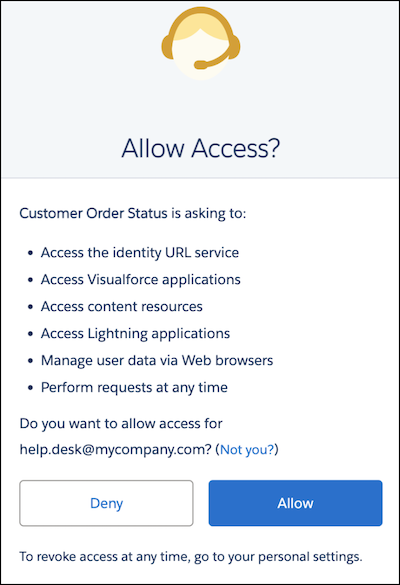
If users previously approved access, it isn’t necessary to approve access again.
Salesforce Grants Authorization Code
After users approve access to an external client app, Salesforce redirects users to the callback URL, where they can view the callback with an authorization code.
https://www.mycustomerorderstatus.com/oauth2/callback?
code=aPrx4sgoM2Nd1zWeFVlOWveD0HhYmiDiLmlLnXEBgX01tpVOQMWVSUuafFPHu3kCSjzk4CUTZg==- The first part of the callback is the external client app’s callback URL:
https://www.mycustomerorderstatus.com/oauth2/callback. - The second part is the authorization code that the external client app uses to get an
access token:
code=aPrx4sgoM2Nd1zWeFVlOWveD0HhYmiDiLmlLnXEBgX01tpVOQMWVSUuafFPHu3kCSjzk4CUTZg==. The authorization code expires after 15 minutes.
If the state parameter is included in the original query
string, the specified state is passed into the approval step.
Request an Access Token
To request an access token, the external client app passes the authorization code to the Salesforce token endpoint as an HTTP POST.
POST /services/oauth2/token HTTP/1.1
Host: mycompany.my.salesforce.com
Content-length: 307
Content-type: application/x-www-form-urlencoded
grant_type=hybrid_auth_code&
code=aPrxhgZ2MIpkSy0aOdn07LjKFvsFOis6RGcWXz7p8JQCjcqfed5NQLe7sxWwMY_JQFuLwHRaRA==&
client_id=3MVG9IHf89I1t8hrvswazsWedXWY0iqK20PSFaInvUgLFB6vrcb9bbWFTSIHpO8G2jxBLJA6uZGyPFC5Aejq&
client_secret=*******************&
redirect_uri=https://www.mycustomerorderstatus.com/oauth2/callback
The POST in the example contains these parameters.

| Parameter | Description |
|---|---|
Request Header
|
The request header can contain these parameters.
The request header also supports these parameters.
The |
grant_type
|
The type of validation that the external client app can provide to prove it’s a
safe visitor. For the hybrid web server flow, the value must be
hybrid_auth_code. |
code
|
A temporary authorization code received from the authorization server. The external client app uses this code in exchange for an access token. This type of OAuth 2.0 flow is a secure way to pass the access token back to the application. |
client_id
|
The consumer key of the external client app. To access the consumer key, from the External Client App Manager, find the external client app and select Edit Settings from the dropdown. Then expand the OAuth Settings section, and click Consumer Key and Secret. You're sometimes prompted to verify your identity before you can view the consumer key. |
client_secret
|
The consumer secret of the external client app. To access the consumer secret, from the External Client App Manager, find the external client app, and select Edit Settings from the dropdown. Then expand the OAuth Settings section, and click Consumer Key and Secret. You’re sometimes prompted to verify your identity before you can view the consumer secret. This parameter is required unless the external client app doesn’t have
Require Secret for Web Server Flow enabled. If a
|
redirect_uri
|
The URL where users are redirected after a successful authentication. The redirect URI must match one of the values in the external client app’s Callback URL field. Otherwise, the approval fails. You can find the redirect URI on the external client app’s OAuth Settings page or from the external client app’s definition. This value must be URL encoded. |
You can also include these parameters.
| Parameter | Description |
|---|---|
client_assertion
|
Instead of passing a client_secret, you can
provide a client_assertion and client_assertion_type. If a client_secret parameter isn’t provided, Salesforce checks for the client_assertion and client_assertion_type. See Use client_assertion Instead of client_secret. |
client_assertion_type
|
Provide this value when using the The value of |
code_verifier
|
Required only if a
code_challenge parameter was specified in the authorization request.
Specifies 128 bytes of random data with high entropy to make guessing the
|
format
|
If not included in the request’s header, you can specify the expected return format.
The
|
client_assertion
Instead of client_secretIf you provide a client_assertion instead of a client_secret, the value of client_assertion
must include these parameters.
iss—Theclient_idfrom the external client app definition.sub—Theclient_idfrom the external client app definition.aud—The token servlet URL: https://hostname/services/oauth2/token.exp—The expiration time of the assertion within 5 minutes, expressed as the number of seconds from 1970-01-01T0:0:0Z measured in UTC.
The client_assertion must also be signed with the
private key associated with the OAuth consumer’s uploaded certificate. Only the RS256 algorithm
is supported. For the private_key_jwt client
authentication method, see the OpenID Connect specifications.
Instead of sending client
credentials as parameters in the body of the POST, Salesforce supports the HTTP Basic
authentication scheme. This scheme’s format requires the client_id and client_secret in the
authorization header of the post as follows.
Authorization:
      Basic64Encode(client_id:secret)
The client_id and client_secret are separated with
a colon (:). For more information, see the OAuth 2.0
Authorization Framework document.
This example shows an access token POST request that uses the HTTP Basic authentication scheme, rather than sending client credentials in the POST request’s body.
POST /services/oauth2/token HTTP/1.1
Host: mycompany.my.salesforce.com
Authorization: Basic client_id=3MVG9IHf89I1t8hrvswazsWedXWY0iqK20PSFaInvUgLFB6vrcb9bbWFTSIHpO8G2jxBLJA6uZGyPFC5Aejq&
client_secret=*******************&

grant_type=hybrid_auth_code&code=aPrxsmIEeqM9PiQroGEWx1UiMQd95_5JUZ
VEhsOFhS8EVvbfYBBJli2W5fn3zbo.8hojaNW_1g%3D%3D&
redirect_uri=https%3A%2F%2Fwww.mysite.com%2Fcode_callback.jspclient_id and client_secret are sent in the POST’s body, the authorization header is
ignored.Salesforce Grants an Access Token
After Salesforce validates the app’s credentials, it sends back a response with the access token.
In this example, the response is in a JSON format.
{
"access_token": "00DB0000000TfcR!AQQAQFhoK8vTMg_rKA.esrJ2bCs.OOIjJgl.9Cx6O7KqjZmHMLOyVb.U61BU9tm4xRusf7d3fD1P9oefzqS6i9sJMPWj48IK",
"signature": "d/SxeYBxH0GSVko0HMgcUxuZy0PA2cDDz1u7g7JtDHw=",
"scope": "web openid",
"id_token": "eyJraWQiOiIyMjAiLCJ0eXAiOiJKV1QiLCJhbGciOiJSUzI1NiJ9.eyJhdF9oYXNoIjoiSVBRNkJOTjlvUnUyazdaYnYwbkZrUSIsInN1YiI6Imh0dHBzOi8vbG9...",
"instance_url": "https://mycompany.my.salesforce.com",
"id": "https://login.salesforce.com/id/00DB0000000TfcRMAS/005B0000005Bk90IAC",
"token_type": "Bearer",
"issued_at": "1558553873237"
}
The token response includes these parameters.
| Parameter | Description |
|---|---|
access_token
|
OAuth token that an external client app uses to request access to a protected resource on behalf of the client application. Additional permissions in the form of scopes can accompany the access token. |
signature
|
Base64-encoded HMAC-SHA256 signature signed with the client_secret. The signature can include the concatenated ID
and issued_at value, which you can use to verify that
the identity URL hasn’t changed since the server sent it. |
scope
|
The scopes associated with the access token. Scopes further define the type of protected resources that the client can access. You assign scopes to an external client app when you build it, and they’re included with the OAuth tokens during the authorization flow. For valid parameters, see OAuth Tokens and Scopes. |
content_domain
|
The domain of the content session, which maps to the
content SID: MyDomainName.file.force.com →
content_sid.
|
content_sid
|
The SID associated with the domain of the content session. Salesforce returns a unique SID that the hybrid app directly sets in the domain’s session cookie. |
lightning_domain
|
The domain of the Lightning session, which maps to the
Lightning SID: <MyDomainName or
instance>.lightning.force.com → lightning_sid.
|
lightning_sid
|
The SID associated with the domain of the Lightning session. Salesforce returns a unique SID that the hybrid app directly sets in the domain’s session cookie. |
visualforce_domain
|
The domain of the Visualforce session, which maps to the
Visualforce SID: MyDomainName.vf.force.com →
visualforce_sid.
|
visualforce_sid
|
The SID associated with the domain of the Visualforce session. Salesforce returns a unique SID that the hybrid app directly sets in the domain’s session cookie. |
csrf_token
|
The cross-site request forgery (CSRF) token to prevent attacks during child sessions. |
id_token
|
A signed data structure that contains authenticated user attributes, including a unique identifier for the user and a timestamp indicating when the token was issued. It also identifies the requesting client app. See OpenID Connect specifications. This parameter is returned
if the scope parameter includes |
instance_url
|
A URL indicating the instance of the user’s org. For
example: https://yourInstance.salesforce.com/.
|
id
|
An identity URL that can be used to identify the user and to query for more information about the user. See Identity URLs. |
token_type
|
A Bearer token type,
which is used for all responses that include an access token.
|
issued_at
|
Time stamp of when the signature was created in milliseconds. |
sidCookieName
|
The name of the session cookie that the hybrid app uses to directly bridge a web
session. The default value is sid. |
cookie-sid_Client
|
A session cookie that detects and prevents session tampering. This session cookie allows the hybrid app to directly bridge a web session. |
cookie-clientSrc
|
A session cookie that is used for security protection. This session cookie allows the hybrid app to directly bridge a web session. |
The token response can also contain these parameters.
