
Set Up the Token Exchange Flow
Some use cases require you to integrate Salesforce with an external identity provider along with multiple apps and microservices. To simplify these integrations, use the OAuth 2.0 token exchange flow. With this flow, exchange tokens from an external identity provider for Salesforce tokens.
Required Editions
| Available in: Enterprise, Performance, Unlimited, and Developer Editions |
For example, you host a customer portal outside of the Salesforce platform. To provide login and registration to your customers, you use an identity provider. When your customers are logged in, they access data from a variety of enterprise services, including web apps and microservices. To authorize your portal to grant users access to their data, all of these enterprise services accept access tokens from your identity provider.
You use Salesforce to track customers’ Support cases, and you want to give users a way to access their cases in your portal. By configuring Salesforce to accept tokens from your identity provider, you can easily fit Salesforce into your integration pattern. Using the token exchange flow, Salesforce validates the identity provider’s tokens, maps them to a Salesforce user, and issues Salesforce tokens, giving users access to their data within your portal.
Here’s a step-by-step overview of the token exchange flow.
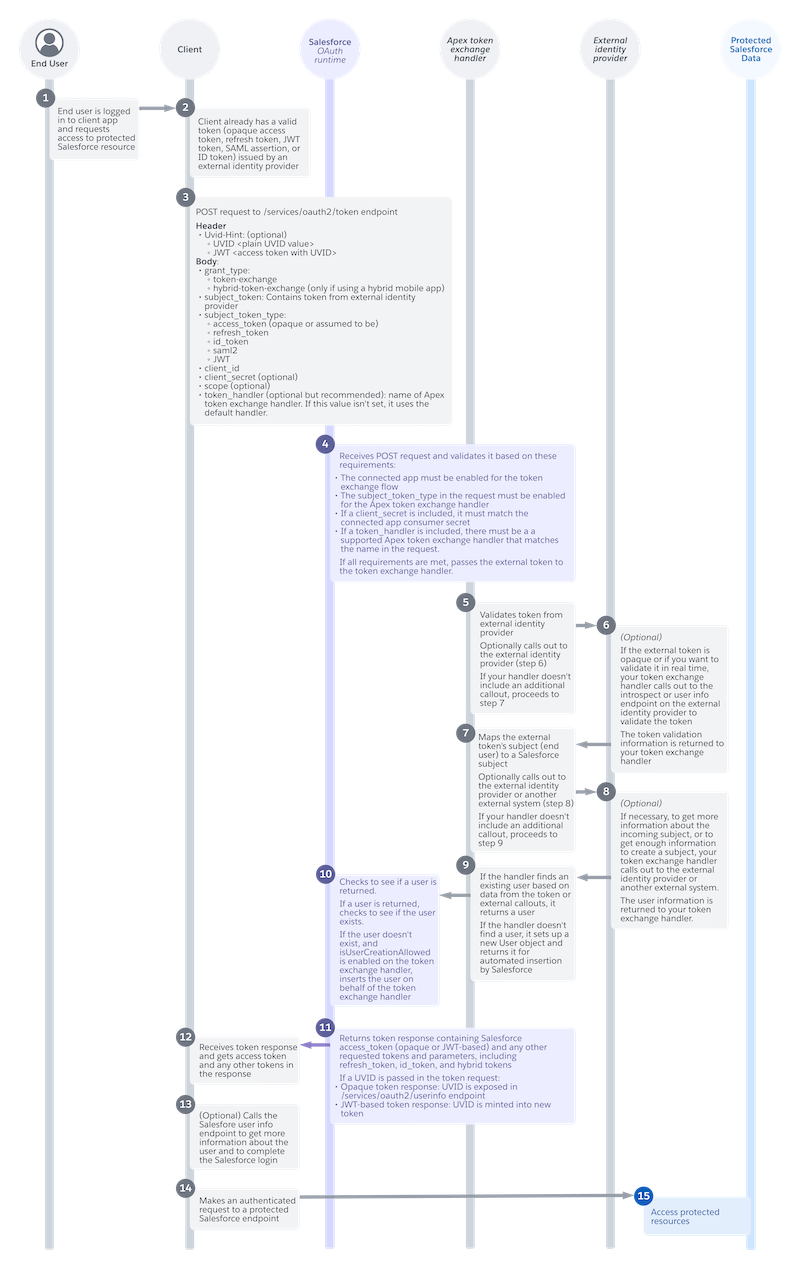
End User Requests Access to Salesforce Data (1)
An end user is logged in to your app. They request access to protected Salesforce resources. For example, they click a button to view their cases.
App Has a Valid Token (2)
When the end user logged in, they received one or more tokens from your identity provider. For example, they received an access token and a refresh token. To get access to Salesforce data, your app can exchange one of these tokens. Salesforce accepts these token types.
- Access tokens
- Refresh tokens
- JSON Web Tokens (JWTs)
- SAML assertions
- ID tokens
App Requests an Exchange for a Salesforce Token (3)
To get a Salesforce token, your app sends a POST request to the /services/oauth2/token endpoint on your My Domain login URL or Experience Cloud site URL.

The request supports one header.
| Header | Required? | Description |
|---|---|---|
Uvid-Hint
|
No. If you implement the guest user flow on your app, you can optionally use this header to pass in a unique visitor ID (UVID) tied to a guest user’s identity. Use the UVID to carry contextual information from a guest user session, such as the user’s cookie preferences, into a named user session. | Contains the UVID, a Version 4 universally unique identifier (UUID) that identifies unknown visitors. Send the UVID as a plain value, or send a JWT-based access token with a UVID minted into it. To send the UVID as a plain value,
include a UVID prefix so that the request is formatted as To send a JWT-based access token with a UVID, include a JWT prefix before
the value, such as |
Include these parameters in the request.
| Parameter | Required? | Description |
|---|---|---|
grant_type
|
Yes. | The OAuth 2.0 method that the app uses to request the access token. The token exchange flow supports these values.
|
subject_token
|
Yes. | The token issued by the identity provider. The maximum length is 10,000 characters. |
subject_token_type
|
Yes. | The type of token issued by the identity provider. The flow supports these token types.
|
client_id
|
Yes. | The consumer key of the connected app or external client app. |
client_secret
|
It depends on your connected app or external client app settings. For
connected apps, to require a For external client apps, set the |
The consumer secret of the connected app or external client app. We recommend that you send a consumer secret only if your app has a private client back end where it can keep the secret safe. For public clients that don’t have a private back end, such as mobile apps and single-page apps, we don’t recommend sending a secret because it can get leaked through the browser. |
scope
|
No. | Permissions that define the type of protected resources a connected app can access. The values that you send in this request must match or be a subset of the scopes assigned to your connected app or external client app. For more information about each scope and its purpose, see OAuth Tokens and Scopes. |
token_handler
|
No, but it’s strongly recommended. If you don’t include this parameter, Salesforce uses your default handler. You define a default handler by using the isDefault field on the OauthTokenExchHandlerApp metadata type. You must have at least one default handler. | The name of the Apex token exchange handler used to validate the token and map it to a Salesforce user. |
Here’s an example token request that contains an access token.
POST /services/oauth2/token? HTTP 1.1
Host: MyDomainName.my.site.com
Uvid-Hint: UVID abcd-1234-efgh

grant_type=urn:ietf:params:oauth:grant-type:token-exchange&
subject_token=*************&
subject_token_type=urn:ietf:params:oauth:token-type:access_token&
client_id=***********&
client_secret=************&
scope=web&
token_handler=MyTokenHandler
Salesforce OAuth Runtime Completes Initial Validation (4)
Salesforce’s OAuth runtime receives the request and runs it through an initial validation. The validation is based on these requirements.
- The connected app or external client app must be enabled for the token exchange flow. See Integrate an App for the Token Exchange Flow.
- The
subject_token_typein the request must be enabled for the token exchange handler. To enable a handler for a token type, set the corresponding field in the handler’s OauthTokenExchangeHandler metadata definition totrue.subject_token_typeValueOauthTokenExchangeHandler Field urn:ietf:params:oauth:token-type:access_tokenisAccessTokenSupported urn:ietf:params:oauth:token-type:refresh_tokenisRefreshTokenSupported urn:ietf:params:oauth:token-type:id_tokenisIdTokenSupported urn:ietf:params:oauth:token-type:saml2isSaml2Supported urn:ietf:params:oauth:token-type:jwtisJwtSupported - If the request includes a
client_secret, it must match the consumer secret of the connected app or external client app. - If the request includes a
token_handler, the org must have a supported Apex token exchange handler that matches the name in the request. - The token exchange handler must be enabled, which means the
isEnabled field on its OauthTokenExchangeHandler metadata
definition must be set to
true.
If the request meets these initial requirements, Salesforce sends the token from the external identity provider to the Apex token exchange handler.
Apex Handler Validates the Token (5)
The Apex handler receives the identity provider token and validates it using your custom validation logic. How you want to validate the token is entirely up to you.
(Optional) Apex Handler Calls Out to the Identity Provider for Validation (6)
Depending on your validation requirements, you can optionally configure your handler to call out to the identity provider. If the token is opaque, or if you want to validate it in real time, call out to the token introspection or User Info endpoint on the external identity provider.
Apex Handler Maps the Token to a Salesforce Subject (7)
The Apex handler identifies the token’s subject, which is the end user to whom it was issued, and maps it to a Salesforce subject.
(Optional) Apex Handler Calls Out to the Identity Provider for User Information (8)
To get enough information to create a subject, or to get additional information about an incoming subject, you can optionally configure your handler to call out to the identity provider or to another external system.
Apex Handler Finds or Sets Up a User (9)
If the handler finds a user based on data from the token or from an external callout, it returns the user.
If the isUserCreationAllowed field is set to true on the handler’s OauthTokenExchangeHandler metadata
definition, the handler sets up a new User object and returns it to Salesforce. This action
doesn’t actually create the user—instead the User object is returned to Salesforce for
automated insertion.
For more information on customizing your handler to validate tokens and map subjects, see Token Exchange Handler Validation and Subject Mapping in the Apex Developer Guide.
Salesforce OAuth Runtime Completes User Mapping (10)
The Salesforce OAuth runtime checks to see if the handler returned a user. If so, it confirms whether the user exists and completes the mapping. If the user doesn’t exist, and if the handler is configured to set up users, Salesforce automatically inserts the user on behalf of the token exchange handler.
Salesforce OAuth Runtime Returns Token Response (11)
Salesforce returns a response that contains a Salesforce access token and any other tokens or parameters that you’ve requested, including refresh tokens, ID tokens, and hybrid tokens. The access token can be opaque or JWT-based, depending on your connected app or external client app settings.
If you passed a UVID in the token request, it’s also passed through the flow. For an opaque token response, the UVID is exposed on the services/oauth2/userinfo endpoint on your My Domain login URL or Experience Cloud site URL. For a JWT-based token response, the UVID is minted into the new access token.
App Receives Response (12)
Your app receives the token response, including the access token and other tokens and parameters. Here’s an example token response.
{
    "access_token":"*******************",
    "signature":"ts6wm/svX3jXlCGR4uu+SbA04M6qhD1SAgVTEwZ59P4=",
    "scope":"openid api",
    "id_token":"XXXXXX",
    "instance_url":"https://MyDomainName.my.salesforce.com",
    "id":"https://MyDomainName.my.salesforce.com/id/00Dxxxxxxxxxxxx/005xxxxxxxxxxxx",
    "token_type":"Bearer",
    "issued_at":"1667600739962"
}
App Calls User Info Endpoint (13)
If necessary to complete the user login, your app can call the /services/oauth2/userinfo endpoint on your My Domain login URL or Experience Cloud site URL. For example, if you passed a UVID in your token request, and Salesforce returned a response with an opaque access token, call the User Info endpoint to get the UVID.
App Requests Access to Salesforce Data (14)
Now that your app has a Salesforce access token, it makes an authenticated request to a protected Salesforce resource to get the user their data.
End User Accesses Salesforce Data (15)
If the request is successful, the end user can access their Salesforce data in your app. From the user’s perspective, they simply clicked a button and saw their data, without being asked to log in or approve access.
