
Token Exchange Flow Diagram and Process
The OAuth 2.0 token exchange flow can simplify integrations for use cases with a central identity provider serving multiple apps and microservices. To understand how the flow works, review this step-by-step overview.
Required Editions
| Available in: Enterprise, Performance, Unlimited, and Developer Editions |
Here's the scenario: You host a customer portal outside of the Salesforce platform. To make sure customers can access all of the information they need, you integrated the portal with a variety of different apps and microservices. For example, you use a third-party app to handle payments and shipping, and you use Amazon Web Services to manage customer data. You don't want to make customers sign in to all of these different services, so you also use Okta as a third-party identity provider. This way, customers can log in to Okta and access all of the information they need in your portal.
You need a way to manage support cases in the portal, and you know that Salesforce can do the job. However, you want to make sure that customers can access their case information directly in your portal without logging into Salesforce. In other words, you want a way to make Salesforce fit into your existing system. That's where the token exchange flow comes in. With this flow, you can make sure that customers can access their Salesforce data when they log in to your portal via Okta.
To understand how the token exchange flow can provide this experience, let's look at the sequence of the flow. For more detailed explanation of the requests and responses in this flow, see Set Up the Token Exchange Flow.
When the flow starts, assume that the end user already logged in to the customer portal (the client) via Okta (the identity provider). The client is integrated with Salesforce using the external client app framework.
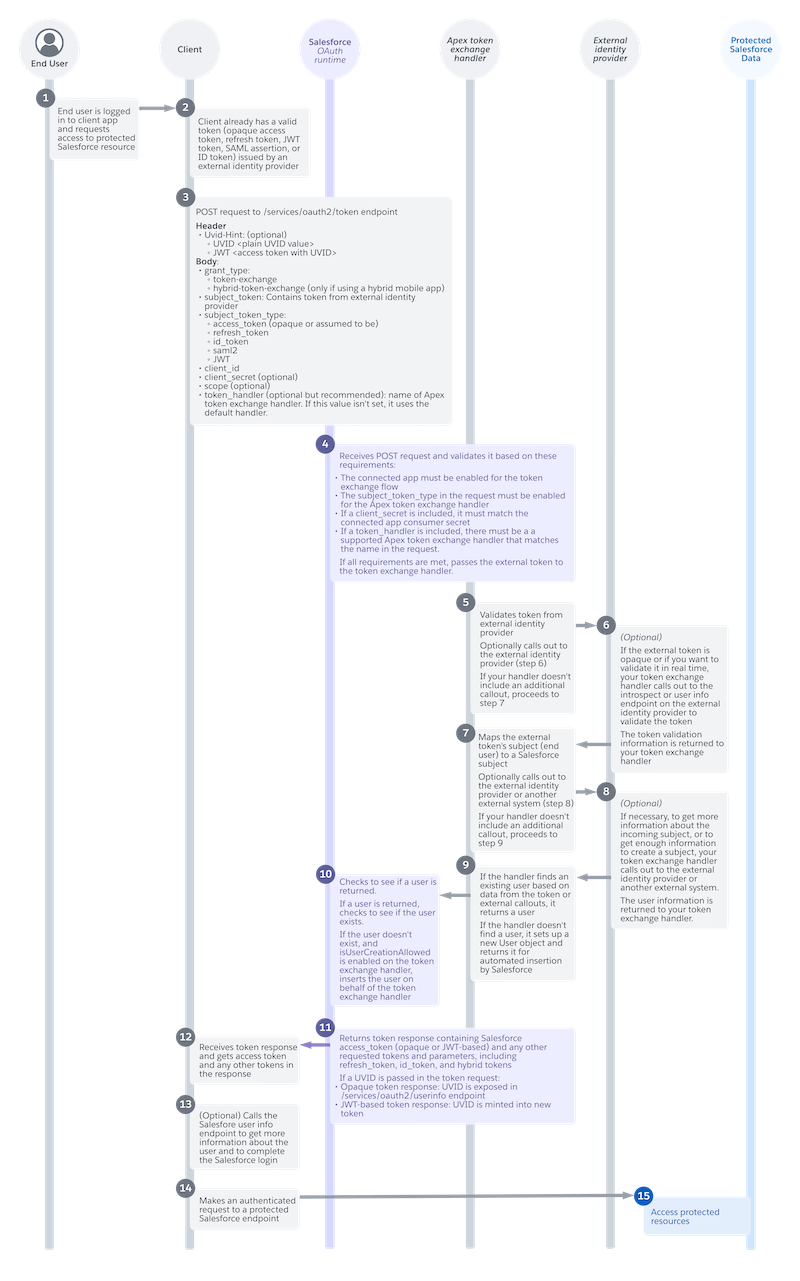
- (1) The end user requests access to protected Salesforce resources. For example, in the customer portal, the user clicks a button to access their support case information.
- (2) Because the user already logged in, the client has a valid token from the identity provider.
- (3) The client app sends a POST request to the Salesforce
/services/oauth2/token endpoint. This request includes multiple
parameters, which depend on your use case. At minimum, it must include these parameters.
- A
grant_typeparameter, which tells Salesforce that this app wants to use the token exchange flow. - A
subject_tokenparameter with the token from the identity provider. - A
subject_token_typeparameter, which indicates the type of token, such as an opaque access token, refresh token, ID token, SAML assertion, or JSON Web Token (JWT). - A
client_id, which tells Salesforce which external client app is registered for this client.
- A
- (4) The Salesforce OAuth runtime receives the POST request and validates it. If the request is valid, Salesforce passes the identity provider's token to an Apex token exchange handler.
- (5) The Apex token exchange handler validates the token. As part of its validation, the
handler can call out to the identity provider.
 Note This callout to the identity provider is optional and depends on how you develop your handler. If you don't include this callout, the flow proceeds to step 7.
 - (6) (Optional) If called, the identity provider returns information to help the handler validate the token.
- (7) The handler maps the subject in the token to a Salesforce subject. To get more
information about the subject, the handler can call out to the identity provider again.
Note This second callout to the identity provider is also optional. If you don't include this callout, the flow proceeds to step 9.
- (8) (Optional) If called, the identity provider returns user information to the token exchange handler.
- (9) If the handler finds an existing Salesforce user, it returns a user. If it can't find an existing user, it sets up a new User object and returns it to Salesforce for automated insertion.
- (10) The Salesforce OAuth runtime checks to see if the handler returned an existing user. If not, Salesforce inserts a new user on behalf of the token exchange handler.
- (11) The Salesforce OAuth runtime returns an access token to the client. The token response also includes any other requested tokens and parameters, such as a refresh token or ID token.
- (12) The client receives the token response with the access token and other requested tokens.
- (13) (Optional) If necessary, the client can call out to the Salesforce user info endpoint to get more information about the user and to complete the login.
- (14) The client can now use the access token to make an authenticated request to a protected Salesforce endpoint.
- (15) Salesforce grants access to the requested resources.
At the end of the flow, the end user can log in via the identity provider and access their Salesforce data in the client application,without ever directly logging in to Salesforce. For example, they can log in via Okta and access their support case information, provided by Salesforce, in your customer portal.
