
Define a Token Exchange Handler
To finish creating a token exchange handler, define the handler on the Token Exchange Handlers page in Setup, or use Metadata API to define a new OauthTokenExchangeHandler metadata type.
Required Editions
| Available in: Enterprise, Performance, Unlimited, and Developer Editions |

- Define a Handler in Setup
Define a handler from the Token Exchange Handlers page in Setup. - Define a Handler via Metadata API
Define an OauthTokenExchangeHandler metadata type.
Define a Handler in Setup
Define a handler from the Token Exchange Handlers page in Setup.
- From Setup, in the Quick Find box, enter Token, and then select Token Exchange Handlers.
- Click Create Token Exchange Handler.
- Enter a name and an API name. The API name must be unique.
- Enter a description for the handler.
- Select the types of tokens that you want the handler to support.
- Optionally, to configure the handler to create users when it can’t find them in Salesforce, select Allow this handler to create users. If this setting is enabled, the handler doesn’t actually insert a user. It creates a User object that Salesforce automatically inserts for you.
- Associate an Apex class with the handler definition.
- To generate an Apex handler template, select Create Apex class
template. Salesforce creates an autogenerated handler and saves it under the name
AutocreatedTokenExchHandler<string of
        numbers>.
. To customize the handler, find it on the Apex Classes page in Setup and edit the code to suit your use case.
Important The autogenerated handler gives you a place to start, but it isn't ready as-is. Make sure you customize and test it.- To use a handler that you created, for Apex Class, select a token exchange handler Apex
class that extends the
Auth.Oauth2TokenExchangeHandlerclass.
- To generate an Apex handler template, select Create Apex class
template. Salesforce creates an autogenerated handler and saves it under the name
- Save the handler.
- To save the handler and enable it, click Save and Enable. Enabling the handler means it’s in an enabled state, but doesn’t mean it’s associated with any external client apps or connected apps yet.
- To save the handler without enabling, click Save. You can always enable it later.
The new handler appears in your list view on the Token Exchange Handlers page. To enable or disable it, click and select Enable or
Disable.
and select Enable or
Disable.
Next, enable apps for the token exchange handler.
Define a Handler via Metadata API
Define an OauthTokenExchangeHandler metadata type.
Make sure that you have the right permissions to work with Metadata API. See Metadata API Edit Access in the Metadata API Developer Guide.
To work with Metadata API, use the Salesforce Extensions for Visual Studio Code on Salesforce CLI, or use a developer tool of your choice. For more information, see Metadata API Developer Tools in the Metadata API Developer Guide.
Metadata API supports file-based and CRUD-based development. These steps cover how to define the handler with file-based development.
- Create a package.xml manifest file that references the
OauthTokenExchangeHandler metadata type. Here’s an example. This example uses
<members>*</members>to retrieve all components of the handler’s metadata definition.<?xml version="1.0" encoding="UTF-8"?> <Package xmlns="http://soap.sforce.com/2006/04/metadata"> <types> <members>*</members> <name>OauthTokenExchangeHandler</name> </types> <version>60.0</version> </Package> - Create a directory called oauthtokenexchangehandlers.
- In the oauthtokenexchangehandlers directory, create a file called <your handler name>.oauthtokenexchangehandler. This file defines the handler.
- In the <your handler name>.oauthtokenexchangehandler file, create
the handler definition. For now, include these fields. Don’t add an enablements field yet—add this field when you associate the handler with an app after you deploy it.For a full description of each field, see OauthTokenExchangeHandler in the Metadata API Developer Guide.
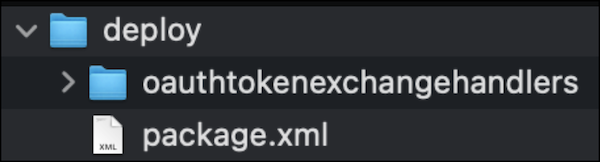
Field Description description A description for the handler. developerName The handler’s developer name, such as MyHandler.isAccessTokenSupported Indicates whether the handler supports access tokens. isEnabled Indicates whether the handler is enabled. For now, set this field to false.isIdTokenSupported Indicates whether the handler supports ID tokens. isJwtSupported Indicates whether the handler supports tokens in a JSON Web Token (JWT) format. isProtected Indicates whether the handler is protected. See Protected Components in Managed Packages. isRefreshTokenSupported Indicates whether the handler supports refresh tokens. isSaml2Supported Indicates whether the handler supports SAML 2.0 assertions. isUserCreationAllowed Indicates whether the handler can set up User objects, which Salesforce uses to automatically insert users. masterLabel A user-friendly name for the handler. tokenHandlerApex The Apex class that handles validation and subject mapping. Use the Apex class you created. Here’s an example file.<?xml version="1.0" encoding="UTF-8"?> <OauthTokenExchangeHandler xmlns="http://soap.sforce.com/2006/04/metadata"> <developerName>MyTokenExchangeHandler</developerName> <description>My token exchange handler</description> <isAccessTokenSupported>true</isAccessTokenSupported> <isEnabled>false</isEnabled> <isIdTokenSupported>false</isIdTokenSupported> <isJwtSupported>true</isJwtSupported> <isProtected>false</isProtected> <isRefreshTokenSupported>false</isRefreshTokenSupported> <isSaml2Supported>false</isSaml2Supported> <isUserCreationAllowed>true</isUserCreationAllowed> <masterLabel>MyTokenExchangeHandler</masterLabel> <tokenHandlerApex>MyOauthTokenExchangeHandler</tokenHandlerApex> </OauthTokenExchangeHandler> - Create a directory called deploy, and move the
package.xml file and the oauthtokenexchangehandlers
folder containing your <your handler name>.oauthtokenexchangehandler
file into the new directory.
Here’s how the file structure looks.
- Compress the directory into a .zip file.
- Using your metadata development tool, use the
deploy()call to deploy the .zip file to your org.
Next, use Metadata API to enable the token exchange handler for a connected app or external client app.
