Configure OpenID Connect Single Logout with Salesforce as the Relying Party
Configure single logout (SLO) for an authentication provider acting as the OpenID
Connect provider. With OpenID Connect SLO, users can log out of either Salesforce or the OpenID
Connect provider to log out of both of them.
Required Editions
Available in: both Salesforce Classic and Lightning Experience
Federated Authentication is available in: All
Editions
Delegated Authentication is available in:
Professional, Enterprise, Performance,
Unlimited, Developer, and Database.com
Editions
Authentication Providers are available in:
Professional, Enterprise, Performance,
Unlimited, and Developer Editions
User Permissions
Needed
To view the settings:
View Setup and Configuration
To edit the settings:
Customize Application
AND
Modify All Data
Before you configure OpenID Connect SLO, review this information.
Make sure that the authentication provider supports OpenID Connect SLO.
Salesforce currently supports front-channel SLO only, meaning that SLO redirects must
occur in the same browser. Salesforce doesn’t support SLO across different browsers.
Some authentication providers don’t support logout initiated by the relying party. In
this case, complete only step 5. Users can log out of Salesforce when initiated by the
authentication provider. But logging out of Salesforce doesn’t necessarily log the user
out of the authentication provider session.
These steps edit an existing Authentication Provider. The fields are the same when you
create or manage a connected app.
From Setup, use the Quick Find box to find and select
Auth. Providers.
Next to the auth provider that you want to configure for SLO, click
Edit.
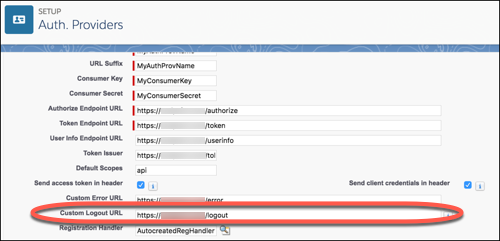
Under Auth. Provider Edit, enter the logout endpoint from the authentication provider
in Custom Logout URL. With this endpoint, Salesforce can initiate SLO. The Custom Logout
URL must be an absolute URL and start with http:// or
https://.
Save your work.
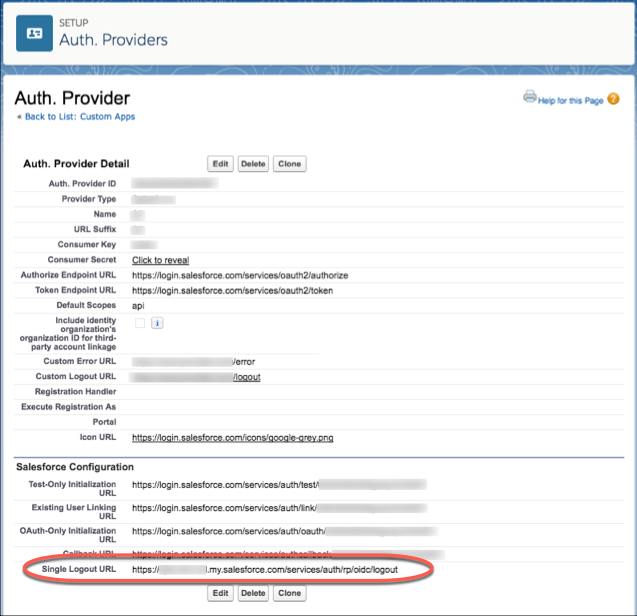
Provide the OpenID Connect provider with the SLO endpoint for your Salesforce org.
The OpenID Connect provider uses this endpoint to initiate SLO. The endpoint has
the format
https://MyDomainName.my.salesforce.com/services/auth/idp/oidc/logout
where MyDomainName is your Salesforce domain. You can also find this
endpoint using the OpenID Connect Discovery Endpoint.
We use three kinds of cookies on our websites: required, functional, and advertising. You can choose whether functional and advertising cookies apply. Click on the different cookie categories to find out more about each category and to change the default settings.
Privacy Statement
Required Cookies
Always Active
Required cookies are necessary for basic website functionality. Some examples include: session cookies needed to transmit the website, authentication cookies, and security cookies.
Functional Cookies
Functional cookies enhance functions, performance, and services on the website. Some examples include: cookies used to analyze site traffic, cookies used for market research, and cookies used to display advertising that is not directed to a particular individual.
Advertising Cookies
Advertising cookies track activity across websites in order to understand a viewer’s interests, and direct them specific marketing. Some examples include: cookies used for remarketing, or interest-based advertising.