Disconnect a Passkey from a User’s Account (Salesforce Orgs)
If a user loses or replaces the device where they used a passkey (also known as a
built-in authenticator), you can disconnect the passkey from their account. If a user’s passkey
stops working, reset it by disconnecting the passkey. Then ask the user to re-register their
passkey or create a new passkey.It’s also a good security practice to disconnect all of a user’s
verification methods if they leave your company.
Required Editions
Available in: both Salesforce Classic and Lightning Experience
Available in: all editions
User Permissions
Needed
To remove a user’s passkey registration:
Manage MFA in User Interface
Important
Salesforce enforces MFA requirements in the summer of 2026. See these articles for more
information and detailed rollout timelines.
From Setup, use the Quick Find box to find and select
Users.
Select the user’s name.
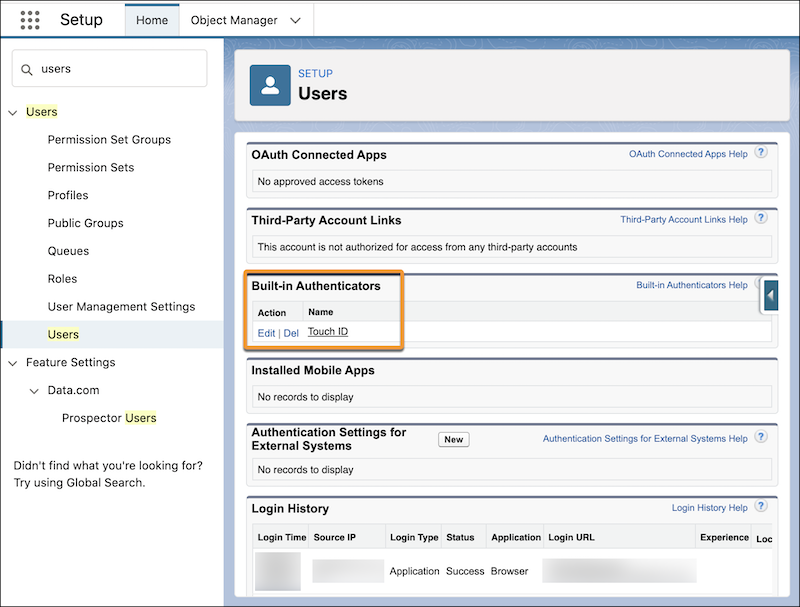
On the user’s detail page, find the Built-in Authenticators section. Next to the
passkey that you want to disconnect, click Del.
After disconnecting the passkey, guide the user to re-register it or create a new passkey.
If the user is moving to a replacement device, they must set up the passkey on the device
first. Refer them to Create a Passkey for guidance. Admins can’t register
verification methods for users.
We use three kinds of cookies on our websites: required, functional, and advertising. You can choose whether functional and advertising cookies apply. Click on the different cookie categories to find out more about each category and to change the default settings.
Privacy Statement
Required Cookies
Always Active
Required cookies are necessary for basic website functionality. Some examples include: session cookies needed to transmit the website, authentication cookies, and security cookies.
Functional Cookies
Functional cookies enhance functions, performance, and services on the website. Some examples include: cookies used to analyze site traffic, cookies used for market research, and cookies used to display advertising that is not directed to a particular individual.
Advertising Cookies
Advertising cookies track activity across websites in order to understand a viewer’s interests, and direct them specific marketing. Some examples include: cookies used for remarketing, or interest-based advertising.