Log In to Your Org with Certificate-Based Authentication
If your Salesforce org supports certificate-based authentication as a login method, you
can log in with your unique user authentication certificate instead of a username and password.
Required Editions
Available in: both Salesforce Classic and
Lightning Experience in All editions
If you don’t see this feature, contact your Salesforce admin to check whether your org is set
up for certificate-based authentication.
Important If your certificate has been compromised or if you’ve lost your personal
identification verification (PIV) card, contact your Salesforce admin immediately.
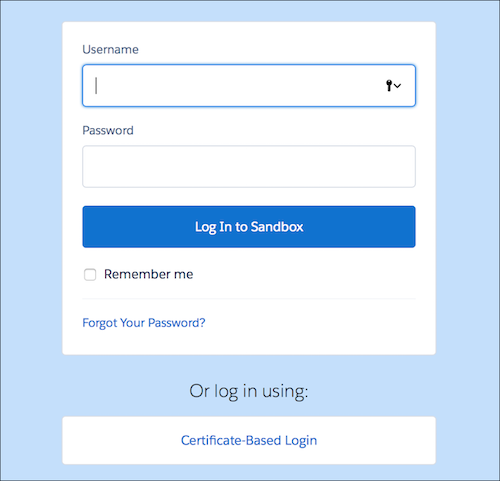
From your browser, navigate to your org’s My Domain login page.
Click Certificate-Based Login.
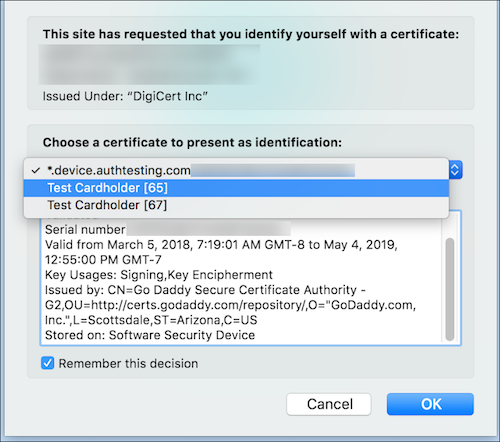
Follow the on-screen instructions to select the certificate to log in with.
If you are authenticating with a PIV card, you might be prompted to enter a PIN and then
select the authenticating certificate. If you are authenticating with a
certificate-authority (CA) signed certificate, you are prompted to select a valid certificate.
After you select your unique user authentication certificate, you are authenticated to
your org.
If you select Remember this decision, the next time you log in from
this browser, you’re not prompted to select a certificate.
If you receive an error when logging in with certificate-based authentication, contact
your Salesforce admin. Your certificate might be invalid, and your admin must upload a new user
authentication certificate for you. If your certificate is valid and you still receive a login
error, ask your Salesforce admin to check the Monitor Login History to determine the reason for your login
failure.
We use three kinds of cookies on our websites: required, functional, and advertising. You can choose whether functional and advertising cookies apply. Click on the different cookie categories to find out more about each category and to change the default settings.
Privacy Statement
Required Cookies
Always Active
Required cookies are necessary for basic website functionality. Some examples include: session cookies needed to transmit the website, authentication cookies, and security cookies.
Functional Cookies
Functional cookies enhance functions, performance, and services on the website. Some examples include: cookies used to analyze site traffic, cookies used for market research, and cookies used to display advertising that is not directed to a particular individual.
Advertising Cookies
Advertising cookies track activity across websites in order to understand a viewer’s interests, and direct them specific marketing. Some examples include: cookies used for remarketing, or interest-based advertising.