You are here:
Test the Impact of Blocked Salesforce Session Cookies
To support users that block third-party cookies, test custom functionality and code that uses a Salesforce session cookie.
Required Editions
| Available in: Salesforce Classic and Lightning Experience |
| Available in: Group, Essentials, Professional, Enterprise, Performance, Unlimited, and Developer Editions |
| User Permissions Needed | |
|---|---|
| To edit My Domain settings: | Customize Application |

Because of regulatory and consumer pressure, major web browsers block third-party cookies by default. In some browsers, users can allow these cookies via a setting. However, that practice can introduce security risks.
Third parties can’t access Salesforce cookies directly, and enhanced domains changed the Salesforce-hosted URLs for your org to avoid other cross-domain interaction within Salesforce. And when your Setup pages are served on the salesforce-setup.com domain, Classic pages can be loaded in Setup without cross-domain cookies.
However, custom code or functionality that uses a Salesforce session cookie can still be affected when browsers block third-party cookies. The most common example is when a website loads an authenticated Visualforce page in an iframe. That authentication process relies on a Salesforce session cookie. Or, if you previously enabled third-party cookies to use Lightning Out (Beta) without a custom domain or token-based authentication,the Lightning components that you deployed outside of Salesforce servers can stop working. To keep that custom code or functionality working, test the behavior when third-party use of Salesforce cookies is blocked and update the code as needed.
Disable Third-Party Use of Salesforce Cookies
To test the impact of blocked third-party cookies on functionality that requires third-party use of Salesforce cookies, enable a setting on the My Domain Setup page that requires first-party use of Salesforce Cookies. If the browser already blocks third-party cookies, you can skip this step.

If the browser already blocks third-party cookies, these settings have no effect. Also, these settings only affect Salesforce cookies. To test calls from Salesforce that use a third-party cookie, including third-party applications embedded in Salesforce, disable third-party cookies in your browser.
- From Setup, use the Quick Find box to find and select My Domain.
- In the Routing and Policies section, click Edit.
-
Select Require first-party use of Salesforce cookies.
When this setting is enabled, the
SameSite=Noneattribute is removed from Salesforce cookies. Any interaction with the cookies that Salesforce serves mimics the behavior when third-party cookies are blocked, regardless of which browser you use.If Setup pages aren't served on the salesforce-setup.com domain for your org, when this setting is enabled, accessing older Setup pages that were built in Classic requires an extra step. Users see a message that directs them to open the page in Salesforce Classic.
-
Enable Allow cross-domain use of Salesforce cookies on the preview
domain and save your changes.
This setting is available and applies only when the Require first-party use of Salesforce cookies setting is enabled. This setting is enabled by default when Require first-party use of Salesforce cookies is enabled.
Some delivered Salesforce features use the preview domain to load content, emails, products, and more in an iframe. For example, a user previews an email draft for a campaign in Marketing Cloud. Not all of those features work when third-party cookies are blocked. While Salesforce updates those features, this setting allows you to test the effect of blocked third-party cookies without unnecessary disruption.
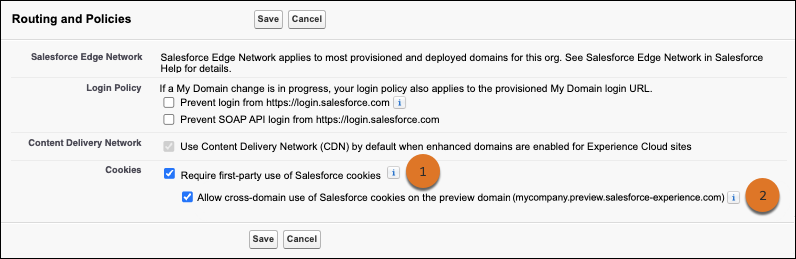
We recommend that the Allow cross-domain use of Salesforce cookies on the preview domain setting (2) is enabled whenever the Require first-party use of Salesforce cookies setting (1) is enabled. Otherwise, features that use Lightning to frame the preview domain no longer work.
Resolve Issues
At a high level, there are two ways to resolve issues with functionality that no longer works when third-party cookies are blocked. You can change the process to access the cookie from the same domain, or you can use an alternative method to provide the information in the cookie.
If a different domain loads content from your org that you made publicly available via a site, a session cookie isn’t used. In this case, no other steps related to Salesforce session cookies are required unless your Visualforce pages were served previously on salesforce.com.
If the domain for your unmanaged Visualforce pages changed from salesforce.com to force.com, see the knowledge article Ensure Access to Your Visualforce Pages in Summer ’24 and Winter ’25 for details on how to update your org for that change.
To frame an authenticated Visualforce page or other authenticated site content, we recommend that you use a custom domain to serve the framed content. With a custom domain, you serve your site content on a domain that you own, such as https://www.example.com. Most importantly, you can serve your authenticated content in Salesforce on the same registrable domain as the page that frames it, allowing the required session cookie. There are two methods for configuring a custom domain to serve the authenticated content.
- Serve the authenticated content on a subdomain of the registrable domain for the site that frames the content. For example, if your website is example.com, use a custom domain to serve your authenticated site content on a subdomain such as site.example.com. This approach also works if the domain of the site that frames the content is another subdomain, such as www.example.com.
- Set up a custom domain to serve the authenticated page on the same domain that frames it.
Use a third-party service or CDN to serve the custom domain, including completing the required
prerequisites. Be careful to avoid conflicts between
your chosen custom URL path prefixes and other content served on the domain.
When you use this option, include the Salesforce-served URL path prefix when you frame the content. For example, if your custom domain is example.com, to serve an Experience Cloud site page with a site path of /store, frame this URL: https://example.com/store.
If you can’t use a custom domain to serve the authenticated content, there are two other options. You can stop framing the Visualforce page or site content and open the page in a new browser window or tab instead. Or you can use Lightning Out (Beta) with token-based authentication to serve the content.
