Using custom report types, you can create custom reports for Mobile Device Management
statistics, such as how many active and revoked devices your Salesforce org has.
Required Editions
Available in: Enterprise, Performance, Unlimited, and
Developer Editions
User Permissions Needed
To view user devices that access Salesforce:
View Devices
To create and update custom report types:
Create and Customize Reports
Manage Custom Report Types
To delete custom report types:
Create and Customize Reports
Manage Custom Report Types
Modify All Data
Devices are exposed in the UserDevice and UserDeviceApplication sObjects. Use UserDevice to
represent information that is unique to a device. Use UserDeviceApplication to represent
information about applications installed on a device that is accessing Salesforce. See UserDevice and UserDeviceApplication in the Object Reference for
Salesforce and Lightning Platform Developer Documentation.
Set up a customer report type for the UserDevice and UserDeviceApplication sObjects to
generate Device Management custom reports. See Custom Report Types.
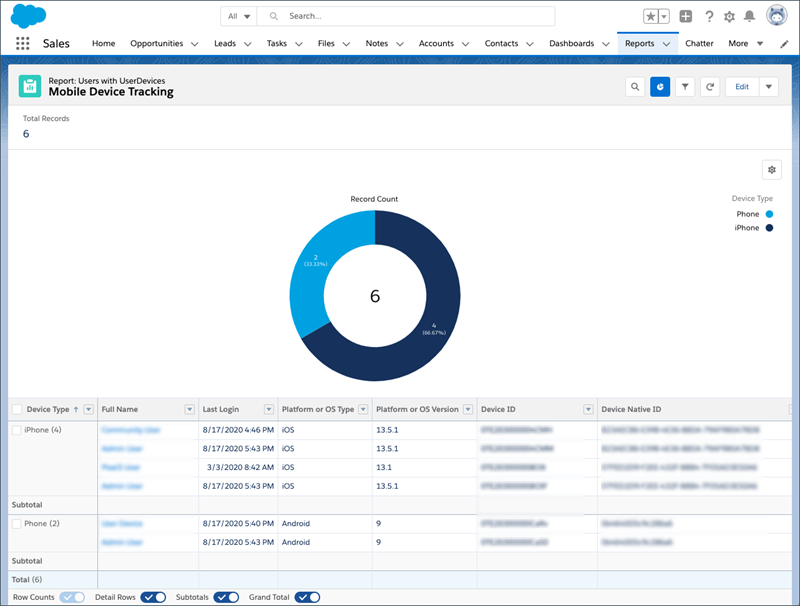
Example
This custom report shows the number of active and revoked devices in your org, along
with statistics about the devices and users logging into your org.
We use three kinds of cookies on our websites: required, functional, and advertising. You can choose whether functional and advertising cookies apply. Click on the different cookie categories to find out more about each category and to change the default settings.
Privacy Statement
Required Cookies
Always Active
Required cookies are necessary for basic website functionality. Some examples include: session cookies needed to transmit the website, authentication cookies, and security cookies.
Functional Cookies
Functional cookies enhance functions, performance, and services on the website. Some examples include: cookies used to analyze site traffic, cookies used for market research, and cookies used to display advertising that is not directed to a particular individual.
Advertising Cookies
Advertising cookies track activity across websites in order to understand a viewer’s interests, and direct them specific marketing. Some examples include: cookies used for remarketing, or interest-based advertising.