You are here:
Use Visualforce with Mobile Device Tracking
In addition to configuring Mobile Device Tracking using APIs, you can interact with it through Apex and a Visualforce page.
Required Editions
| Available in: Enterprise, Performance, Unlimited, and Developer Editions |
| User Permissions Needed | |
|---|---|
| To view user devices that access Salesforce: | View Devices |
| To edit user devices: | Manage Devices |
Create a Visualforce page for Mobile Device Tracking. See Visualforce.

Example 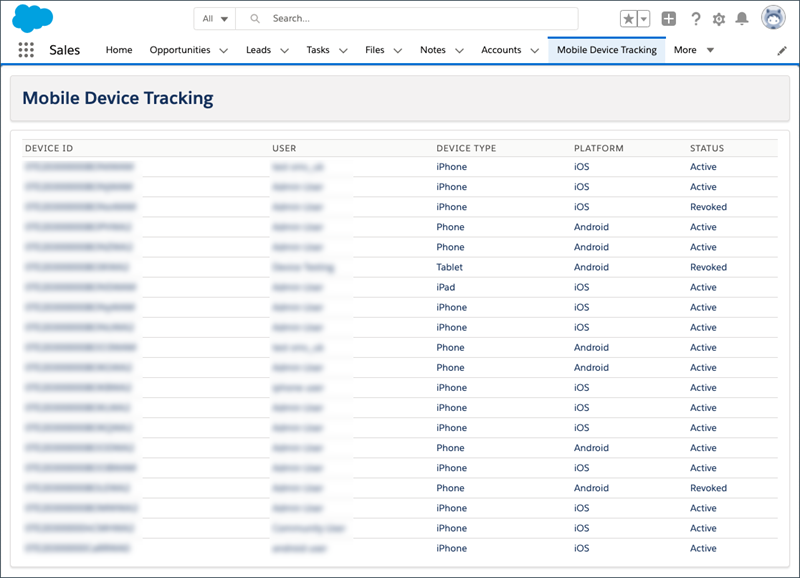
This example Visualforce page lists devices for your Salesforce org.
This code example shows the UserDeviceWrapper
class required by the UserDeviceController
class that powers the Visualforce page.
public class DeviceWrapper {
    public String id{get; set;}
    public String userName{get; set;}
    public String deviceType{get; set;}
    public String platformType{get; set;}
    public String status{get; set;}
}
This code example is the UserDeviceController
that powers this Visualforce
page.
public class UserDeviceController {
    private final List<DeviceWrapper> devices;
        public String targetId{get;set;}

    public UserDeviceController() {
        targetId = '';
        List<UserDevice> rawDevices = [SELECT Id,User.Name,DeviceType,PlatformType,Status FROM UserDevice];
        devices = new List<DeviceWrapper>();
        for(UserDevice d : rawDevices) {
            DeviceWrapper a = new DeviceWrapper();
            a.id = d.id;
            a.userName = d.User.Name;
            a.deviceType = d.DeviceType;
            a.platformType = d.PlatformType;
            a.status = d.Status;
            devices.add(a);
        }
    }

    public List<DeviceWrapper> getDevice() {
        return devices;
    }
}
After the Apex controller is created, you create the following Visualforce page.
<apex:page controller="UserDeviceController" lightningStylesheets="true">
    <apex:sectionHeader title="Mobile Device Tracking"/>
    <apex:pageBlock>
        <apex:form >
            <apex:pageBlockTable value="{!device}" var="a">
                <apex:column value="{!a.id}" headerValue="Device ID" />
                <apex:column value="{!a.userName}" headerValue="User" />
                <apex:column value="{!a.deviceType}" headerValue="Device Type" />
                <apex:column value="{!a.platformType}" headerValue="Platform" />
                <apex:column value="{!a.status}" headerValue="Status" />
            </apex:pageBlockTable>
        </apex:form>
    </apex:pageBlock>
</apex:page>
See Also
Did this article solve your issue?
Let us know so we can improve!
