You are here:
Copy Authorized Email Domains into a Sandbox
To avoid a second round of DNS verification, import your authorized email domains from production to a sandbox. In production, specify the authorized email domains to copy to a sandbox. Then, in a sandbox, import the available domains with one click.
Required Editions
| Available in: Salesforce Classic and Lightning Experience |
| Available in: all editions except Database.com |
| User Permissions Needed | |
|---|---|
| To modify authorized email domains: | Email Administration |
Specify Authorized Email Domains to Copy into Sandboxes
In production, configure the authorized email domains that you want to import into sandboxes.
- In production, from Setup, use the Quick Find box to find and select Authorized Email Domains.
-
For each authorized email domain that you want to import into sandboxes, enable a
setting.
- For a verified entry in the list, click Edit.
-
Select Allow copy to sandbox, and then save your changes.
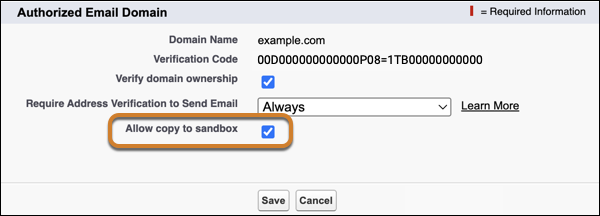

Import Authorized Email Domains into a Sandbox
In your sandbox org, import all authorized email domains from production.
- In a sandbox, from Setup, use the Quick Find box to find and select Authorized Email Domains.
-
Click Import from Production.
All authorized email domains in production that meet these conditions are imported into your sandbox.
- The domain is verified
- “Allow copy to sandbox” is enabled
- The authorized email domain doesn’t exist in the sandbox at the time of import
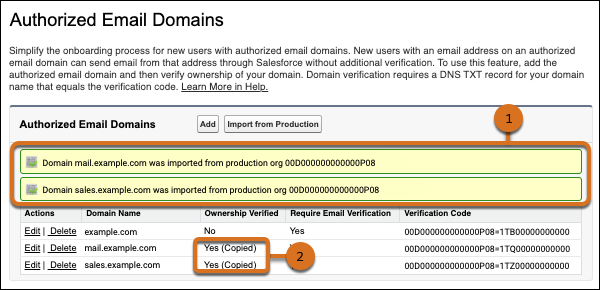
A message confirms each imported authorized email domain. (1) Imported domains show Yes (Copied) in the Ownership Verified column. (2)
Authorized email domains that already exist in your sandbox aren’t imported again. To import an updated version of an authorized email domain from production, delete the domain in the sandbox and then click Import from Production again.
Note If the authorized email domain is unverified in production when you import that domain into a sandbox, separate DNS verification is required for the entry in the sandbox.
Each imported authorized email domain is an independent copy. Changes to the authorized email domain in one org have no effect on the other org.
You can’t update the “Require email verification” setting on an imported authorized email domain
- To update the requirement for email verification in the sandbox only, delete the imported domain. Then re-add and verify the authorized email domain in the sandbox.
- To disable the requirement for email verification setting everywhere, delete the imported domain. Then update the authorized email domain in production and import it into the sandbox again.
