You are here:
Use a Verified Domain for User-Level Email Verification
If a trusted integration or admin manages your users’ email addresses in Salesforce, specify which domains require address verification. For each authorized email domain, you can require email address verification only when users change their email address, or disable address verification entirely. Or only require address verification for an email address change when the domain has an active DomainKeys Identified Mail (DKIM) key.
Required Editions
| User Permissions Needed | |
|---|---|
| To manage DKIM keys, configure email deliverability, or configure authorized email domains: | Customize Application |
| To modify authorized email domains: | Email Administration |

To learn how to verify your email address in Salesforce, see Verify Your Email Address and Return Email Address in Salesforce.
Set Requirements for Email Address Verification with Authorized Email Domains (Recommended)
For each authorized email domain, you can require email address verification only when users change their email address, or disable address verification entirely. The authorized email domain setting applies to all email addresses on that domain, including user addresses and shared addresses, such as organization-wide email addresses.
-
Verify your sending email domains via an authorized email domain. See Set Up an Authorized Email Domain.
To bypass user-level address verification for a domain with an existing DKIM key, create an authorized email domain record for that domain.
- From Setup, use the Quick Find box to find and select Authorized Email Domains.
- Click Edit next to the verified domain for which you want to disable user email verification.
-
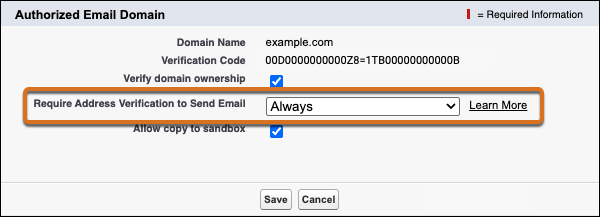
Select an option for the Require Address Verification to Send Email field.
-
To require that users verify email addresses that use this domain, select Always. This option is the default.
-
To require address verification only for email address changes, select For Updated Addresses Only.
This option is most commonly used when a trusted integration, such as a single sign-on (SSO) identity provider, creates user accounts, and users manage their email addresses after account creation.
-
To disable email address verification for all email addresses that use this domain entirely, select Never.
This option is most commonly used when a trusted integration or admin manages user email addresses.
Note If you set the “Require Address Verification to Send Email” field to Never for one or more authorized email domains, Salesforce restricts email address updates. This restriction helps protect you against impersonation fraud. Only users with the Manage Users or Modify All Data permission can update email addresses and return email addresses on user accounts.
-
- Save your changes.

For example, you set up and verify an authorized email domain for example.com. Then you set the Require Address Verification to Send Email field on that authorized email domain to Never.
This configuration has no impact on user account verification or the user’s ability to log in to Salesforce.
With this configuration, users with an email address that ends in @example.com can send email from Salesforce without verifying their email address. Also, organization-wide email addresses, Email-to-Case routing addresses, and Experience Cloud site sender email addresses on that domain can send email without address verification.
Because at least one authorized email domain never requires email address verification, only users with the Manage Users or Modify All Data permission can update email addresses and return email addresses on user accounts.
Bypass User Email Address Verification for All Domains with an Active DKIM Key
To require address verification only for email address changes if an active DKIM key exists for the email domain, enable a Deliverability setting. The Deliverability setting applies only to user email verification, and there is no option to disable email address verification entirely.
-
Review and set up your DKIM keys.
- To review your active DKIM keys, from Setup, use the Quick Find box to find and select DKIM Keys.
- To verify a new sending email domain via a DKIM key, see Create a DKIM Key.
- Verify your sending email domains via DKIM keys. See Create a DKIM Key.
- From Setup, use the Quick Find box to find and select Deliverability.
-
Enable Verify the ownership of email sending domains by DKIM keys
and save your changes.

This setting affects email addresses for new user accounts and shared email addresses. Email address verification is still required to change a user email address or shared email address.
For example, an active DKIM key exists for example.com. On the Deliverability page in Setup, you enable the Verify the ownership of email sending domains by DKIM keys field.
This configuration has no impact on user account verification or the user’s ability to log in to Salesforce.
With this configuration, users with an email address that ends in @example.com can send email from Salesforce without verifying their email address. Also, organization-wide email addresses, Email-to-Case routing addresses, and Experience Cloud site sender email addresses on that domain can send email without address verification.
However, when a user changes their email address to a different address that ends in @example.com, that user can’t send email from Salesforce until they verify that address.
