Opt Out of Key Derivation with BYOK
For Field-Level Encryption (FLE), Files and Attachments, and Event Bus Data, you can opt out of key derivation and upload a final data encryption key (DEK). Opting out gives you even more control of the key material used to encrypt and decrypt your data.
Required Editions
| Available in both Salesforce Classic (not available in all orgs) and Lightning Experience. |
| Available in: Enterprise, Performance, and Unlimited Editions with the Salesforce Shield or Shield Platform Encryption licenses. |
| Available for free in Developer Edition. |
| User Permissions Needed | |
|---|---|
| To generate, destroy, export, import, and upload tenant secrets and customer-supplied key material: | Manage Encryption Keys |
| To allow BYOK to opt out of key derivation: | Customize Application AND Manage Encryption Keys |

Note This page is about Shield Platform Encryption, not Classic Encryption. What's the difference?

Important With Database Encryption, you must use KDF. Opting out of KDF is
not supported for Database Encryption.
Generate your customer-supplied data encryption key using a method of your choice. Then calculate an SHA256 hash of the key, and encrypt it with the public key from a BYOK-compatible certificate. See Upload Your BYOK Key Material for details about how to prepare customer-supplied key material.
- From Setup, in the Quick Find box, enter Encryption Settings, and then select Encryption Settings.
- In the Advanced Encryption Settings section, turn on Allow BYOK to Opt-Out of
Key Derivation.You can also enable the Allow BYOK to Opt-Out of Key Derivation setting programmatically. See EncryptionKeySettings in the Metadata API Developer Guide.You can now opt out of key derivation when you upload key material.
- From Setup, in the Quick Find box, enter Key Management, and then select Key Management.
- In the Key Management Table, select a key type.
- Click Bring Your Own Key.
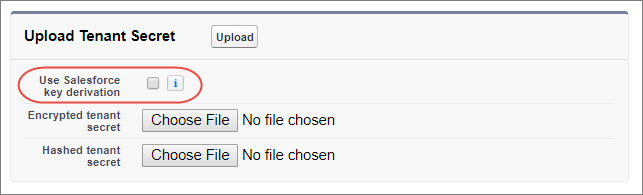
- Deselect Use Salesforce key derivation.
-
In the Upload Tenant Secret section, attach your encrypted DEK and your plaintext hashed
file.
The key material you upload will be used as a DEK, not as a tenant secret.
- Click Upload.This data encryption key automatically becomes the active key. From now on, the Shield Key Management Service (KMS) skips the derivation process and uses your data encryption key to directly encrypt and decrypt your data. You can review the derivation status of all key material on the Key Management page.
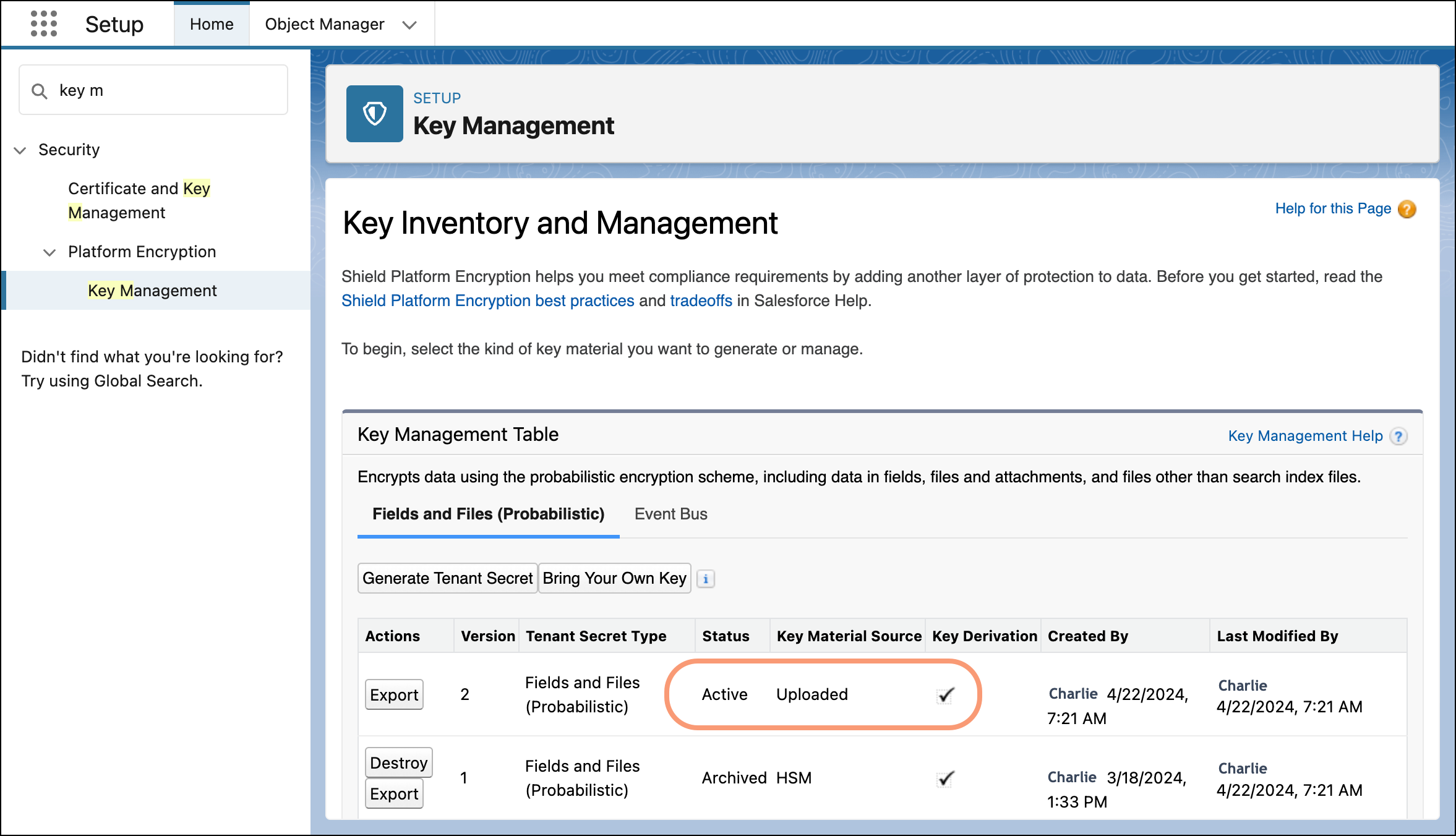
- Export your data encryption key and back it up as prescribed in your organization’s
security policy.To restore your data encryption key, reimport it. The exported data encryption key is different from the data encryption key that you uploaded. It’s encrypted with a different key and has additional embedded metadata. See Back Up Your Tenant Secret in Salesforce Help.
Did this article solve your issue?
Let us know so we can improve!
