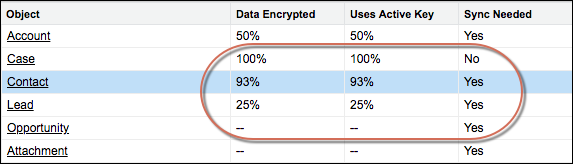
The Encryption Statistics and Data Sync page shows you how much of your data is encrypted
by Shield Platform Encryption, and how much of that data is encrypted by active key material.
Use this information to inform your key rotation actions and time lines. You can also use the
Encryption Statistics page to collect information about the fields and objects you want to
synchronize with the background encryption service.
Required Editions
Available in both Salesforce Classic (not available in all orgs) and Lightning
Experience.
Available in: Enterprise, Performance, and Unlimited
Editions with the Salesforce Shield or Shield Platform Encryption licenses.
Available for free in Developer Edition.
User Permissions Needed
To view Platform Encryption Setup pages:
View Setup and Configuration
And
Customize Application
To view statistics when user is not a System Admin
View permission on all encrypted objects.
To gather statistics when the user is not a System Admin
Modify Metadata Through Metadata API Functions system permission
From Setup, in the Quick Find box, enter Platform Encryption, and
then select Encryption Statistics.
Select an object type or custom object from the left pane. If you see a “--” in the Data
Encrypted or Uses Active Key columns, you haven’t gathered statistics for that object
yet.
Click Gather Statistics.
The gathering process time varies depending on how much data you have in your
object. You’re notified by email when the gathering process is finished. When your statistics
are gathered, the page shows updated information about data for each object. If encryption for
field history and feed tracking is turned on, you also see stats about encrypted field history
and feed tracking changes.
Note
You can gather statistics once every 24 hours, either by clicking Gather
Statistics or running the self-service background encryption service.
Feed Item doesn’t display statistics because it’s derived from Feed Post. Gathering
statistics for Feed Post is sufficient to confirm the encryption status of both Feed Post and
Feed Item.
As described in the User Permissions section, if you assign non-admin users to a
permission set with the minimum required permissions (View Setup and Configuration and
Customize Application) those users will experience issues when they try to view or
gather encryption statistics. To resolve, you need to provide that permission set with
View permission on all encrypted objects, and then include the Modify Metadata Through
Metadata API Functions system permission.
When your org migrates to Hyperforce, to a new cell in Hyperforce, or to a different data
center, your existing encryption statistics are not copied to the new org. This affects
both your production org and your sandboxes.
We use three kinds of cookies on our websites: required, functional, and advertising. You can choose whether functional and advertising cookies apply. Click on the different cookie categories to find out more about each category and to change the default settings.
Privacy Statement
Required Cookies
Always Active
Required cookies are necessary for basic website functionality. Some examples include: session cookies needed to transmit the website, authentication cookies, and security cookies.
Functional Cookies
Functional cookies enhance functions, performance, and services on the website. Some examples include: cookies used to analyze site traffic, cookies used for market research, and cookies used to display advertising that is not directed to a particular individual.
Advertising Cookies
Advertising cookies track activity across websites in order to understand a viewer’s interests, and direct them specific marketing. Some examples include: cookies used for remarketing, or interest-based advertising.
