
You are here:
Cache-Only Key Flow
With Field-Level Encryption (FLE), you can insert a final data encryption key into the encrypted key cache. You supply a cache-only key as an encrypted JWE JSON file, wrapped with your content encryption key.

Note Customer-supplied cache-only keys are available for application tier applications, such as
FLE,
Event
bus, and so on. They’re not supported for Database
Encryption, nor
are they supported for Search Index encryption on Hyperforce.
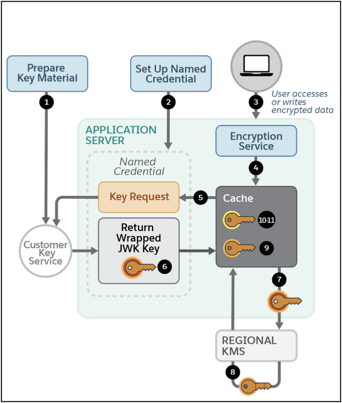
- Users prepare their key material. Cache-only key material is wrapped in a JSON format.
- The user generates a 256-bit AES data encryption key by using a cryptographically secure method.
- The user generates and downloads a BYOK-compatible certificate.
- The user creates a JWE protected header. The JWE protected header is a JSON object with three claims: the algorithm used to encrypt the content encryption key, the algorithm used to encrypt the DEK, and the unique ID of the cache-only key.
- The user encodes the JWE protected header as BASE64URL(UTF8(JWE Protected Header)).
- The user encrypts the content encryption key with the public key from the BYOK certificate by using the RSAES-OAEP algorithm. The user then encodes this encrypted content encryption key as BASE64URL(Encrypted CEK).
- The user generates an initialization vector for use as input to the DEK’s AES wrapping and then encodes it in base64url.
- The user wraps the DEK with the content encryption key.
- Encode the JWE header as ASCII(BASE64URL(UTF8(JWE Protected Header))).
- Reform authenticated encryption on the DEK with the AES GCM algorithm. Use the content encryption key as the encryption key, the initialization vector (the bytes, not the base64URL encoded version), and the Additional Authenticated Data value, requesting a 128-bit Authentication Tag output.
- Encode the resulting ciphertext as BASE64URL(Ciphertext).
- Encode the Authentication Tag as BASE64URL(Authentication Tag).
- The user assembles the JWE as a compact serialization of all the preceding values, concatenating values separated by a period.
- Users prepare a Salesforce named credential to serve as a secure callout connection, specifying their external key service as the endpoint. (Named principals are also supported.)
- The user accesses or writes encrypted data.
- The encryption service requests key material from the encrypted key cache for a DEK.
- If no DEK is returned, the encryption service initiates a request to the endpoint specified in the customer-created named credential.
- The customer’s key service returns a content encryption key wrapped in a key encryption key, formatted as a JSON Web Encryption structure (JWE).
- The encrypted key cache validates the response and sends the content encryption key to the regional Shield KMS to be unwrapped.
- The regional Shield KMS unwraps the content encryption key with the HSM-generated certificate’s key encryption key.
- The regional Shield KMS returns the unwrapped content encryption key to the encrypted key cache over a TLS-secured channel.
- The DEK is unwrapped with the content encryption key.
- The DEK is wrapped with a cache key-encrypting key and placed in the encrypted key cache for encrypt and decrypt operations.
Did this article solve your issue?
Let us know so we can improve!
