
You are here:
External Key Management Flow
For EKM, Shield Platform Encryption relies on the customer’s external KMS to generate and secure the DEKs used by the Shield Platform encryption service. These DEKs reside with the Shield Platform encrypted key cache in a wrapped state. When encryption or decryption operations are needed, the appropriate DEK is unwrapped by the external KMS. The customer key service then sends the unwrapped DEK securely back to the Shield Platform encryption service, which stores it in the Salesforce encrypted key cache. Encryption and decryption operations then use the cached DEKs.
The process begins when you create a root key in the customer KMS. You create a policy that gives Salesforce’s regional Shield KMS some important permissions.
- Permission to request the customer key service to generate and wrap a DEK by using the root key
- Permission to request the customer key service to unwrap the DEK by using the customer root key
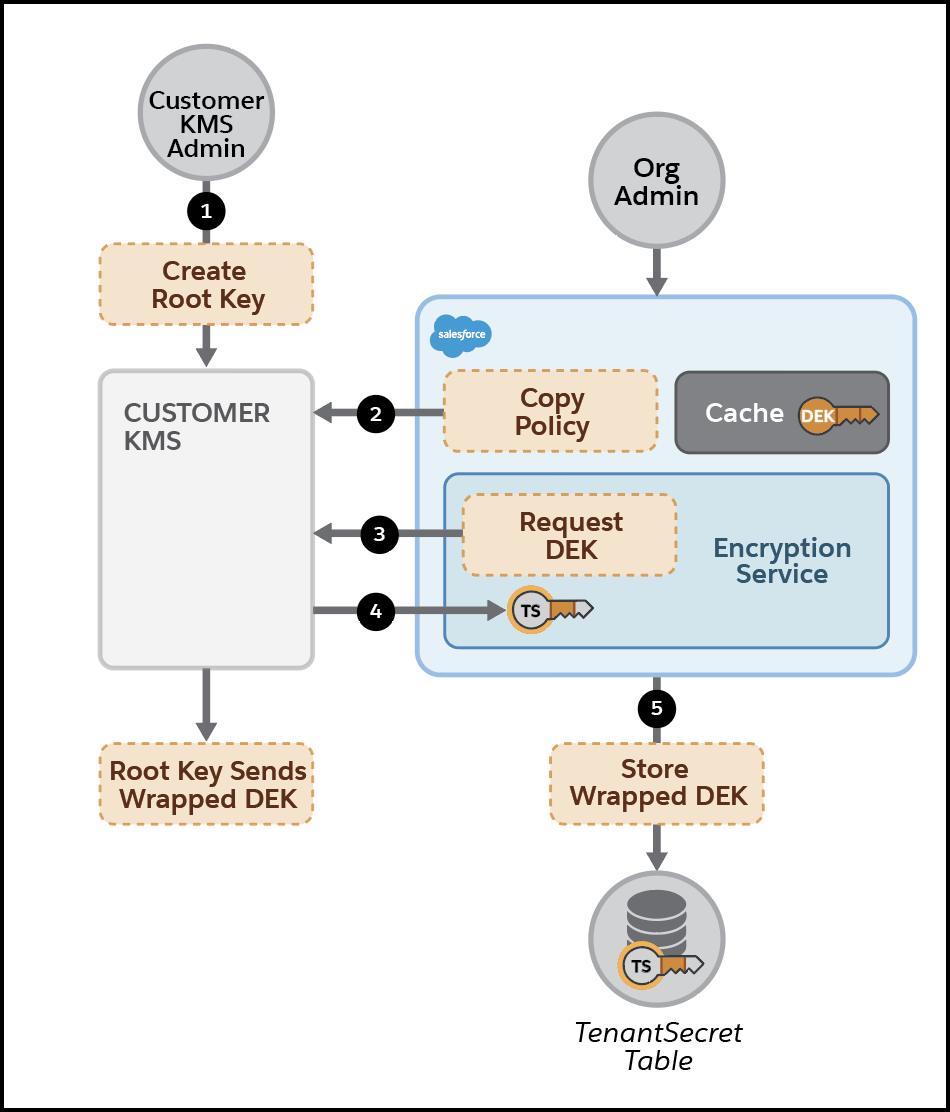
You use this policy to create an EKM DEK in Setup. Then the Shield Platform encryption service requests the customer KMS to generate a DEK and wrap it by using the root key. The customer KMS creates a DEK, wraps it, and sends it to the Shield Platform encryption service over TLS. This copy is the only copy of the DEK that exists. Shield Platform Encryption stores the DEK wrapped by the root key in the database. Here’s the process, step by step.
- The customer KMS admin creates a root key.
- The Salesforce admin creates a key policy and copies it to the customer KMS.
- With the policy in place, the Salesforce encryption service requests a DEK for local storage.
- The customer KMS uses the root key to wrap the new DEK, which it sends back via TLS.
- The encryption service stores the wrapped DEK in the Salesforce database.
When the Shield Platform encryption service detects encryption operations that require the EKM DEK, it checks its encrypted key cache for it. If the unwrapped DEK isn’t present in the cache, the Shield Platform encryption service requests that the key service unwrap the DEK. The key service unwraps the DEK and sends it back to the Shield Platform encryption service over TLS. Then the Shield Platform encryption service adds the unwrapped key to the encrypted key cache.
- A user accesses or saves encrypted data.
- The Shield Platform encryption service gets the DEK from the TenantSecret table.
- The encryption service sends the wrapped key to the customer KMS over a secure channel to be unwrapped.
- The customer KMS uses the root key to unwrap the DEK and sends it back to the encryption service.
- The encryption service stores the unwrapped key in the encrypted key cache for immediate use.
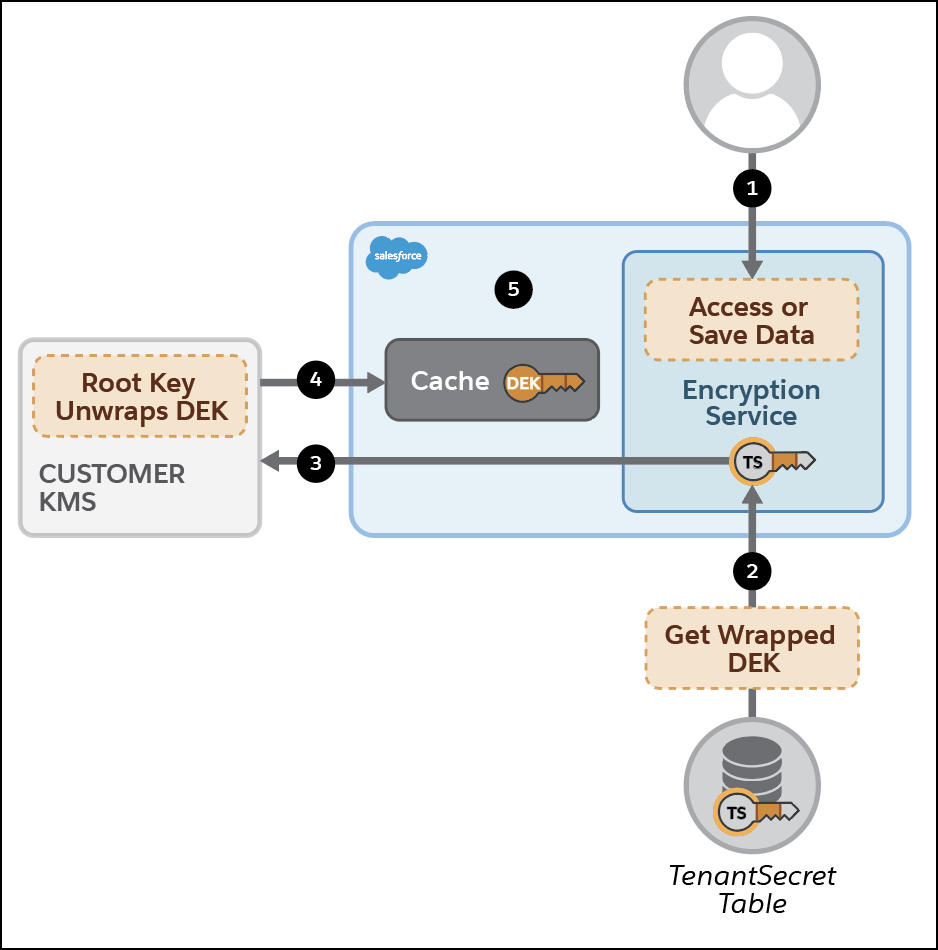
If the unwrapped DEK is present in the cache, the Shield Platform encryption service uses it for encryption and decryption of customer data.
Because EKM DEKs bypass the key-derivation process, they’re used to directly encrypt and decrypt your data.
The Shield KMS enhanced cache controls ensure that key material is stored securely while in the cache. The Shield KMS encrypts the fetched key material with an org-specific AES 256-bit cache encryption key and stores the encrypted key material in the cache for encrypt and decrypt operations. HSM-protected keys secure the cache encryption key in the cache, and the cache encryption key is rotated along with key lifecycle events such as key destruction and rotation. Once the encryption key is in the cache, encryption and decryption requests go through the encrypted key cache.
The enhanced cache controls provide a single source of truth for key material that’s used to encrypt and decrypt your data. Keys are unwrapped by the customer KMS and stored in the key cache until the DEK is revoked or rotated or until the cache is flushed. After the cache is flushed, the EKM service again fetches the DEK from your specified key service. The cache is flushed regularly every 72 hours. Certain Salesforce operations flush the cache, on average, every 24 hours. Destroying a DEK invalidates the corresponding DEK that’s stored in the cache.
