You are here:
Secure External Redirections from Hyperlinks in Salesforce
After you populate the Trusted URLs for Redirects allowlist, protect your users from redirections to untrusted URLs. You can warn block redirections that originate from a hyperlink in Salesforce or warn users during those redirections.
Required Editions
| Available in: all editions |
| User Permissions Needed | |
|---|---|
| To modify session settings: | Customize Application |
These settings apply when a user clicks a hyperlink when the target URL isn’t on the Trusted URLs for Redirects allowlist. The availability and behavior of this feature varies based on whether the user accesses Salesforce via Lightning Experience or Salesforce Classic.
Regardless of these settings, if the target URL fails a syntax check, the redirection is blocked.

- Before you enable this feature, specify the URLs that you trust for external redirections.
-
To secure redirections for users who access Salesforce via Lightning Experience, from
Setup, find and select Trusted URLs for Redirects. Then for
Redirections to Untrusted URLs (Beta), select an option.
-
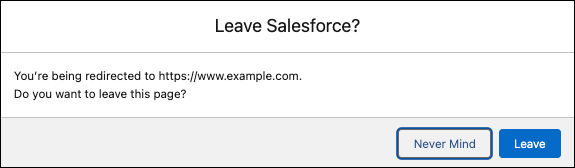
To show a warning message that requires these users to confirm that they want to leave the current page before they’re redirected, select With user’s permission.
-
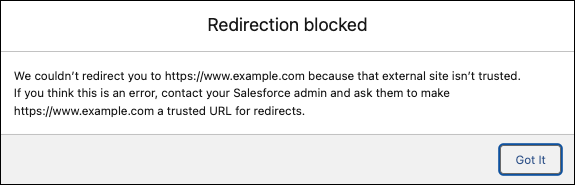
To block redirections to untrusted external URLs for these users, select Never.
A message informs the user that they can’t access the page because the external site isn’t trusted.
-
-
To secure redirections for users who use Salesforce Classic, from Setup, find and
select Session Settings. Under External Redirections, select an
option in the Allow redirections to untrusted external URLs field.
In Salesforce Classic, the messages open in a new browser tab.
-
To show a warning message that requires these users to confirm that they want to leave the current page before they’re redirected, select With user’s permission.
For users who access Salesforce via Salesforce Classic, the warning message includes an option for the user to trust the URL in the future.

-
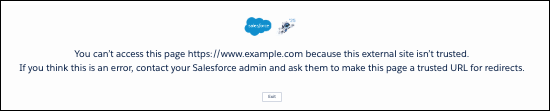
To block redirections to untrusted external URLs for these users, select Never.
A message informs the user that they can’t access the page because the external site isn’t trusted.
-
If you select Never for either setting, to reduce end-user frustration and potential broken functionality, consider allowlisting all URLs for your other Salesforce orgs and custom domains. See Identify Cross-Org Urls to Allow for Redirections.

