You are here:
Test External Redirections
After you update your Trusted URLs for Redirects allowlist, verify that the corresponding redirections are allowed.
Required Editions
| Available in: all editions |
To understand where and when Salesforce restricts redirections based on the Trusted URLs for Redirects allowlist, see External Redirection Restrictions in Salesforce

- If you know the action or link that redirects users to an allowed URL, initiate the redirection from within Salesforce.
- To test multiple URLs in succession, you can test the redirection from your
browser.
- Log in to Salesforce.
- In the browser address bar, delete the URL path: the characters after the first forward slash (/).
- Replace the path by entering this string:
?startURL=targetUrl.
If the redirection is allowed, you’re redirected to targetUrl. If the redirection is blocked, you get an Invalid Page Redirection error.
Here’s an example of an Invalid Page Redirection error.
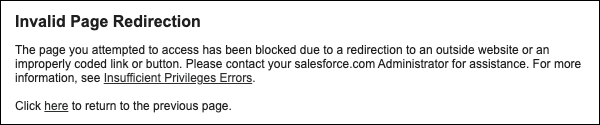

To allow redirections from production to sites in your sandbox, you added https://mycompany--uat.sandbox.my.site.com to your Trusted URLs for Redirects allowlist in production. You also decided not to allow redirections from your production org to files in that sandbox, which are hosted on this URL: https://mycompany--uat.sandbox.file.force.com
After you log in to your production org, the browser address bar contains this URL: https://mycompany.lightning.force.com/lightning/page/home.
To test redirections to the allowed sandbox site URL, you delete lightning/page/home from the URL in the browser bar and replace it with ?startURL=https://mycompany--uat.sandbox.my.site.com. The new URL is https://mycompany.lightning.force.com/?startURL=https://mycompany--uat.sandbox.my.site.com. Because the target URL is on the allowlist, when you press Enter, you’re redirected to the sandbox site.
To test redirections to the blocked sandbox content URL, you modify the URL in the browser address bar to https://mycompany.lightning.force.com/?startURL=https://mycompany--uat.sandbox.file.force.com. Because the target URL isn’t on the allowlist, when you hit Enter, you get an Invalid Page Redirection error.
