
You are here:
General Enhancements for Starter and Pro Suite
Customize the vertical navigation bar for easy access to apps and use the new home page to prioritize your tasks for the day. Manage your plans for the fiscal year in Quick Settings and consider the benefits when you upgrade your account to Pro Suite.
Verify your Identity with Multi-Factor Authentication
Multi-factor authentication is turned on by default for all paid Starter and Pro Suite orgs created on or after April 8, 2024. See MFA Is Turned On by Default Starting April 2024.
Retired In-App Bot Assistance
The in-app bot assistant in Starter and Pro Suite is scheduled for retirement in March 2024. To continue to request help with technical issues, contact Salesforce Customer Support via Salesforce Help. You can also check out our documentation to learn more about Starter and Pro Suite tools.
Locate Your Solutions Efficiently with the Vertical Navigation Bar
Managing information about your customers is easier than ever. Wherever you are in Salesforce, you can now quickly access Accounts and Contacts from the vertical navigation bar. This feature is available for Starter and Pro Suite in March 2024. Previously, you could manage these items only within the Sales and Service apps.
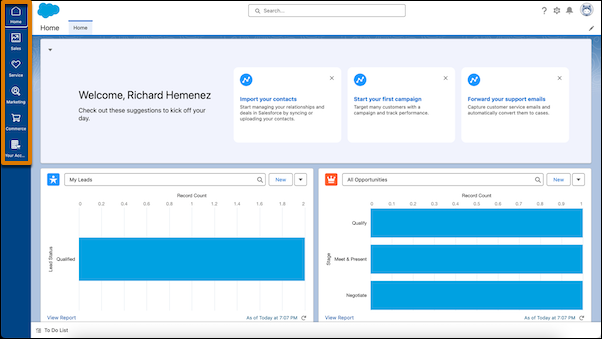
Spend less time finding the apps you need with the Starter home page vertical navigation bar. Locate all your marketing, sales, service, and commerce solutions in one place, as well as access your self-service subscription portal. This feature is available for Starter starting in February 2024.
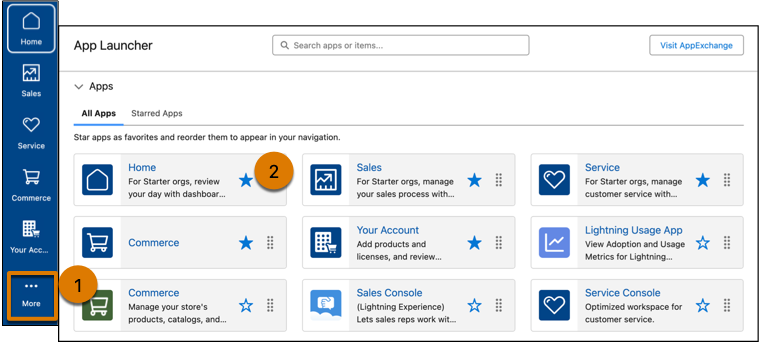
Create a customized workspace to suit your needs in Pro Suite. To open App Launcher, click More (1). Star the apps you want to see in the vertical navigation bar (2). Order apps by dragging them in App Launcher or directly on the vertical navigation bar.
Easily Upgrade to Pro Suite
Get Pro Suite directly from your Pro Suite trial and continue your work in Salesforce. Click Buy Now from your Pro Suite trial, and then select Pro Suite.
You can now quickly request an upgrade from Starter to Pro Suite in the Product Catalog in Your Account. See Upgrade from Starter to Pro Suite in Your Account.
Spend less time on setup and more time on your business as Pro Suite guides you through each step quickly and easily. Consider these benefits of upgrading your edition:
- Customize your app for maximum efficiency and explore all Pro Suite has to offer.
- Engage with customers and provide real-time customer support by adding chat.
- Drive accurate sales projections and close deals faster using forecasting.
- Make it simple for customers to purchase your products and services when you create quotes that let them see and compare prices.
Focus on What Matters by Personalizing the Home Page
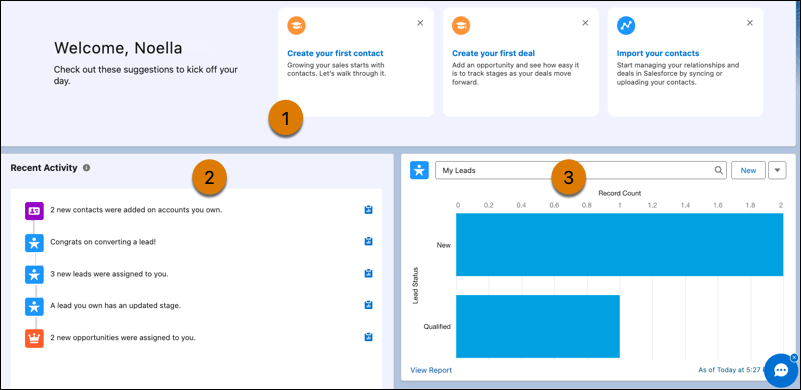
Get to work quickly on the things that matter most to your company using the new, intuitive home page (1). Make informed decisions about where to focus your attention and plan tasks for the day with insights into updates and activity (2). Save time by viewing record reports and stages on one page without searching for them (3). Personalize the home page by keeping what works and dismissing what doesn’t.
Quickly Access Options for Managing Forecasts and Records
In Quick Settings, access new options that help you add a fiscal year for more accurate planning, and tailor records and pages according to the needs of your teams.
- Improve forecasts for how much your company plans to sell when you include a fiscal year. Measure revenue and earnings year-over-year to adjust opportunity data, monitor pipeline changes, and redirect resources.
- Alter page layouts in Pro Suite to change the content of the fields on a record’s related or detail page. For example, on a lead record, remove the Fax field and make the Mobile field required so your teams can concentrate on relevant information.
- Customize record contents in Pro Suite for objects such as leads, opportunities, and contacts. For example, quickly update a record by editing a contact’s name, address, or owner from Quick Settings.
- Manage user settings and permissions in Pro Suite. For example, create users and determine which features they can access. Clone, deactivate, or delete users.
