
You are here:
Marketing Enhancements for Starter and Pro Suite
Learn about updates to campaigns and flows so you can monitor and manage their activity.
Manage Campaigns More Effectively with Flow Updates
A new campaign layout makes it easier to see all of the emails in a series, and organizes campaign details and performance on a left sidebar for persistent access. This feature is available for Starter and Pro Suite in February 2024.
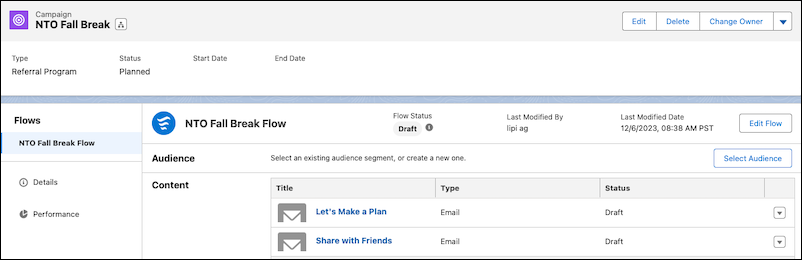
Here are other updates to campaign flows:
- Message Series campaigns now show a Select Audience button, so that you can select a segment without opening Flow Builder.
- When you delete a campaign, its flow is no longer deleted with it. The flow’s sharing settings revert to private, or any defined setting. To revert, you can restore the campaign from the Recycle Bin. Or, delete unwanted flows from the Flows page.
- To edit scheduled or automated emails, you can pause a running flow and hold segment members where they are. Then, activate a new flow version when the updated email is ready. When you activate the flow, choose whether to send the original email or the updated email to the people who are waiting. The campaign record continues to show the original flow version until you activate the updated flow version.
- To support evergreen campaigns, configure your flow as recurring on its Start element.
- To listen for engagement activities before triggering the next element, add a Wait Until Event element.
If you use custom permission sets in Starter and want these flow updates, add the Email invocable action to the relevant permission sets.
Simplify Email Consent with New Merge Fields
We updated consent options for email recipients in February 2024. The Preference Manager merge field now opens a form where recipients can manage subscriptions, and the Opt Out of All Emails merge field was changed. The name is now Unsubscribe, and it’s a link that removes recipients from the related subscription with one click.
