
You are here:
General Enhancements for Starter and Pro Suite
Learn about real-time collaboration with Slack and a streamlined way to send emails.
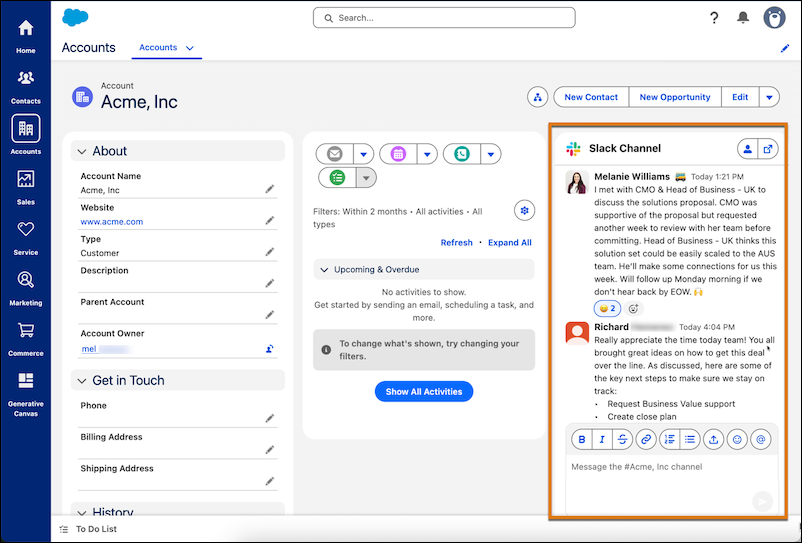
Collaborate in Real-Time with Salesforce Channels for Slack
Connect teammates, collaborate in real-time, share documents, and get more done with Salesforce Channels for Slack. Seamlessly integrate Slack's collaborative experience right into your Salesforce records, like an account or opportunity. You can access your conversations directly from the record or in Slack. Conversations remain synchonized, making it easy to communicate with your team no matter where they are.
This functionality is available for Starter and Pro Suite starting in June 2025.
Send Marketing Emails to a Filtered Segment of Your Audience Directly from a List View
When viewing leads or contacts, you can now go directly from filtering them in the list view to automating marketing emails to your filtered audience segment. From any lead or contact list view, click Send Email. Select the marketing email option, and then follow the prompts to create and send your content. We take care of creating the details for you. You don’t even have to leave the list view.
For example, let’s say you want to send a marketing email campaign to only Operation Managers. You can filter your contacts by title in the Contacts tab, and then click Send Email and select the Marketing Email type. This action defines all current contacts with the title Operations manager as a segment, which you can use to define recipients of your marketing email campaigns.
