Select An Org
Salesforce Sandbox Preview Instructions
Publish Date: Jul 14, 2026
Description
Winter '27 is coming with lots of new features. Use your sandbox to get early access to new features and test your configurations before the production upgrade.
The sandbox preview window for Winter '27 begins August 28, 2026. You must have an active sandbox on a preview instance by August 27, 2026 (the day before sandbox preview) to take advantage of the preview.
Here’s how... First, decide whether you want to:
-
Keep one or more of your sandboxes on the current Summer ’26 release version, or,
-
Try the next major release, Winter '27 version, in your sandbox(es).
After you decide:
-
Check if the Release Type of the sandbox is preview (upgrade) or non-preview (no upgrade), and
-
Determine if you need to refresh and when, based on the cutoff date of August 27, 2026.
Usually, no action is required because your sandbox is already on a preview instance.
How Does Sandbox Preview Work?
The sandbox preview is a 6-week window ahead of a major Salesforce release when all preview sandboxes are upgraded to the next major Salesforce release. It’s your first chance to test your configurations on the new release.
Sandboxes are updated in groups based on the instance where they’re located. All sandboxes on a preview instance get upgraded together, and all sandboxes on non-preview instances remain on the current release. The only way to change the upgrade status of a sandbox is to move it to another instance by refreshing it. If you want to move it to a preview instance, you must do so before the cutoff date.
To create a sandbox on a Winter '27 preview instance, you must create or refresh the sandbox in advance of 6:00 PM PT on August 27, 2026 (01:00 UTC on August 28, 2026). If your sandbox request is complete in time, we upgrade it to Winter '27.
To create a sandbox on a Summer '26 non-preview instance, you have two options:
-
Select the Request Non-Preview option when you create or refresh a sandbox before 6:00 PM PT on August 27, 2026 (01:00 UTC on August 28, 2026). This non-preview request feature is enabled through an org permission. To get this permission, contact Salesforce Customer Support. After you receive the permission, the Request Non-Preview option will be available to all sandboxes created for a given org during preview request windows going forward.
-
Create or refresh a sandbox as normal after 6:00 PM PT on August 27, 2026 (1:00 UTC on August 28, 2026).
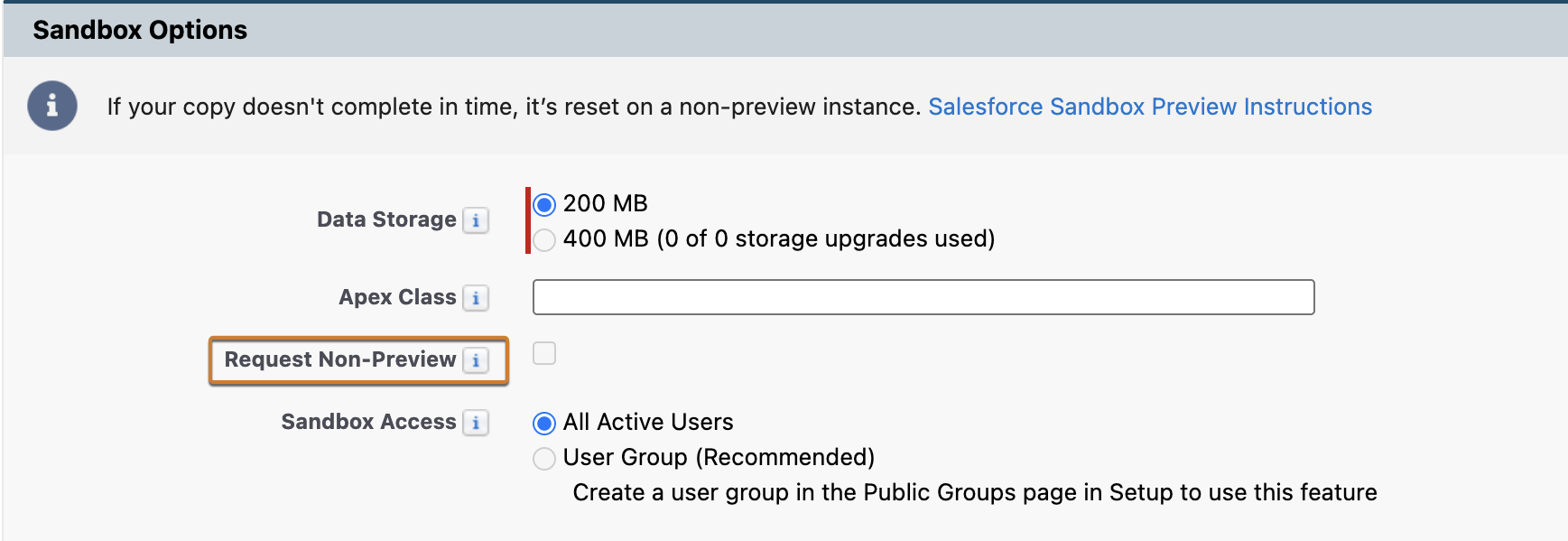
For the Winter '27 Release, we upgrade the preview instances to Winter '27 on August 28 and August 29, 2026, and non-preview instances to Winter '27 on October 9 and October 10, 2026.
The following timeline shows the following key dates for creating a sandbox on a preview or non-preview instance:
-
Non-Preview Opt-In: This is the period of time in which you can create a sandbox on a preview instance by default, or request a non-preview instance.
-
Sandbox Preview Window: This is the period of time in which orgs on preview instances will be exposed to the new release. Production and non-preview instances are upgraded to the new release around 6 weeks after the start of the sandbox preview window.
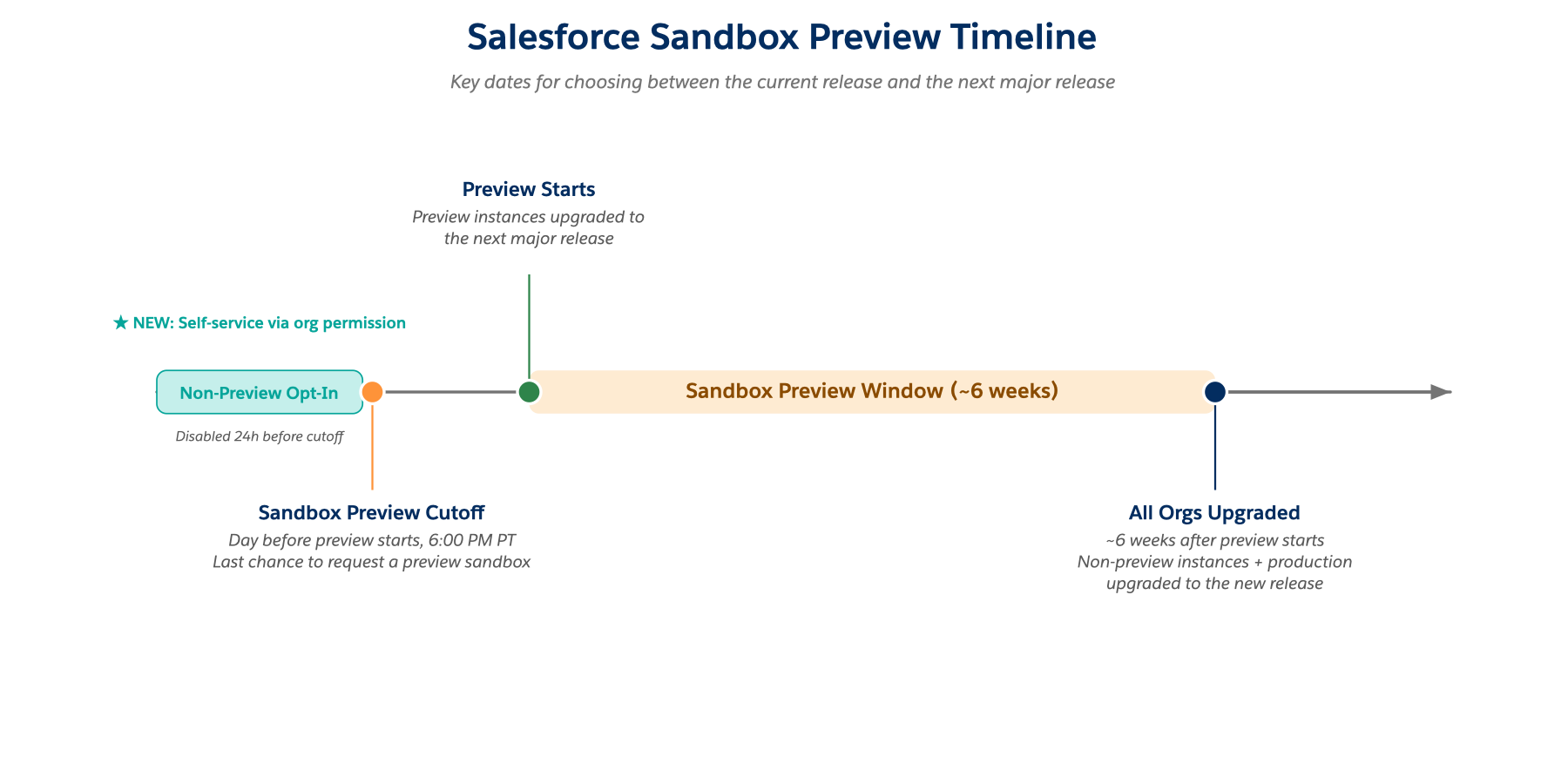
Follow the basic process below if you want your sandbox to participate in the Winter '27 preview.
1. Find your sandbox details.
In production, from Setup, in the Quick Find box, enter Sandbox, and then select Sandbox. Use the Release Type column to determine if your sandbox is on a preview or non-preview instance.
You can also use the Sandbox Preview Guide to determine if each of your sandboxes is on a preview or non-preview instance. Enter your sandbox instance name(s). The guide tells you if it’s preview or non-preview and what to do to either move to the next release (Winter '27) or stay on the current release (Summer '26). You can also check multiple sandboxes and view the full list of preview and non-preview instances.
2. Understand the cutoff date.
Every release, we give you a cutoff date for sandbox refresh completions, and usually, it’s the day before the preview starts. For Winter '27, the cutoff date is August 27, 2026. Any sandbox created after the cutoff isn’t a preview sandbox. If you have a sandbox on a preview instance and refresh it after the cutoff, your sandbox is routed to a non-preview instance and reverts to Summer '26.
Resolution
Should I Refresh my Sandbox?
Here are the most common scenarios:
It’s important to plan ahead. The popularity of the sandbox preview program often means backlogs in sandbox create and refresh requests, especially closer to the cutoff date. Remember, if it’s a full sandbox it can take some time to copy.
All incomplete sandboxes are reset to a non-preview instance before the sandbox preview starts on August 28, 2026, so we recommend that you request your sandbox at least a week before the deadline to improve your chances of getting a completed sandbox on a preview instance.
We aim to process each request on time, but we can’t guarantee the completion of your sandbox before the deadline.
I Want to Create a New Sandbox — What Are My Options?
|
Create a new sandbox that goes to a preview instance and gets the Winter '27 preview |
Create a new sandbox that goes to a non-preview instance and stays on Summer '26 |
|
Submit your sandbox request well ahead of the 6:00 PM PT cutoff on August 27, 2026 (01:00 UTC on August 28, 2026) so that the sandbox copy is completed before the sandbox release. Plan ahead. If you submit your request too close to the deadline and the copy isn’t completed, or if your request is after the deadline, your Sandbox is built on a non-preview instance. |
Select the Request Non-Preview option when you create the sandbox between now and the 6:00 PM PT cutoff on August 27, 2026 (01:00 UTC on August 28, 2026). To enable this feature, contact Salesforce Customer Support. -OR- Wait to submit your request to create a sandbox until after 6:00 PM PT on August 29, 2026 (01:00 UTC on August 30, 2026). |
I Have a Sandbox — What Are My Options?
|
If the Release Type of your sandbox is: |
You want to try Winter '27 in your sandbox |
You want the sandbox on Summer '26 |
|
Preview |
No action needed. Your sandbox is already on a preview instance and gets upgraded to Winter '27 on August 28, 2026. If you must refresh your sandbox for other reasons, do so well in advance of 6:00 PM PT on August 27, 2026 (01:00 UTC on August 28, 2026) to make sure that your sandbox is completed before the cutoff date. If you refresh your sandbox after the deadline or your sandbox isn’t completed in time, it is built on a non-preview instance. |
Select the Request Non-Preview option when you refresh the sandbox between now and the 6:00 PM PT cutoff on August 27, 2026 (01:00 UTC on August 28, 2026). To enable this feature, contact Salesforce Customer Support. -OR- Wait to refresh the sandbox after 6:00 PM PT on August 27, 2026 (1:00 UTC on August 28, 2026).
Refreshing a sandbox deletes it and recreates it as a new copy of production. Be sure to save any configurations or data unique to the sandbox elsewhere before refreshing it. |
|
Non-Preview |
Your sandbox is on a non-preview instance. Refresh it between now and 6:00 PM PT on August 27, 2026 (01:00 UTC on August 28, 2026) to try out Winter '27. If you refresh your sandbox after the deadline or your Sandbox isn’t completed in time, it is built on a non-preview instance. |
No action is needed because your sandbox is on a non-preview instance and stays on Summer '26. If you must refresh your sandbox for other reasons, you have two options: 2.Wait to refresh it after 6:00 PM PT on August 27, 2026 (1:00 UTC on August 28, 2026) to remain on a non-preview instance. |
Note: If you decide to keep your sandbox on the current Summer '26 release, your sandbox isn’t upgraded to Winter '27 until October 9, 2026, or October 10, 2026.
I Have a Sandbox That I Want to Clone - What Are My Options?
|
Before the sandbox preview window |
By default, sandbox clone requests are routed to a preview instance until 6:00 PM PT on August 27, 2026 (01:00 UTC on August 28, 2026).
To route a sandbox clone request to a non-preview instance, select the Request Non-Preview option when you clone the sandbox before 6:00 PM PT on August 27, 2026 (01:00 UTC on August 28, 2026). To enable this feature, contact Salesforce Customer Support. |
|
During the sandbox preview window |
From 6:00 PM PT on August 27, 2026 (01:00 UTC August 28, 2026) through October 10, 2026, we process sandbox clone requests on the same release version of Salesforce as the sandbox being cloned. |
AgentExchange Preview Instructions
Use this chart if you plan to upload or install one or more AgentExchange packages using your sandboxes during the sandbox preview window.
|
You can upload AgentExchange Packages: |
You can install AgentExchange Packages: |
You can’t install AgentExchange Packages | ||
|
Before the sandbox preview window Anytime until sandbox preview starts on August 28, 2026 |
From your Summer '26 production or sandbox instance |
To any Summer ‘26 production or sandbox instance | ||
|
During the sandbox preview window From August 28, 2026, through October 9, 2026 |
From your Summer '26 production or sandbox instance |
To any Summer ‘26 production or sandbox instance | ||
|
From your Winter '27 sandbox instance |
To any Winter '27 production or sandbox instance |
To any Summer '26 production or sandbox instance | ||
|
After the sandbox preview window Any time after June 13, 2026 |
From your Winter '27 production or sandbox instance |
To any Winter '27 production or sandbox instance | ||
If you have any questions or need assistance about your sandbox options and the Summer '26 release, refer to Salesforce Help.
Resources
Get Early Access with the Sandbox Preview Unit | Salesforce Trailhead
Knowledge Article Number
000391927
Did this article solve your issue?
Let us know so we can improve!
