Select An Org
Salesforce Platform API Versions 21.0 through 30.0 Retirement
Publish Date: Apr 2, 2026
Description
Original Publication Date - October 20, 2020
Updated - March 17, 2026
What’s the status of SOAP, REST, and Bulk API versions 21-30?
These API versions are deprecated (as of Summer ‘22 release), are no longer supported, and retired (as of the Summer '25 release). Applications that consume these versions will be disrupted because calls will fail and respond with an error that the requested endpoint is not found and can’t be processed by the platform. Below are the errors:
- REST API returns 410: GONE.
- SOAP API returns 500: UNSUPPORTED_API_VERSION.
- Bulk API returns 400: InvalidVersion.
Note: API versions 7.0 through 20.0 were retired and made unavailable in the Summer ’22 release.
Why were these API versions retired?
We are focusing our development efforts on enhancing the latest API versions to improve the overall Salesforce experience when building custom functionality via applications. To put things in perspective, API version 30 was from our Spring ‘14 release.
Who This Affects?
This retirement affects organizations using legacy integrations that call API versions 21.0 through 30.0. If your integration was built before Spring 2014 and hasn't been updated, you may be using these deprecated API versions.
- Common scenarios include:
- Legacy connected apps built between 2011-2014 that haven't been updated
- Custom integrations using older Data Loader versions (pre-version 31). For example, if you're using Data Loader version 40 or lower, you'll need to upgrade to avoid disruption
- Third-party applications that haven't updated their Salesforce API calls
- Outbound Messaging configurations created before 2014
- AJAX Toolkit references in Visualforce pages pointing to versions 21.0-30.0
What did this API version retirement impact?
This retirement affects any code, package, application, or integration executing a request of versions 21.0 through 30.0 SOAP, REST, or Bulk API.
Note: This retirement does not impact the following:
- The API versions of Apex Classes, Apex Triggers, Visualforce Pages, Flows, and Process Builders
- The out-of-the-box B2B Classic/Visualforce product
- Versioned metadata components in a managed package
- Custom Apex REST & SOAP Web Services (A custom Apex web service is a way to make an Apex class method callable as a public API. You can learn more about Apex Web Services here: Apex Web Services )
What actions did I need to take?
- Identify any components/applications in your org that use these legacy API versions.
- Update those components/applications. Before the Summer '25 release, you should have modified or upgraded your applications to function with current, supported API versions. Salesforce strongly recommends moving to newer API versions because they provide improved security, performance, and capabilities.
Please see the table below for some common places of impact and what actions were needed to take for each:
| Component | Action to take |
| Data Loader | Install a newer version |
| Web Services Connector | Upgrade to a current version |
| AJAX Toolkit | Update the version reference in the path of JavaScript references to the connection.js file to reflect a supported API (for example, /soap/ajax/58.0/connection.js). |
| Visualforce Pages that embed deprecated API calls via the AJAX Toolkit | See AJAX Toolkit above |
| SForceOfficeToolkit COM interface | Adopt a replacement solution that interacts with the latest Salesforce APIs |
| Force.com Toolkit for PHP | Adopt a replacement solution that interacts with the latest Salesforce APIs. |
| Return SOAP API calls from payloads generated by Outbound Messaging | If your Outbound Messaging listener is set up to make a return SOAP call to Salesforce using the EnterpriseURL or PartnerURL sent in the payload, you will need to either configure your client to modify the API URL to use a version greater than 30.0 or recreate the message in Salesforce Setup, which sets the API version to the latest available on the current release. When creating a new Outbound Messaging definition, you can attach it to an existing workflow rule and remove the previous outbound message from that workflow. |
| Connected apps | Check with the developer to either upgrade to a more recent version of the connected app or revise the implementation to interact with the latest Salesforce APIs. |
How did I know if/where these legacy API versions were used in my applications?
You would have gotten in touch with the developers of the applications you use to determine the API versions.
In addition, you can review API events in the free API Total Usage EventLogFile that report SOAP, REST, and Bulk API activity from Salesforce using either of the following two methods.
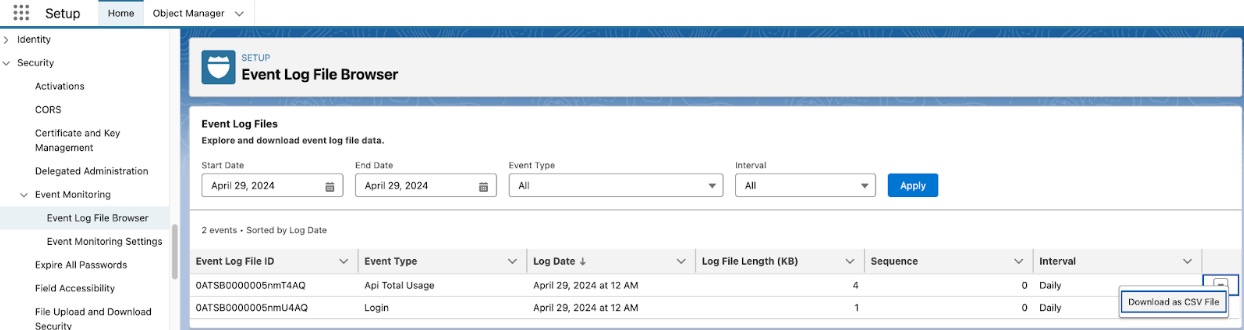
- The first method is to use the new Event Log Browser included in the Summer ‘24 release. With this, you can browse the API Total Usage event log files in your org and download them as CSV files to view the individual API events.
From within Setup, navigate to Security → Event Monitoring → Event Log Browser. Here you can view the event log files for the last 24 hours, or the last 30 days if you have activated Event Monitoring. You can then download individual event log files as CSV files to view the API events in them.
- Alternatively, the second method is to use a client such as the Salesforce CLI to run a SOQL query against the EventLogFile object, providing the event log files for the last 24 hours, or the last 30 days if you have activated Event Monitoring.
sf data query -q "SELECT Id, LogFile, EventType, CreatedDate FROM EventLogFile WHERE EventType IN ('ApiTotalUsage')" -o <your-username>For each result, perform a REST API request to the endpoints in the query result to retrieve the event log data in that event log file*.
/services/data/v58.0/sobjects/EventLogFile/0AT3i000005vXpWGAU/LogFilePaste the response body into an application to easily inspect the event log data as a CSV file.
- Review each CSV file and determine if requests are being made to endpoints with API versions 30 and below.
Review all API Total Usage events (ApiTotalUsage EventType) with API_VERSION of 30 and below**

- For any integrations or clients that consume versions 30.0 and below, follow the hints provided by key fields in the event log data to help identify the source of the legacy API call:
CONNECTED_APP_NAME, USER_NAME, CLIENT_NAME, API_FAMILY, API_RESOURCE, ENTITY_NAMEFor more information on Event Monitoring, take the Event Monitoring Trailhead Module.
*For introductory information on performing a REST API request, see this Trailhead Use REST API.
**The “API Total Usage” event type consolidates relevant request information across the SOAP, Bulk, and REST APIs, including version information. See the event definition details here. API-enabled organizations have free access to the API Total Usage event log files with 1-day data retention. With Event Monitoring enabled, you can access this and all other event log file types with 30-day data retention.
You can also do the following to find Bulk API requests or SOAP API logins:
- Find Bulk API requests: For Bulk API, navigate to the “Bulk Data Load Jobs” page within Setup and view the details of each “Bulk V1” job. This API retirement will impact any job with a value of 30.0 or below within the “API Version” field.
- Find SOAP API logins: For the SOAP login() operation, navigate to “Login History” within Setup and review the entries with “SOAP Enterprise” or “SOAP Partner” as the API Type. Alternatively, the LoginHistory sObject can be queried via SOQL. Any login entry that features a value of 30.0 or below within the “API Version” field will be impacted by this retirement.
Note: Partners can leverage the Package Usage Logs for insights on their deprecated API consumption.
How can I find where these legacy API versions were used in my code?
You can use Salesforce Code Analyzer to find where these legacy API versions are used in your code. Refer to this documentation.
Salesforce for Outlook
API calls originating from Salesforce for Outlook will have a CLIENT_NAME of “SfdcApplication/” in the API Total Usage EventLogFile. Upgrade to the latest version of Salesforce for Outlook which uses a supported API version.
Microsoft Power Query
If API calls from Microsoft Power Query are using these deprecated API versions, then follow these instructions to update the API version that Microsoft Power Query uses.
How can I get more information?
About the latest API versions supported, visit the Salesforce Developers site.
About APIs and outbound messaging:
- Platform API Basics (Trailhead)
- Introduction to SOAP API (Developer Guide)
- Understanding Outbound Messaging (Developer Guide)
- Bulk API (Developer Guide)
- Introduction to REST API (Developer Guide)
- “REST” covers all APIs with endpoint URIs under
/services/data/vXX.Y/and/services/metadata/vXX.Y/where XX.Y is the API version. This includes the “standard” Salesforce Platform REST API to work with sObjects and records, but also the following resources:
- “REST” covers all APIs with endpoint URIs under
Observe the results of a REST request to GET /services/data/v30.0 or GET /services/metadata/v30.0 to understand the top-level resources affected when v30.0 and below endpoints are retired.
If you would like more information about this legacy API retirement, you can see An Important Update to Our Legacy API Retirement Plan .
For an explanation of API versions geared towards admins, listen to the podcast here (it’s a few years old, but the core information is still relevant): Why API Versions Matter with Kris Harrison .
I still need help. What can I do next?
- Go through the resources above.
- Post on the Trailblazer community.
- If you have any questions or need assistance, refer to Salesforce Help. Please remember what you have already tried and where you are stuck so Support can help you as efficiently as possible. Please note that Support cannot update the legacy APIs in your org.
To view all current and past retirements, see Salesforce Product & Feature Retirements . For more information about Salesforce’s approach to retiring products and features, read our Product & Feature Retirement Philosophy.
Knowledge Article Number
000389618
Did this article solve your issue?
Let us know so we can improve!
