Select An Org
Salesforce for Outlook Retirement
Publish Date: Mar 27, 2024
Description
Updated - March 2024
Salesforce for Outlook product retirement has been rescheduled for December 2027. The action menu (also known as the New Record button in the Salesforce for Outlook side panel) stopped functioning in Summer '21.
If you want your users to continue accessing Salesforce functionality from Microsoft Outlook (and vice versa), consider migrating to the Outlook integration (formerly called Lightning for Outlook) and Einstein Activity Capture. These products replace Salesforce for Outlook features and deliver solutions in areas where Salesforce for Outlook falls short. We continue to introduce enhancements for these products every release.
Note: Salesforce offers multiple Microsoft integration products that include side panels. If you're not sure which one you're using, see the screenshots in this article to verify whether you're using it.
Why is Salesforce retiring this product?
In Winter ’19, Salesforce for Outlook entered a maintenance-only phase that reduced availability to existing users only. However, due to some Salesforce for Outlook dependencies on Microsoft Internet Explorer 11 (IE11), Salesforce for Outlook functionality is affected as Lightning Experience ends its extended support for IE11.
Salesforce for Outlook has relied on Lightning Experience to interpret Apex calls made from IE11. Because Salesforce Classic can’t interpret Apex calls, Salesforce for Outlook relies on Lightning Experience for users working from both Lightning Experience and Salesforce Classic. After Salesforce ends extended support for IE11 for Lightning Experience, Apex calls made from IE11 to Salesforce are blocked to maintain the end of the IE11 support. At that point, calls are blocked to Salesforce for Outlook as well.
For the delayed retirement, we established some workarounds to the technical limitations facing Salesforce for Outlook as we neared the end of extended support for Internet Explorer 11. While we can delay the retirement of most features until 2027, there are still some dependencies that can’t be avoided. So the Salesforce for Outlook action menu, which lets your users create new Salesforce for Outlook records from the Salesforce for Outlook side panel, was retired with the Summer '21 release.
How will orgs be impacted by this change?
The action menu was retired in Summer '21, and the full product retirement scheduled for December 2027.
Action Menu Unavailable in Summer '21
Starting in Summer '21, Salesforce for Outlook users can no longer create Salesforce records from Outlook using the side panel action menu. After the action menu is retired, the new records button (
Salesforce for Outlook action menus are populated by actions that admins add to email application publisher layouts or global actions layouts. Admins can add actions that let users create records, such as New Contact, New Event, New Case, etc.
After the side panel is removed, admins can continue to edit or create email publisher layouts from Outlook Configurations in Setup. However, doing so no longer affects the action menus in the Salesforce for Outlook side panel.
Note: If you plan to move to the Outlook Integration, we recommend that you avoid deleting any existing layouts. You can repurpose them when you set up the Outlook integration.
To refresh your memory about the action menu, see Create Records Directly from the Salesforce Side Panel and Email Application Publisher Layouts.
After the action menu is removed, users can continue creating Salesforce records using one of these two workarounds:
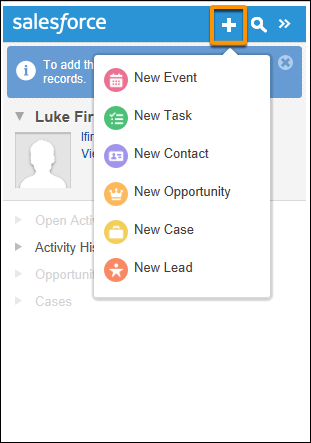
- Users can log in to Salesforce and create records there, or
- If you’re ready to move to our next-generation products, the Outlook integration and Einstein Activity Capture, the Outlook integration side panel lets users create records directly from Outlook. When admins move users to that product, any email application publisher layouts originally created for Salesforce for Outlook are available to assign to Outlook integration users right away. We share resources for moving to the next generation products later in this article.
Full Product Retirement in December 2027
After the full product retirement in 2027, admins and users no longer have access to Salesforce for Outlook features or the settings and user assignments saved in Outlook configurations. There is no impact to a customer’s existing contact, event, task, or email data as a result of the retirement.
Data Impact
Admins and users lose access to Outlook configurations only. All other Salesforce and Microsoft Outlook data remains unaffected.
- Users do not lose any Microsoft Outlook data that has synced to Salesforce before the 2027 product retirement. That is, any information from Microsoft Outlook contacts, events, tasks, or emails that were added or synced to Salesforce remains in Salesforce.
- After the 2027 retirement, admins and users will lose access to their Outlook configurations. Outlook configurations are the admin- or user-configured collection of Salesforce for Outlook settings that determine how users sync, which users sync, which features users have access to, and some additional product settings. For a reminder about what details are retained in Outlook configurations, see Create Salesforce for Outlook Configurations. Even if customers opt not to migrate to a replacement product before Salesforce for Outlook retirement, we recommend retaining the details saved in Outlook configurations in case customers want to enable consistent Microsoft Integration functionality later.
Feature Impact
After the 2027 retirement, users lose access to all Salesforce for Outlook functionality and settings:
- Contacts, events, or tasks no longer sync between Salesforce and Microsoft Outlook. From the Salesforce for Outlook side panel, users won’t be able to connect to Salesforce, nor can they use any of the features there.
- Customers won’t be able to update settings or use features available from the Salesforce for Outlook icon on the Microsoft Windows desktop system tray.
- The Outlook Configurations page won’t be accessible from Salesforce Setup, so admins can’t access, create, or edit Outlook configurations.
- The Salesforce for Outlook page won’t be available from users’ Personal Settings, so users can’t download Salesforce for Outlook or view their Outlook configurations from Salesforce.
- Unresolved Items no longer lists unmatched syncing or associated items resulting from Salesforce for Outlook. Unresolved Items remain available for other products, like Einstein Activity Capture Lightning Sync, and Email to Salesforce.
How can Salesforce admins identify that their users are impacted?
From Salesforce Setup, admins can refer to the Salesforce for Outlook login history report and export a .csv file to see who’s logged in over the last 6 months. If a more comprehensive list is needed of all users who have access to Salesforce for Outlook, admins can check Outlook configuration assignments to see which of their users are assigned to sync, access the side panel, and more.
What is the replacement and what are the key differences between the legacy product and the replacement?
Salesforce offers the following products to replace Salesforce for Outlook functionality:
- Outlook Integration (replaces the Salesforce side panel experience, where reps can see Salesforce records and use some Salesforce features directly from Outlook)
- Einstein Activity Capture (replaces contact and event sync)
For more details on the benefits of the replacement products, see Learn About the Next-Generation Microsoft Integration Products.
Customers should familiarize themselves with the scenarios in which the next-generation features are not able to replace Salesforce for Outlook. The following list includes a high-level glance at some of the differences.
- While Salesforce for Outlook can connect Salesforce to Microsoft Outlook 2010 and Microsoft Exchange 2010, our next-generation products aren't compatible with those versions of Microsoft applications. Microsoft is planning to end support for those versions. To continue integrating Microsoft with Salesforce, we encourage customers to migrate to versions of Outlook and Exchange that both Microsoft and Salesforce support. For details, see Learn About the Support Differences Between Salesforce for Outlook and the Next-Generation Products.
- The Outlook integration supports IE11 through December 2021 for only Outlook 2013, Outlook 2016, and volume-licensed versions of Outlook 2019. For details about supported browsers, see Outlook Integration System Requirements.
- Next-generation features aren't available for all Salesforce editions and licenses. For details, see Learn About the Support Differences Between Salesforce for Outlook and the Next-Generation Products.
- The Outlook integration and Einstein Activity Capture have some feature differences with Salesforce for Outlook. For detailed feature comparison, see Compare Features Between Salesforce for Outlook and the Next-Generation Products.
In the meantime, we continue to release new features for our next-generation Microsoft Integration products. Check out the Salesforce Release Notes for Outlook integration and Einstein Activity Capture to learn what's new upcoming releases.
Where can I get help migrating to the replacement products?
Check out our migration guide, Move from Salesforce for Outlook to the Next-Generation Products.
What about Lightning Sync?
You may recall another Microsoft integration product, Lightning Sync, which also syncs contacts and events. Starting in Winter ’21, Lightning Sync isn’t available to new Salesforce customers. At that time, no additional enhancements are being made to the product. For that reason, Einstein Activity Capture is the long-term solution for syncing contacts and events between Microsoft or Google applications and Salesforce, and we recommend that customers first explore Einstein Activity Capture to sync their contacts and events. We continue to introduce improvements to Einstein Activity Capture based on the needs we hear about from customers. To see when new features are available, keep an eye on the Salesforce Release Notes.
If you have more questions, refer to Salesforce Help. To view all current and past retirements, see Salesforce Product & Feature Retirements.
To read about the Salesforce approach to retirements, read our Product & Feature Retirement Philosophy.
Knowledge Article Number
000393445
Did this article solve your issue?
Let us know so we can improve!
