Seleccionar una organización
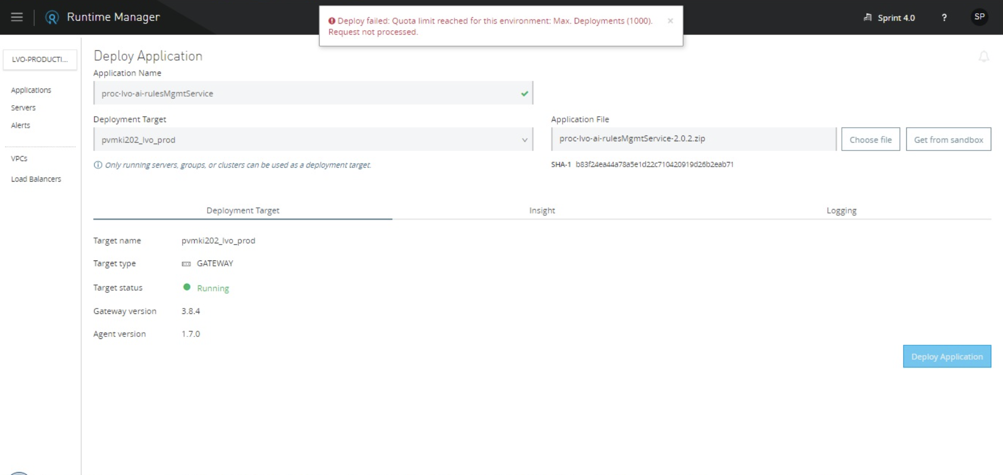
Runtime Manager displays error stating that Quota Limit has been reached
Fecha de publicación: Nov 19, 2025
Tarea
.
Pasos
SYMPTOM
When trying to perform an action in Runtime Manager you get an error stating that Quota Limit has been reached. For example:"Deploy failed: Quota limit reached for this environment: Max. Deployments (1000). Request not processed."
CAUSE
This happens because Runtime Manager has some recommended limits:| Name | Limit | Can it be increased? |
| 1) Maximum number of deployments per Environment | 1000 | Yes |
| 2) Maximum number of deployments per Target | 200 | Yes |
| 3) Maximum size in MB of a deployment | 200 | No |
| 4) Maximum number of Servers per Environment | 500 | Yes |
| 5) Maximum number of Servers per Server Group | 20 | Yes |
| 6) Maximum number of Servers per Cluster | 8 | No |
SOLUTION
For each type of quota there is a remediation that can be applied:1) Create a new Environment, and distribute the deployments among them
2) Register a new server, and distribute the deployments among them
3) In case of Hybrid Deployments consider using a domain that would contain the shared and most heavy libraries
4) Create a new Environment, and distribute the servers among them
5) Create a new Server Group, and distribute the runtimes among them
6) Create a new Cluster, and distribute the runtimes among them
Firstly, please check if any of the above suit you.
If not, you can create a Support case ticket to request exceeding these limits (only the ones that can be increased apply) but please be noted the following points.
Increases are generally only approved for small changes (i.e., +10%). Also, approval is granted typically for emergency situations where an urgent deployment is needed and an increase will allow a few more applications to be deployed for that release. Increase is typically not approved for large increases or increases that are simply to allow larger architectures. That is because the limits are in place as they are the performance tuned numbers for both customer experience and platform stability. Therefore, once a limit has been increased, additional increases would not be possible in general.
For this activity to increase the limit, please provide the following details in the Support ticket:
- Request limit name and size (Example: 1,100 for Maximum number of deployments per Environment)
- Reason for not being able to use the recommended solutions (Example: There is a plan to have more Runtime Servers as a permanent solution. However, it would take a couple of months so we need this increase only for 1 month temporary)
- OrganizationID
- EnvironmentID
On Private Cloud Edition (PCE) it is currently not possible to increase the maximum number of deployments per Environment.
Número del artículo de conocimiento
001115836
¿Resolvió este artículo su problema?
¡Háganos saber cómo podemos mejorar!
