Välj en organisation
Automatic Enablement of Document Generation 2.0 in Summer ’25
Publiceringsdatum: Dec 10, 2025
Beskrivning
Salesforce is retiring Document Generation 1.0 on July 31, 2025, which may be being used within the Industries Communications, Media, Energy & Utilities (CME), Insurance (INS), Vlocity Government (PS), or Omnistudio managed packages.
You’re receiving this message because we’ve identified you as an admin of a Salesforce org that uses document generation within the Industries Communications, Media, Energy & Utilities (CME), Insurance (INS), Vlocity Government (PS), or Omnistudio (OS) managed packages.
Salesforce is making changes to improve document generation performance, scalability, and reliability while ensuring compliance with evolving data protection regulations. These changes aim to bolster security, scalability, and operational efficiency for Salesforce's services and features. We previously sent out an advance communication regarding these changes. See Document Generation 1.0 Retirement, and Changes to Document Generation Process and Previewer in Spring '25.
What do the terms Document Generation 1.0 and Document Generation 2.0 refer to?
Document Generation 1.0 refers to the document generation within the CME, INS, Vlocity Government (PS), and Omnistudio managed packages up to the Winter '25 release (October 2024). The client-side document generation processing is handled locally at the package level.
Document Generation 2.0 refers to the document generation in the CME, INS, Vlocity Government (PS), and Omnistudio managed package, beginning with the Spring '25 release (February 2025). The client-side document generation processing will use a hybrid approach. This means that client-side document generation will be partially handled locally at the package level and partially on the same Hyperforce infrastructure that currently supports server-side document generation. While client-side processes will only use the Hyperforce infrastructure to a limited extent, this shared setup ensures continuity and consistency between client-side and server-side operations. This hybrid client-side document generation processing is subject to the limits of server-side document generation. For more information on the server-side processing, see Server-Side Document Generation in CLM and Omnistudio Server-Side Document Generation.
What is changing?
Document Generation 1.0 manages the client-side document generation entirely within the Industries CME, INS, Vlocity Government (PS), and Omnistudio-managed packages. Salesforce will retire Document Generation 1.0 services by the end of July 2025.
In Spring '25, we introduced Document Generation 2.0. It includes updates to the client-side document generation process, the PDF previewer’s look and feel, and minor changes to the custom font configuration. These changes are designed to enhance performance and reliability without significantly altering your day-to-day experience or existing features. See Enhance Document Generation with Document Generation 2.0
Do I need to take any action?
In July 2025, Document Generation 1.0 will reach its End of Life, and you’ll no longer have access to document generation capabilities unless you upgrade to the Spring ‘25 or higher managed package.
-
If you manually upgrade to Spring ‘25 managed package, you must provide in-app Acknowledgement and complete post-upgrade steps to use Document Generation 2.0 services and features.
-
If you upgrade (manual or auto-upgrade) to Summer ‘25 managed package, then Document Generation 2.0 is enabled by default. However, you still need to complete post-upgrade steps.
We recommend that you conduct thorough testing in a sandbox environment to ensure compatibility with your existing configurations, particularly for custom fonts and document generation processes. See Get Started With Document Generation 2.0.
Document Generation 2.0 Timeline
Customers who are already on Document Generation 2.0 could skip this section.
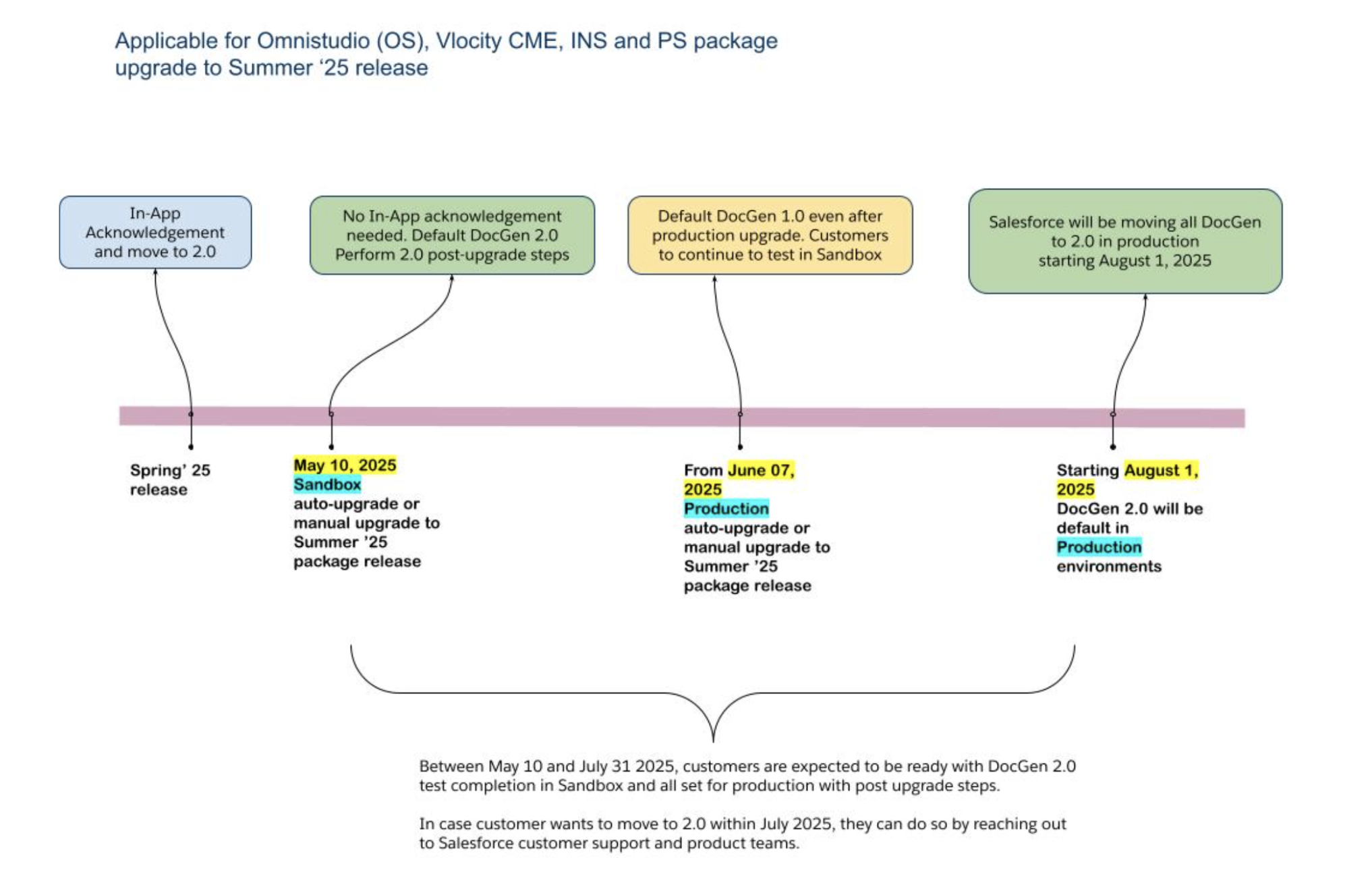
To support Document Generation customers smoothly transition to Document Generation 2.0, following timelines and actions are recommended.
-
From May 10, 2025, the Sandbox orgs with managed packages (OS, CME, INS, PS) will be auto-upgraded to Summer ‘25 release. These orgs will have Document Generation 2.0 by default. Customers are expected to run post upgrade Document Generation 2.0 steps and perform Document Generation testing.
-
Customers who are manually upgrading to Summer ‘25 managed package (OS, CME, INS, PS) will have Document Generation 2.0 by default. Customers are expected to run post upgrade Document Generation 2.0 steps and perform Document Generation testing.
-
Production auto-upgrade of managed packages to Summer ‘25 release happens in June 2025. In Production orgs after Summer ‘25 upgrade, Document Generation will be in 1.0 (not 2.0) till July 31st 2025.
-
Customers should use the time between Sandbox upgrade (May 10) and EoL (July 31st) to test Document Generation 2.0 on Sandbox environment and get ready for production Document Generation 2.0 rollout.
-
From August 1, 2025 (post Document Generation 1.0 EoL in July 31, 2025), the production orgs where Document Generation in Summer’25 managed packages (OS, CME, INS, PS) is available, will be moved to Document Generation 2.0 automatically.
-
In case, customer wants to move to Document Generation 2.0 on Summer ‘25 release rollout in production before August 1, 2025, a case can be raised with the Salesforce support team to do the transition. We encourage customers to move to Document Generation 2.0 as early as possible
-
Customers who are on Document Generation 1.0 in Spring ‘25 release in Production orgs should perform In-App acknowledgement and move to Document Generation 2.0 after testing in Sandbox environment.
-
Please note starting from May 10, 2025, all Sandbox orgs with Document Generation 1.0 either in Spring ‘25 or Summer ‘25 release package versions, will automatically move to Document Generation 2.0. Customers should update Document Generation 2.0 configuration steps given in the help documentation.
-
The customers who are on older package releases (older than Spring ‘25 release), should plan to move to Spring’25 or Summer ‘25 release and transition to Document Generation 2.0 before July 31, 2025.
-
Beyond July 31, 2025, Document Generation 1.0 will be End Of Life (EoL) as communicated earlier and cannot be accessible
-
The customer issues or queries raised during Sandbox testing related to Document Generation 2.0 shall be addressed.
Government Cloud Plus and Government Cloud Plus - Defense Customers (Updated)
The Document Generation 1.0 client-side feature as part of the Omnistudio and INS managed packages is authorized under FedRAMP High and DoD IL5, while it is interoperable in the CME managed package. In addition, the server-side functionality of Document Generation 1.0 across all managed packages is also interoperable. See Government Cloud Available Products and Features.
The Document Generation 2.0 client-side and server-side features are authorized at FedRAMP High and DoD IL5 in Government Cloud Plus and Government Cloud Plus - Defense. DoD IL5 authorization for Government Cloud Plus - Defense includes Document Generation 2.0 implementations as part of the Omnistudio and INS managed packages and the latest implementations without managed packages.
How can I get more information?
For information on the services, see Salesforce Infrastructure and Sub-processors and Trust and Compliance Documentation. For more information on Salesforce’s approach to retiring products and features, read our Product & Feature Retirement Philosophy. If you have further questions, open a case with support via Salesforce Help.
Upgrade Actions and Requirements Overview for Summer ‘25
Customers upgrading to the Summer ‘25 managed package need to complete the post-upgrade steps for Document Generation 2.0 in the Sandbox, Developer, and Production Org environments.
|
Managed Package Upgrade to Summer ‘25 |
Document Generation in Managed Packages |
Document Generation In-App Acknowledgement |
Document Generation Post-Upgrade steps |
|---|---|---|---|
|
Auto Upgrade Program |
|
Not Required |
Required |
|
Manual Upgrade from Winter ‘24 |
|
Not Required |
Required |
|
Manual Upgrade from older releases such as Summer ‘24 or earlier |
|
Not Required |
Required |
Customers that are upgrading to the Summer ‘25, but have document generation licenses and are using Document Generation 2.0 services and features directly without any managed packages can review and follow the optional post-upgrade steps for document generation.
|
Salesforce Core Upgrade to Spring ‘25 |
Document Generation mechanism in Core |
Document Generation In-App Acknowledgement |
Document Generation Post-Upgrade steps |
|---|---|---|---|
|
Salesforce Core with Document Generation licenses |
Document Generation in Core operates independently and doesn’t require a managed package. It uses server-side services. Supported OmniScript: Single Doc Core - DOCX Serverside (LWC) Omniscript |
Not Required |
Optional |
New Install Actions and Requirements Overview for Summer ‘25
New customers who directly installed the Summer ‘25 managed package must ensure that they complete the post-upgrade steps for Document Generation 2.0 in the Sandbox, Developer, and Production Org environments.
|
Spring ‘25 for New Customers |
Document Generation in Managed Packages |
Document Generation In-App Acknowledgement |
Document Generation Post-Install steps |
|---|---|---|---|
Managed Package Installation |
|
Not Required |
Required |
New customers who are using Document Generation 2.0 features directly without any managed packages don’t need to perform any action. In core, document generation uses server-side service.
|
Spring ‘25 for New Customers |
Document Generation mechanism in Core |
Document Generation In-App Acknowledgement |
Document Generation Post-Install steps |
|---|---|---|---|
|
Salesforce Core with Document Generation licenses |
Document Generation in Core operates independently and doesn’t require a managed package. It uses server-side services.
|
Not Required |
Optional |
Comparing Client-Side Document Generation Processing: Document Generation 1.0 vs. 2.0
The client-side document generation processing will transition to a hybrid approach in Document Generation 2.0. The diagram illustrates the client-side processing in both Document Generation 1.0 and 2.0.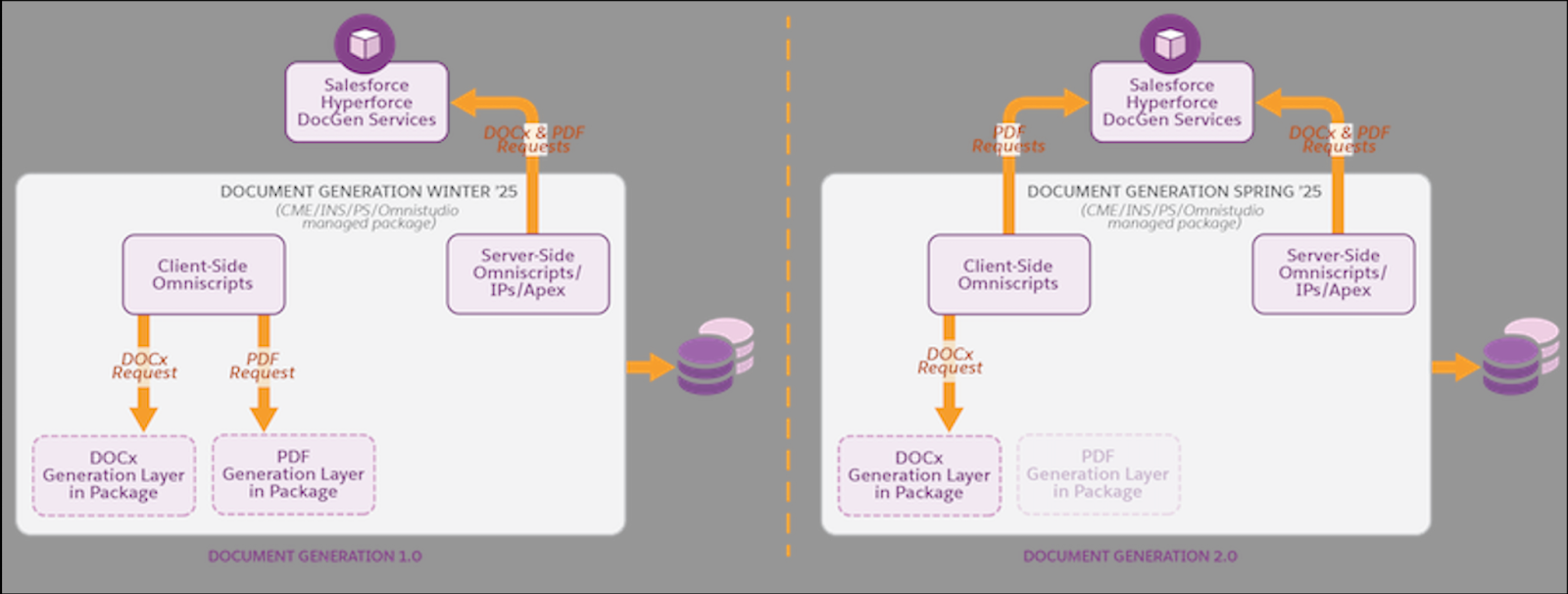
Article Originally Published Date : 17th April 2025
Article Content Last Modified Date : 4 June 2025
Knowledge-artikelnummer
004634300
Löste denna artikel ditt problem?
Berätta för oss vad vi kan förbättra!
