Velg en organisasjon
Salesforce-to-Salesforce Retirement
Publiseringsdato: Jul 17, 2025
Beskrivelse
The Salesforce to Salesforce (S2S) product retirement is scheduled for the Spring '27 release. Salesforce to Salesforce is a legacy feature that enables orgs to share records and facilitate vendor/partner co-selling.
Why is Salesforce retiring this product?
Salesforce has more robust and integrated solutions that align with modern business needs. Effective channel sales involves more than copying records. To meet those challenges, we have recently released a new capability called Partner Cloud.
When will Salesforce to Salesforce be retired?
The retirement of Salesforce to Salesforce will occur in phases.
-
In the Spring ‘26 major release, you will no longer be able to enable Salesforce to Salesforce in an org. The feature will continue to function in orgs where it’s already enabled.
-
In the Summer ‘26 major release, support will no longer be available for Salesforce to Salesforce.
-
In the Spring ‘27 major release, Salesforce to Salesforce will be fully retired in all orgs and will no longer function.
What are the recommended alternatives to Salesforce to Salesforce?
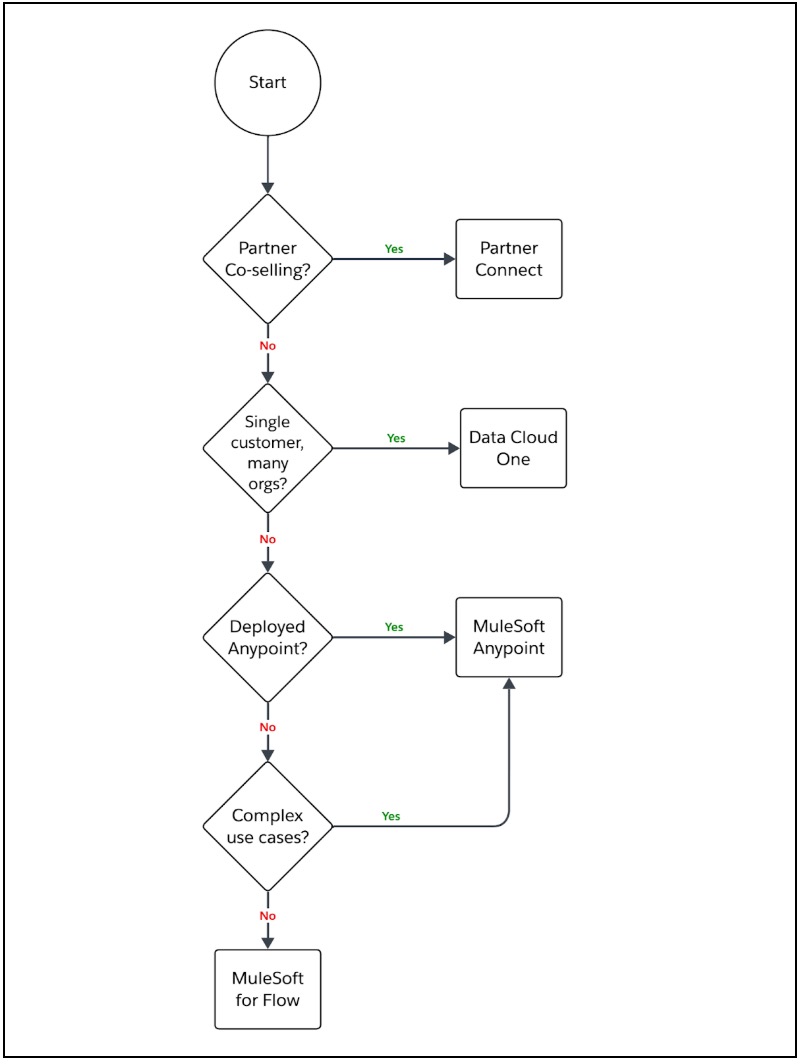
There are a few options, depending on your use case.
|
Use Case |
Option |
|
You need to share information with a partner who’s re-selling your offerings |
Partner Cloud Partner Cloud facilitates collaboration and data sharing with partners via a branded experience with end-to-end visibility and controls. |
|
Your company operates multiple orgs and you want to share data across them |
Data Cloud One Data Cloud One unifies data into a single profile via smart identity resolution; it enables enterprise-wide reporting from a single source of truth and offers robust governance. |
|
Other bespoke use cases |
MuleSoft Anypoint A highly sophisticated platform that orchestrates integration solutions across hundreds of systems—from modern solutions to legacy or on-prem apps that would otherwise be unreachable. MuleSoft for Flow Offers an easy-to-use experience in Flow Builder that delivers integrations between Salesforce and dozens of popular SaaS apps. It can be used to establish communication between two Salesforce orgs. |
This flowchart graphically captures your product alternatives.
How does Salesforce to Salesforce compare to Partner Cloud?
While Salesforce to Salesforce offers basic data synchronization between orgs, it’s a legacy tool that lacks the flexibility and partner-focused features required by modern channel programs.
Partner Cloud, on the other hand, transforms how businesses manage and grow their partner ecosystems—enabling better collaboration, smarter deal registration, and full visibility into partner performance. If you’re looking to scale your partner program and drive real revenue impact, Partner Cloud is the clear choice.
|
Feature/Capability |
Salesforce-to-Salesforce (S2S) |
Partner Cloud |
|
Purpose |
Simple data sharing between two Salesforce orgs |
Full-featured Partner Relationship Management (PRM) |
|
Use Case |
Share leads, contacts, and opportunities between orgs |
Manage partner onboarding, lead registration, co-selling |
|
UI Customization for Partners |
None, relies on the Salesforce UI |
Branded, customizable partner portal via Experience Cloud |
|
Collaboration on Deals |
Basic synchronizing of records only |
End-to-end deal collaboration with visibility and controls |
|
Partner Enablement Tools |
Not included |
Training, certifications, and knowledge sharing tools |
|
Automation Support |
Limited |
Robust flows and approval processes |
|
Analytics and Reporting |
Manual or custom-built |
Built-in dashboards and partner performance analytics |
|
Security Granularity |
All-or-nothing record sharing |
Role-based access controls for partners |
|
Scalability and Governance |
Not ideal for complex partner networks |
Purpose-built for managing multi-tier partner ecosystems |
|
Lead Registration and Deal Management |
No native support |
Native support for registering leads and managing deals |
|
Modernization and Support |
Legacy solution |
Actively developed and integrated with the Salesforce roadmap |
How does Salesforce to Salesforce compare to Data Cloud One?
Salesforce-to-Salesforce was designed for simple, bilateral sharing of data between two Salesforce orgs—but encounters challenges at scale due to its point-to-point nature and lack of governance.
For enterprises with multiple orgs, Data Cloud One is a game-changer: it unifies data into a single customer profile, offers smart identity resolution, central governance, and enables seamless activation back into any org. If you’re investing in an enterprise-wide customer 360 strategy, Data Cloud One offers scalability and sophistication.
|
Feature/Capability |
Salesforce-to-Salesforce (S2S) |
Data Cloud One |
|
Purpose |
Peer-to-peer data sharing between Salesforce orgs |
Unified, enterprise-wide customer data platform |
|
Use Case |
Sync records (for example, Leads, Opportunities) across orgs |
Aggregate, harmonize, and activate data across all orgs |
|
Data Architecture |
Point-to-point sync between pairs of orgs |
Centralized data lakehouse + harmonized identity resolution |
|
Scalability |
Challenging beyond 2–3 orgs; each sync must be configured |
Scales to dozens of orgs with centralized governance |
|
Setup and Maintenance |
Manual, no identity resolution |
Centralized ingestion and mapping with smart ID resolution |
|
Data Quality and Deduplication |
Not supported |
Built-in identity resolution, unification, and deduplication |
|
Real-Time Data Access |
Legacy architecture can suffer from sync lags |
Supports real-time activations with low-latency data access |
|
Cross-Org Reporting |
Not supported; aggregation via ETL or external tools is required |
Native, consolidated views of customer data |
|
Governance and Compliance |
Limited; managed per connection |
Centralized governance via Data Spaces and more |
|
Data Activation |
No support beyond record sync |
Activates unified profiles in any org via Data Cloud activations |
Can I run Salesforce to Salesforce and a new solution in parallel during the transition?
It’s possible to run Salesforce to Salesforce alongside one of the alternatives, although you may notice duplicate data in one or more orgs. Instead, we recommend testing and validation in a sandbox environment without Salesforce to Salesforce configured, to validate the data sharing approach and ensure business continuity.
Will there be any cost involved in transitioning from Salesforce to Salesforce to these alternatives?
As of this writing, the recommended alternatives have some license or cost impact. For more details about replacement products, contact your account executive.
If you have more questions, refer to Salesforce Help. To view all current and past retirements, see Salesforce Product & Feature Retirements.
To read about the Salesforce approach to retirements, read our Product & Feature Retirement Philosophy.
Knowledge-artikkelnummer
005103355
Hjalp denne artikkelen med å løse problemet ditt?
La oss få vite det slik at vi kan forbedre!
