Välj en organisation
Salesforce Platform API Versions 31.0 through 40.0 Retirement
Publiceringsdatum: Apr 30, 2026
Beskrivning
Updated - April 30, 2026
Original Publication Date - April 30, 2026
What's the status of SOAP, REST, and Bulk API versions 31.0 - 40.0?
-
Current: These API versions are currently supported.
-
Future: Summer '27 release – These API versions will be deprecated and will no longer be supported. You can use them, but if you encounter issues and log a case with Salesforce Support, you must first update the API version. There will be no troubleshooting or bug fixes for these API versions.
-
Future: Summer '28 release – These API versions will be retired and removed from the platform. Applications that consume these versions will be disrupted because the API calls will fail and respond with an error that the requested endpoint is not found and the request can't be processed by the platform. Below are the errors:
-
REST API returns 410: GONE.
-
SOAP API returns 500: UNSUPPORTED_API_VERSION.
-
Bulk API returns 400: InvalidVersion.
-
Note: API versions 21.0 through 30.0 were already retired and made unavailable in the Summer '25 release.
Why are we retiring these API versions?
We are focusing our development efforts on enhancing the latest API versions to improve the overall Salesforce experience when building custom functionality via applications. To put things in perspective, API version 31.0 was from our Spring '14 release.
What does this API version retirement impact?
This retirement affects any code, package, application, or integration executing a request of versions 31.0 through 40.0 SOAP, REST, or Bulk API.
Note: This retirement does not impact the following:
-
The API versions of Apex Classes, Apex Triggers, Visualforce Pages, Flows, and Process Builders
-
The out-of-the-box B2B Classic/Visualforce product
-
Versioned metadata components in a managed package
-
Custom Apex REST & SOAP Web Services (A custom Apex web service is a way to make an Apex class method callable as a public API. You can learn more about Apex Web Services here: Apex Web Services)
What actions do I need to take?
-
Identify any components/applications in your org that use these legacy API versions.
-
Update those components/applications. Before the Summer '28 release, you must modify or upgrade your applications to function with current, supported API versions. Salesforce strongly recommends moving to newer versions of APIs as they give you advanced capabilities with improved security and performance.
Please see the table below for some common places of impact and what actions to take for each:
|
Component |
Action to take |
|
Update the version reference in the path of JavaScript references to the connection.js file to reflect a supported API (e.g., /soap/ajax/58.0/connection.js). | |
|
Visualforce Pages that embed deprecated API calls via the AJAX Toolkit. |
See AJAX Toolkit above |
|
SForceOfficeToolkit COM interface |
Adopt a replacement solution that interacts with the latest Salesforce APIs |
|
Force.com Toolkit for PHP |
Adopt a replacement solution that interacts with the latest Salesforce APIs. |
|
Return SOAP API calls from payloads generated by Outbound Messaging |
If your Outbound Messaging listener is set up to make a return SOAP call to Salesforce using the EnterpriseURL or PartnerURL sent in the payload, you will need to either configure your client to modify the API URL to use a version greater than 40.0 or you will need to recreate the message in the Salesforce Setup (which will set the API version to the latest available on the current release). When creating a new Outbound Messaging definition, you can attach it to an existing workflow rule and remove the previous OBM from that workflow. |
|
Connected apps |
Check with the developer to either upgrade to a more recent version of the connected app or work with them to revise the implementation to interact with the latest Salesforce APIs. |
How do I know if/where these legacy API versions are used in my applications?
Please get in touch with the developers of the applications you use to determine the API versions.
You can review API events in the free API Total Usage EventLogFile that report SOAP, REST, and Bulk API activity. The API Total Usage event type consolidates API request information across the SOAP, Bulk, and REST APIs, including version information.
API-enabled organizations have access to the API Total Usage event log files for the previous 24 hours.
Organizations with Event Monitoring enabled can access this and all other event log file types with 30-day data retention (which can be increased up to one year through Event Monitoring Settings or using the EventSettings Metadata API). For more information on Event Monitoring, take the Event Monitoring Trailhead Module.
To review these API Total Usage events you first need to download them as CSV files using one of the following three methods described below.
-
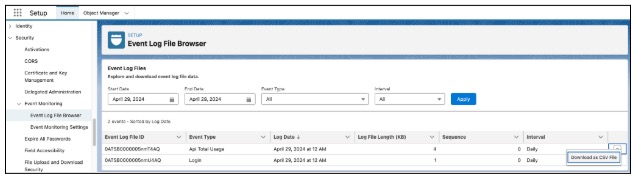
The first method is to use the new Event Log Browser included in the Summer '24 release. With this you can browse the API Total Usage event log files on your org, and download them as CSV files to view the individual API events.
From within Setup, navigate to Security → Event Monitoring → Event Log Browser. Here you can view the event log files for the last 24 hours (or the last 30 days if you have activated Event Monitoring). You can then download individual event log files as CSV files to view the API events in them.
-
The second method is to use this tool provided by Salesforce to automate the download of API Total Usage data on a daily basis to retrieve the last 24 hours of data. This is a Python script that extracts the data in the API Total Usage EventLogFile and downloads it into CSV files. The Python script uses the Salesforce CLI for authentication and data retrieval.
-
The third method is to manually use a client such as the Salesforce CLI to run a SOQL query against the EventLogFile object, providing the event log files for the last 24 hours (or the last 30 days* if you have activated Event Monitoring).
sf data query -q "SELECT Id, LogFile, EventType, CreatedDate FROM EventLogFile WHERE EventType IN ('ApiTotalUsage')" -o <your-username>For each result, perform a REST API request to the endpoints in the query result to retrieve the event log data in that event log file*.
/services/data/v66.0/sobjects/EventLogFile/0AT3i000005vXpWGAU/LogFilePaste the response body into an application to easily inspect the event log data as a CSV file.
*For introductory information on performing a REST API request, see this trailhead Use REST API.
When the API events in the API Total Usage EventLogFile have been downloaded to CSV files, review each CSV file and identify all the requests with API_VERSION of 40 and below.
For API requests with API versions 40.0 and below, follow the hints provided by the following key fields in the event log data to help identify the source of the API call:
-
CONNECTED_APP_ID and CONNECTED_APP_NAME indicate the Connected App or External Client Application that made the API call.
-
A CONNECTED_APP_ID starting with 0H4 indicates a Connected App.
-
A CONNECTED_APP_ID starting with 0xI indicates an External Client Application.
-
-
CLIENT_NAME is an optional header provided by clients to help identify applications making the API calls.
-
USER_NAME identifies the user in your org that is used to authenticate the API calls. While this can be helpful in identifying the originating client, be aware that the same system user account might be shared by multiple clients.
-
CLIENT_IP is the IP address of the requesting client, but be careful if multiple clients from the same physical location share the same IP address.
Partners can leverage the Package Usage Logs for insights on their deprecated API consumption.
How can I find where these legacy API versions are used in my code?
You can use Salesforce Code Analyzer to find where these legacy API versions are used in your code. Refer to this documentation.
Salesforce for Outlook
API calls originating from Salesforce for Outlook will have a CLIENT_NAME of "SfdcApplication/" in the API Total Usage EventLogFile. Upgrade to the latest version of Salesforce for Outlook which uses a supported API version.
Microsoft Power Query
If API calls from Microsoft Power Query are using these deprecated API versions, follow these instructions to update the API version that Microsoft Power Query uses.
How can I get more information?
About the latest API Versions supported, visit the Salesforce Developers site.
About APIs and outbound messaging:
-
Platform API Basics (Trailhead)
-
Introduction to SOAP API (Developer Guide)
-
Outbound Messaging (Developer Guide)
-
Introduction to Bulk API 2.0 and Bulk API (Developer Guide)
-
Introduction to REST API (Developer Guide)
-
"REST" covers all APIs with endpoint URIs under /services/data/vXX.Y/ and /services/metadata/vXX.Y/ where XX.Y is the API version. This includes the "standard" Salesforce Platform REST API to work with sObjects and records, but also the following resources:
-
Observe the results of a REST request to GET /services/data/v40.0 or GET /services/metadata/v40.0 to understand the top-level resources affected when v40.0 and below endpoints are retired.
-
I still need help. What can I do next?
-
Go through the resources above.
-
Post on the Trailblazer community.
-
Contact Salesforce Support via Salesforce Help. Please remember what you have already tried and where you are stuck so Support can help you as efficiently as possible. Please note that Support cannot update the legacy APIs in your org.
You can see Salesforce Product & Feature Retirements to view all current and past retirements. To read about the Salesforce approach to retiring, read our Product & Feature Retirement Philosophy.
Knowledge-artikelnummer
005321531
Löste denna artikel ditt problem?
Berätta för oss vad vi kan förbättra!
