
Explore Agentforce Builder
Agentforce Builder is where you build, customize, and test predictable, context-aware agents. Learn about the intuitive text editor interface, built-in AI assistance, and more.
Required Editions
| Available in: Lightning Experience |
| Available in: Enterprise, Performance, Unlimited, and Developer Editions. Required add-on licenses vary by agent type. |
Agentforce Builder improves productivity by helping you build agents that operate within your business rules. The builder offers:
- Guided setup for agent creation
- Customization of your agent's building blocks, including subagents, actions, supported languages, and channels
- Tools to preview, test, and troubleshoot agent behavior
- Scalable way to deploy agents across channels
The new builder also includes:
- Built-in assistance: Build your agent with the help of Agentforce embedded right into the user interface. Tell Agentforce what you want your agent to do, and it converts your request into subagents, actions, and more. Create, test, troubleshoot, and refine, all with the help of Agentforce.
- Agent Script: Agent Script combines the flexibility of natural language instructions with the reliability of programmatic logic for handling business rules. Use Agent Script to define if-else conditions; set, modify, and compare variables; and chain subagents or actions together in sequence.
- Powerful agent previews and testing: Simulate your agent’s performance and view a detailed breakdown of the interaction, including which subagents and actions the agent used to create its response. Get the details the revamped debugging panel, tracking each moment of the interaction so you can see precisely how the agent spent its time replying.
- Flat navigation: The file explorer and text editor interface gives you an overview of your agent at a glance, so there's less digging and searching for the information you need.
New Agentforce Builder Tour
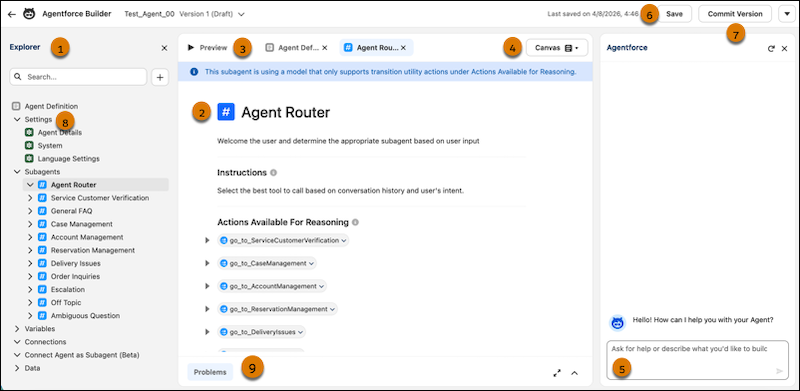
- Explorer(1): See all the details of your agent, including the subagents and their actions, in a single place. Use the Agent Definition section to get an overview of your agent and summary of its capabilities.
- Canvas (2): Use the natural language editor to modify your agent. It includes shortcuts for common tasks, including quick actions for adding logic to your agent, and a picker for resources like subagents, actions, and variables.
- Preview (3): Test your agent by inputting utterances. The details of what and why it selected the subagents and reasoning show in the canvas.
- Canvas and Script (4): Switch between the natural language-based Canvas and the code-based Script views. Your configuration is consistent across both views.
- Agentforce Assistance (5): Ask Agentforce questions or direct it to help you build and debug your agent.
- Save (6): Save the current draft of your agent.
- Commit Version (7): Compile a version of your agent that you can activate and make available to your customers. You can’t modify this version. To make further changes, create a draft of it and modify the draft.
- Settings (8): Edit Agent Details such as your agent’s name and description, System Settings such as Welcome and Error messages, and Language Settings to control the languages your agent responds in.
- Console (9): Address errors and warnings that could interfere with your agent’s performance, such as syntax errors or unexpected values. When you click an error or warning in the console, the builder opens the element or line with the issue.
Explorer
Explorer contains all the information about your agent in one place.
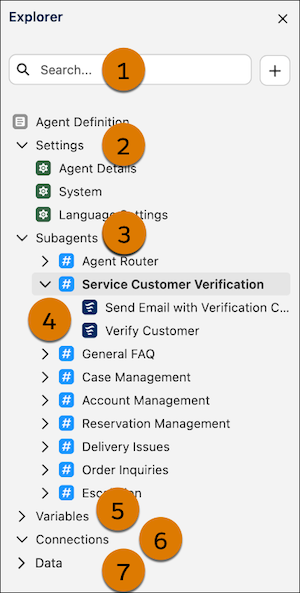
- Search (1): A way for you to search for the elements of your agent.
- Settings (2): A section containing various configuration details about your agent.
- Subagents (3): A section containing all of your agent’s subagents. Each subagent has its own folder containing subagents configuration and actions.
- Actions (4): Actions are listed under their respective subagents. Select an action to configure its description, inputs, and outputs.
- Variables (5): Variables associated with your agent. Variables store values that can help you control how your agent performs.
- Connections (6): A section containing information on agent connections and channels.
- Data (7): Structured data sources that your agent can reference.
Did this article solve your issue?
Let us know so we can improve!
