
You are here:
An Agentforce Guide to Context Engineering
Context engineering is the art and science of giving your AI agent the right information, tools, and instructions to achieve its goals.
While prompt engineering focuses on direct instructions and RAG (Retrieval Augmented Generation) focuses on retrieving the right content, context engineering encompasses the full perspective of everything available to your model.
Sample Context Components
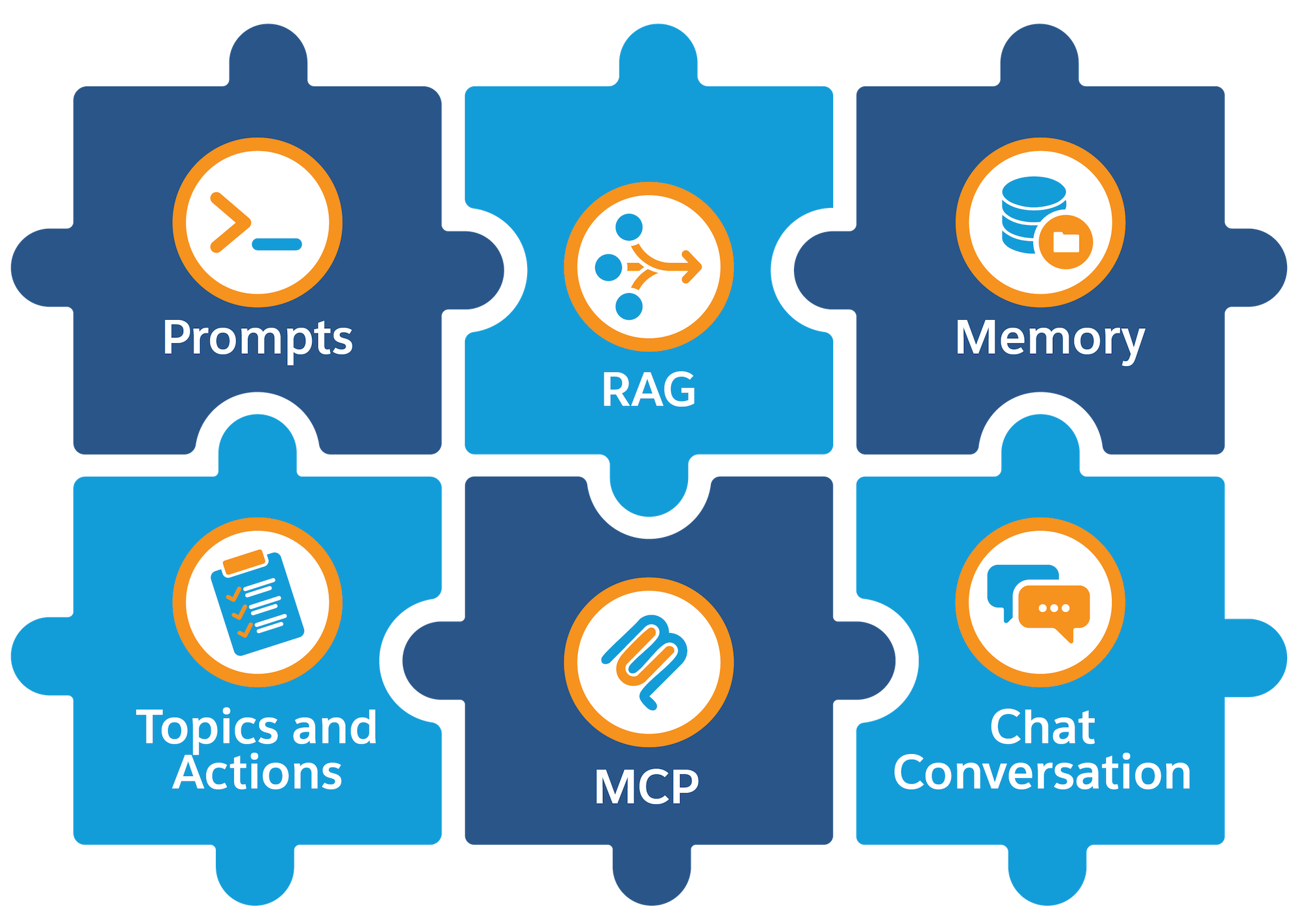
Let's highlight a few key components of the context.
- Prompts and Instructions: The context includes the instructions to the agent, such as the instructions found in each subagent and the user's prompts.
- Actions and Tools: The capabilities your agent can use also affect the context, such as running flows, calling Apex actions, or using prompt templates.
- Data Inputs: The context includes relevant information that your agent obtains from structured and unstructured sources, including CRM data, Data 360, knowledge articles, uploaded documents, Slack, and other data sources.
- Memory: Both short-term (current conversation) and long-term (past interactions) memory can be part of the context.
The goal of context engineering is to optimize and tune this context to give the model the best chance at solving the problem. Getting context engineering right helps you avoid common AI agent problems like:
- Context Clash: Conflicting instructions, which can lead to unexpected performance or even errors.
- Context Confusion: Too much irrelevant content or too many unnecessary tools, which can cause your agent to behave inconsistently and increase agent latency.
- Context Poisoning: Incorrect or outdated information, which can affect users’ trust and adoption of your agent.
Any of these issues can reduce the accuracy and effectiveness of your agents. It's critical to give your AI model the right information in the right way to get the right answers.
Now let's discuss the steps to build reliable and effective Agentforce solutions by using some context engineering best practices.
- Define Clear Objectives. Clearly state what your Agentforce agent should achieve. This step can help solidify your decisions across the rest of the process.
- Limit, Filter, and Route Subagents Effectively. Optimize and limit
subagents and actions to the essential jobs and tools
needed for your agent. After you have the right list of subagents, use subagent classification
effectively so that the agent is routed to the right subagent for the job.
- Limit Subagents. Assign only the most essential subagents and actions to your agent. Add subagents gradually as needed.
- Filter Subagents. Use filters to control access to subagents (using
the Agent Router in Canvas view or the
start_agentsubagent in Script view).This screenshot demonstrates subagent filtering in Canvas view. These instructions use variables to filter out subagents that aren't applicable.
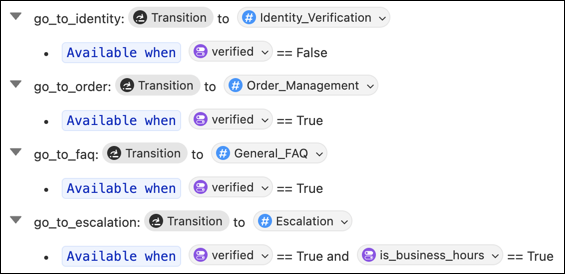
And here’s what the same filtering looks like in Agent Script.
start_agent agent_router: description: "Welcome the user and determine the appropriate subagent based on user input" reasoning: instructions: | You are an agent router for this assistant. Welcome the guest and analyze their input to determine the most appropriate subagent to handle their request. actions: go_to_identity: @utils.transition to @subagent.Identity_Verification description: "Verifies user identity" available when @variables.verified == False go_to_order: @utils.transition to @subagent.Order_Management description: "Handles order lookup, refunds, and order updates." available when @variables.verified == True go_to_faq: @utils.transition to @subagent.General_FAQ description: "Handles various frequently asked questions." available when @variables.verified == True go_to_escalation: @utils.transition to @subagent.Escalation description: "Handles escalation to a human rep." available when @variables.verified == True and @variables.is_business_hours == True - Route Subagent with Logic. Use explicit references to subagents to
deterministically route from one subagent to another, under certain conditions.
This example illustrates how you can use logic instructions to strategically route from one subagent to another.
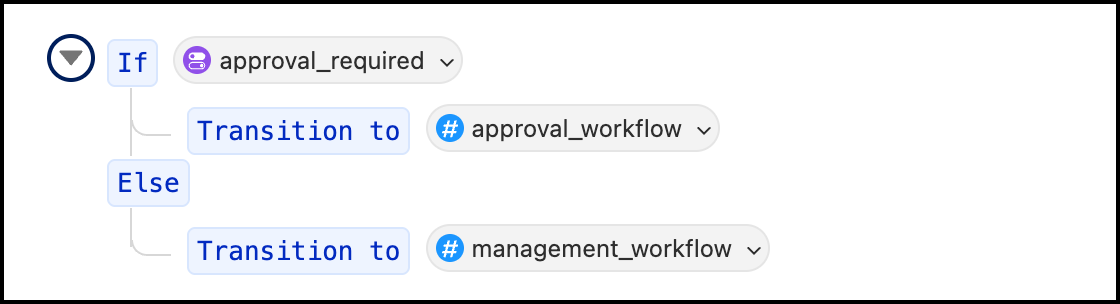
start_agent agent_router:
    reasoning:
        instructions:->
            if @variables.approval_required:
                transition to @subagent.approval_workflow
            else:
                transition to @subagent.management_workflow
See How Subagent Instructions are Resolved to Build a Prompt in Salesforce Help and Reasoning Instructions in the Agent Script Developer Guide.
- Review Your Actions. Make sure that each subagent has relevant and
effective actions to help complete the job.
Keep in mind that some actions (flows, Apex methods, APIs) are more deterministic, whereas actions that use AI models are more probabilistic (prompt templates). See Agent Actions.
You should also think about how and when you want to use an action. For tips on how to do this, see Balance Probabilistic and Deterministic Behavior in the next step.
- Tune Your Subagent Instructions. Whether you're building agents in Canvas view or building them directly with Agent Script, one of the most powerful
ways to optimize the context is from your subagents' reasoning instructions. There are several
aspects to these instructions that are critical for the context.
- Review the Runtime Flow. Before making too many changes to your instructions, ensure that you understand the runtime behavior of an agent so you know which instructions get included in the context. See How Agents Work and How Subagent Instructions are Resolved to Build a Prompt. Developers can also refer to Flow of Control in the Agent Script Developer Guide.
- Use Variables to Store Data. Specify relevant data in variables
so that you can use them directly in your instructions.
This screenshot shows a variable definition in Canvas view.
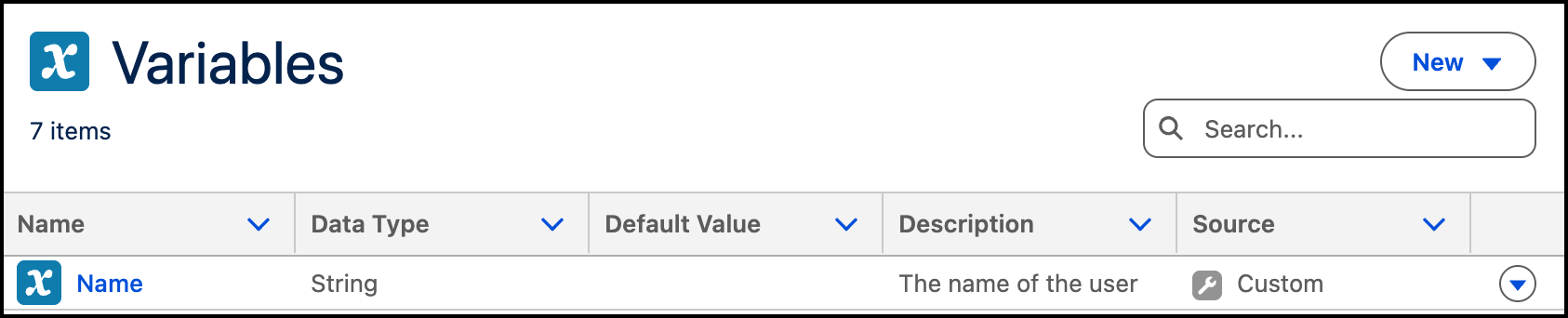
And this code sample shows the same variable in Script view.
user_name: mutable string = ""
    description: "The name of the user"
    label: "Name"
    visibility: "External"
There are several ways to effectively use variables to perform actions. This example demonstrates how to use a variable to filter an action.
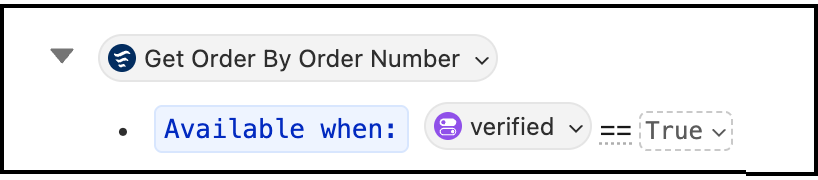
get_order_details: @actions.GetOrderByOrderNumber
    available when @variables.verified == True
And this example demonstrates how to use variables for action inputs and outputs.
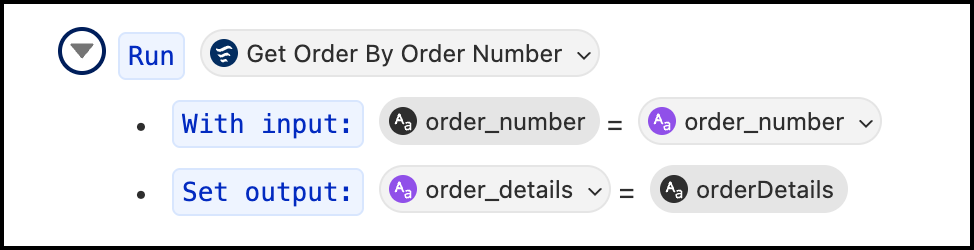
run @actions.GetOrderByOrderNumber
    with order_number = @variables.order_number
    set @variables.order_details = @outputs.orderDetails
You can use variables throughout your agent definition. See Variables.
- Balance Probabilistic and Deterministic Behavior. Your subagent
instructions include both logic-based instructions and prompt-based instructions. Take
advantage of the logic in your instructions for critical business workflows to increase
predictable, deterministic behavior. For example, before the prompt-based instructions
run, you can check the loyalty tier for a user, use conditional logic to determine
whether to thank a user for being a gold tier member, use a variable to customize the
prompt, run an action to send an email. You can then focus the natural language prompt
on what an AI model does best, without overloading the model’s context with unnecessary
and unpredictable logic instructions.
This sample demonstrates how to use logic-based instructions. In these instructions, we check a variable to see if the customer is ready to book a hotel. If so, we get account information using variables for the action inputs and outputs. We then run another action to get hotel info.
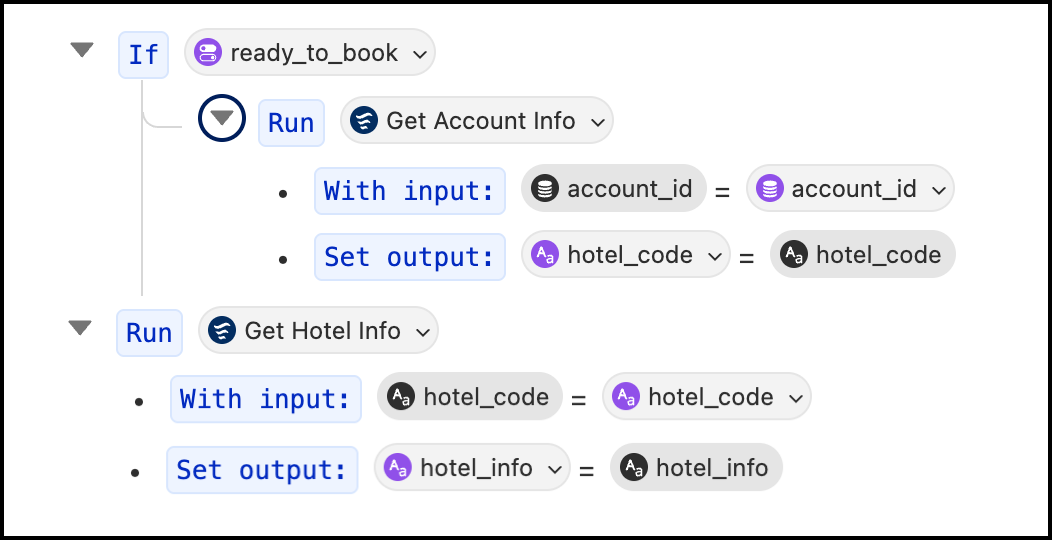
if @variables.ready_to_book:
    run @actions.get_account_info
        with account_id = @variables.account_id
        set @variables.hotel_code = @outputs.hotel_code
run @actions.get_hotel_info
    with hotel_code = @variables.hotel_code
    set @variables.hotel_info = @outputs.hotel_info
See How Subagent Instructions are Resolved to Build a Prompt in Salesforce Help and Reasoning Instructions in the Agent Script Developer Guide.
- Reference Resources Directly. Whether you're building agents in
Canvas view or Script view, you can directly reference subagents, actions, and variables in
your instructions. This feature takes the ambiguity out of your instructions because you
can specifically "@ mention" resources.
This sample illustrates some of the ways to reference resources in your instructions.
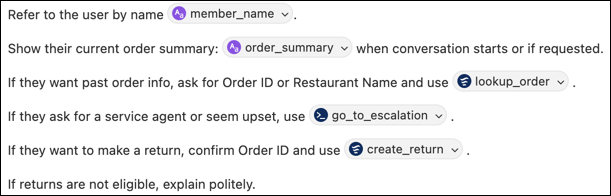
instructions: |
    Refer to the user by name @variables.member_name.
    Show their current order summary: @variables.order_summary
    when conversation starts or if requested.
    If they want past order info, ask for Order ID or Restaurant Name
    and use @actions.lookup_order.
    If they ask for a service agent or seem upset, use @actions.go_to_escalation.
    If they want to make a return, confirm Order ID and use @actions.create_return.
    If returns are not eligible, explain politely.
See Building Agents in Canvas View or Get Started with Agent Script.
- Use Accurate, Relevant Data. Ensure that your inputs are based on
the best possible information.
- Structured data, such as CRM data, Data 360 data, external data, and other sources, must be correct, up to date, and relevant to the decision or task at hand. See Strategies for Data Quality in Trailhead.
- Unstructured data, such as data libraries and other input obtained with RAG, must be accurate and directly relevant to user requests. Successful RAG inputs start with a knowledge store of well-curated, high-quality content that’s accurate, complete, current, organized, and consistent. Other considerations include: search strategy (hybrid or vector search), content parsing and pre-processing, search index optimization, a well-tuned chunking strategy, and using knowledge/RAG quality data and metrics to identify areas to improve.
- Ensure Consistency. Eliminate contradictions across prompts, subagents, actions, RAG data, instructions, and Salesforce configuration.
- Test, Iterate, Refine. Preview your agent in Agentforce Builder. Build tests with Agentforce Testing Center and monitor your agents with analytics. Use feedback from conversation transcripts to refine your context. Be sure to re-test your agents when any aspect of your solution changes, such as a model update.
By carefully managing your agent's context, you can build reliable and effective AI solutions with Agentforce.
