
You are here:
Agentforce Language Support
Learn about supported languages, multi-language setup, and agent testing with Agentforce Builder.
Agentforce Supported Languages
Languages are tested on the agent’s ability to perform standard actions and retrieve information in that language for Agentforce (Default), Agentforce Employee Agent, and Agentforce Service Agent types only. Languages in beta may have some inconsistencies when retrieving information, so plan to test your agent and review its responses carefully.
| Language | Code |
|---|---|
| English |
en_AU
|
en_UK
|
|
en_US
|
|
| Arabic (Beta) | ar |
| Bulgarian | bg |
| Catalan | ca |
| Chinese Simplified | zh_CN |
| Chinese Traditional | zh_TW |
| Croatian | hr |
| Czech | cs |
| Dutch | nl-NL |
| Danish | da |
| Estonian | et |
| Finnish | fi |
| French |
fr_CA
|
fr_FR
|
|
| German |
de
|
| Greek | el |
| Hebrew (Beta) | he |
| Hindi | hi |
| Hungarian | hu |
| Indonesian | id |
| Italian |
it
|
| Japanese |
ja
|
| Korean | ko |
| Malay | ms |
| Norwegian | no |
| Polish | pl |
| Portuguese |
pt_BR
|
pt_PT
|
|
| Romanian | ro |
| Spanish |
es_ES
|
es_MX
|
|
| Swedish | sv |
| Tagalog | tl |
| Thai | th |
| Turkish | tr |
| Vietnamese | vi |
For instructions on adding languages to your agent, see Update Language Settings for more information.
Thoroughly test your agent’s language settings in Agentforce Builder to ensure consistent behavior. Try changing EndUserLanguage in the Variables tab and see how your agent responds. See Test Your Agent in Agentforce Builder for more information.
How It Works
Agentforce architecture is designed to handle language variations by using several key variables and processes. These components ensure that your agents interpret multilingual user inputs accurately and respond in the correct language.
Agentforce uses three main language settings:
- End User Language: This setting represents the user's input language. Its value
is explicitly defined by the agent channel (or client). How this setting is populated
depends on the type of agent channel being used.
- For agents connected to the Agentforce panel in the Lightning Experience (for example, Agentforce Employee agents), the end-user language is set from the Salesforce user's language settings for the org. See Edit Your Language and Locale Settings.
- For agents connected to Enhanced Chat v1 (for example, Agentforce Service agents), the admin sets up a pre-chat field that determines the end-user language. See Use Additional Languages in Enhanced Chat v1 Conversations.
- For agents connected to other channels (for example, Agentforce Lead Nurturing), you can set the end-user language by using the Agent API. See Send Agent Variables with the Agent API.
- Agent Default Language: This is the primary or fallback language that you specify for an agent. An agent uses the default language if no language is detected at the start of a session or if the detected language isn’t supported. See Update Language Settings.
- Agent Allowed Languages: This is a set of secondary supported languages you specify that an agent can switch to based on language detection. See Update Language Settings.
Example: System Messages and End User Language
When you set up your agent, you define System Messages for your agent. These include a Welcome Message, an Error Message, and (for Service Agents) an Escalation Message. These messages are written in a single language.
At the start of the chat session, Agentforce decides whether or not to translate the System Messages based on the three main language settings.
- If the End User Language matches the Agent Default Language, no translation occurs and the System Messages are output as initially written.
- If the settings do not match, Agentforce checks if the End User Language is an Agent Secondary Language. If it is, then Agentforce translates the System Messages into the End User Language.
- If the End User Language is neither an Agent Default Language nor an Agent Secondary Language, the Agent Default Language will be used. No translation occurs and the System Messages are output as initially written.
Expected Behavior:
| Example | Agent Settings | System Message Language |
| 1 | System Message is written in English Agent Default Language set to English Agent Secondary Language is empty End User Language is set to French |
English because only English is allowed for the agent. |
| 2 | System Message is written in English, Agent Default Language set to English Agent Secondary Language set to French End User Language is set to French |
French because End User Language is different from Agent Default Language, and End User Language is available as an Agent Secondary Language. |
| 3 | System Message is written in French Agent Default Language set to English Agent Secondary Language set to French End User Language is set to English |
French because the Agent Default Language is the same as the End User Language. |
Example: Language Switching with Multiple Configured Languages

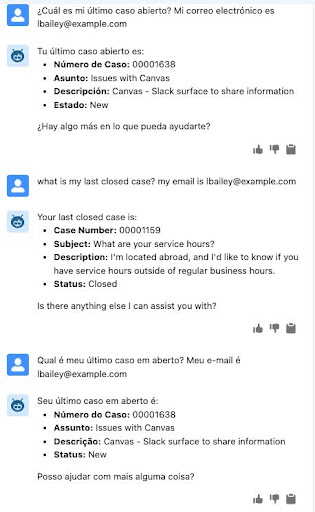
When an agent is configured with multiple languages, the agent prioritizes the language of the user’s input within a conversation if it’s one of the configured languages. For example, consider an agent configured with English as the default language and Portuguese and Spanish as additional languages.
- At the start of the session, the end user's language is set to English.
- The user asks a question in Spanish, and the agent responds in Spanish.
- The user then asks a question in English (in the same conversation), and the agent switches and responds in English, even though the user’s default language is Spanish.
- The user then asks a question in Portuguese (in the same conversation), and the agent switches again and responds in Portuguese.
- When the agent executes an action, action outputs are in the end user language (English) throughout the entire session. But the agent's response, which wraps around the action output, is dynamic. So it's possible to see mixed-language responses, like "Asunto: Issues with Canvas."
The agent respects the languages it’s configured to understand. If a user asks a question in a language the agent is not configured for, the agent may not provide an answer in that language. Instead, it explains that it can’t respond in the user’s language. For example, if a user asks a question in Italian and the agent isn’t configured to use Italian, the agent responds in Italian to explain the languages it supports.
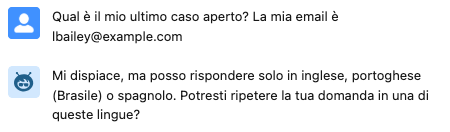
This behavior ensures the agent is responsive to the immediate language of the user’s message, while also maintaining boundaries for languages it isn’t set up to handle.
