
MCP for Agentforce
MCP for Agentforce brings enhanced agent interoperability to Agentforce. Seamlessly register and use third-party tools in Agentforce, so your agents can do more for your customers and employees across systems.
Required Editions
| Available in: Lightning Experience |
| Available in: Enterprise, Performance, Unlimited, and Developer Editions. Required add-on licenses vary by agent type. |
What Is MCP?
Model context protocol (MCP) is an open standard for how AI models connect to external systems, including their tools. Anthropic, which developed the protocol, suggests thinking about MCP like USB-C ports: “Just as USB-C provides a standardized way to connect your devices to various peripherals and accessories, MCP provides a standardized way to connect AI models to different data sources and tools.”
How Does MCP Work?
Let’s say you want an Agentforce agent to retrieve a loan risk score from a third-party banking service for a contact associated with a Salesforce account. Without MCP, you have to manually integrate the two systems and handle all API connectivity, authentication, data access, and code. MCP acts as a translator between systems, so this complex manual work is done for you. The agent is able to use Salesforce data to search for the user’s details with the third-party banking service, and it can use the loan risk score to determine its next steps in the conversation.
The MCP protocol relies on servers, clients, and hosts.
- An MCP server is created by service providers like Salesforce, MuleSoft, and third-party
service providers. A server contains all of the assets that an external system makes
available, including tools, prompts, and resources.
- Tools are similar to agent actions—they’re executable functions that an LLM can call to perform actions in external systems.
- Prompts are natural language instructions from the server to an LLM to guide behavior.
- Resources are data that servers can access, such as data feeds, files, or other information.
- An MCP client connects to one or more servers to access the external system’s tools and data. Think of a client as a retriever of functionality and information.
- An MCP host is the app that coordinates this process. The host provides an interface for using the tools and data from the MCP server and manages the MCP client.
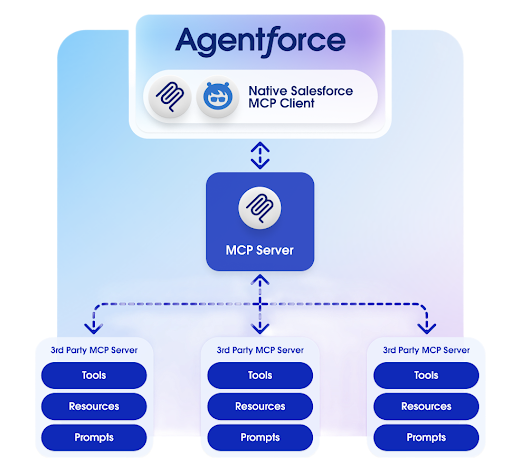
We’ve built an MCP client into Agentforce, so you can easily register and manage MCP servers and your agents can securely access and use server tools.
Trust and MCP for Agentforce
At Salesforce, trust is our #1 value. Because Agentforce is the host and client, you can trust MCP for Agentforce.
MCP for Agentforce is secured by the same security and compliance controls as the rest of Agentforce, including Agentforce Trust Layer and our zero data retention policy. Your Salesforce data stays in Salesforce.
We provide automatic checks against common security threats.
- Invisible characters: Invisible characters can be used to hide malicious instructions. When you register an MCP server in Agentforce Registry, we check for invisible characters in the names and descriptions of the server and tools, and we warn you before you complete registration.
- Rug pulls: A rug pull occurs when a previously safe MCP server or tool is updated by the publisher to include malicious instructions after the server has been registered. We capture server and tool definitions, including input and output schemas, at registration and tool allowlisting. These are treated as stable contracts, not just run-time data, so we can scan for changes at the beginning of each agent session and whenever an agent calls a server tool. When we detect changes, we automatically block use of the out-of-sync server or tool at run time by removing the associated MCP tool actions from the agent’s logic and reasoning. We block only the affected actions, so we don’t otherwise interrupt your agent.
Agentforce Gateway provides another layer of protection, enabling you to control access, set usage limits, and ensure compliance. In Agentforce Gateway, you can create and apply policies to govern MCP server usage and behavior, including rules for specific agents and MCP tools. You can apply policies manually or automatically by rules.
Like other Agentforce features, MCP for Agentforce is powered by generative AI. Generative AI can produce inaccurate responses. Test and review responses carefully.
Testing and Observability
In agent previews in Agentforce Builder and in Agentforce Testing Center, MCP tool actions are identified and can be tested end-to-end, just like other agent actions.

We scan for changes in server and tool definitions at run time. When we detect a change, we remove the associated MCP tool actions from the agent’s logic and reasoning.
Use trace data in Agentforce Builder to identify when MCP tool actions are out of sync. Look for Transition to Subagent and Available Actions events. When your agent transitions to a subagent that includes MCP tool actions, MCP tool actions that are in sync are included in the Available Actions event. MCP tool actions that are out of sync are excluded.
To temporarily disable server and tool validation as part of agent debugging, add a custom header to the named credential associated with the server registration. For the name, enter x-sfdc-mcp-feature-no-tool-validation. For the value, enter true. This advanced debugging option makes it possible to run out-of-sync MCP tool actions (for example, if you suspect the validation process is incorrectly breaking them) and log the validation errors. Only use this header for testing and debugging scenarios, and remove it before activating an agent with MCP tool actions associated with the server.
MCP for Agentforce is supported in the Session Tracing Data Model (STDM) used in Agent Analytics and Agent Optimization.
- Requirements for MCP for Agentforce
Review the requirements to make sure you’re ready to register and use MCP servers in Agentforce. - Considerations for MCP for Agentforce
Carefully review the current considerations and limitations for MCP for Agentforce. - Connecting MCP Servers to Salesforce
The process for connecting Salesforce to an MCP server depends on the source of the server. Third-party MCP servers are connected using the Agentforce Registry, and Mulesoft and Salesforce-hosted servers are connected using API Catalog. - Register a Third-Party MCP Server in Agentforce Registry
Create a connection to an MCP server and allowlist the server tools you want to use with your agents. - Add an MCP Tool Action to Your Agent
Add the agent action that references your MCP tool to an agent from the asset library, so your agent can call the tool in conversation.
