
How Agents Created in the Legacy Builder Work
Follow the path of a user message through the Atlas reasoning engine to learn how an agent built in the legacy Agentforce Builder reasons, takes action, and generates responses.
Required Editions
| Available in: Lightning Experience |
| Available in: Enterprise, Performance, Unlimited, and Developer Editions. Required add-on licenses vary by agent type. |
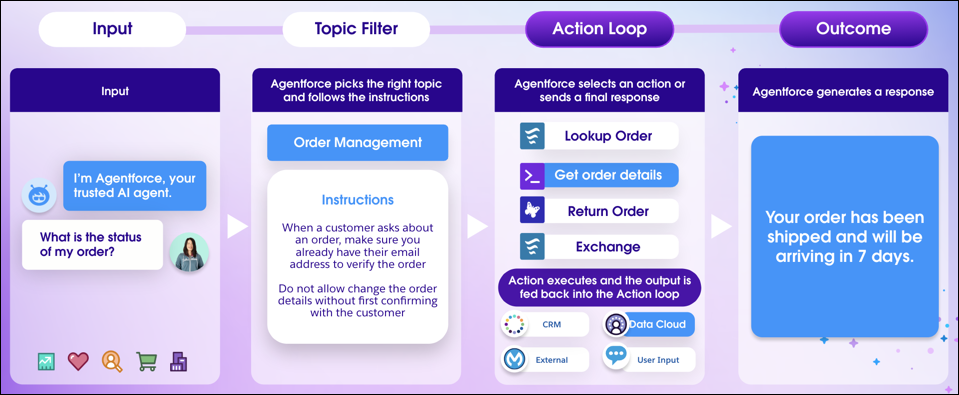
You can think of the reasoning engine as a series of carefully orchestrated prompts sent to a large language model (LLM). Each step in the agent’s iterative classification and reasoning represents one or more LLM calls. The number and size of LLM calls depends on the complexity of the task and which subagents and actions are used. Learn more about large language model support for Agentforce.
Step 1: A user sends a message
If an agent uses a conversational interface, the process begins when a user enters a question or request.
Agents that operate in the background behave differently.
- Agentforce SDR agents—The process begins when the agent initiates contact with a prospect based on a lead assignment, schedule, and other engagement rules that you set.
- Agents called from an Apex class or flow—The process begins when the agent is triggered based on the conditions you set. When you configure your Apex class or flow, you define the agent’s task by specifying a sample user message. The agent uses the same user message to search through the subagents and actions assigned to it, just like if a user had asked a question or made a request in a chat window.
Step 2: The agent classifies the user’s message into a subagent
The agent selects the best matching subagent based on what the user wants to do and the jobs that the agent can do. To do this, the reasoning engine compares the recent conversation history, including the user’s most recent message, to the names and classification descriptions of all the subagents available to the agent. Subagents with a filter applied are included only if the filter conditions are met.
After a subagent is selected, the reasoning engine collects all of the information that the agent needs to determine its next step.
- The recent conversation history, including the most recent user message (on average, the last six turns of the conversation).
- The subagent’s name, scope, and instructions.
- The names and instructions, including input and output instructions, of the actions included in the subagent. Actions with a filter applied are included only if the filter conditions are met.
Then the agent moves on to the reasoning process.
If the reasoning engine can't find an appropriate subagent, the agent moves to an Off-Topic system subagent and tries to bring the conversation back to the subagents assigned to it.
Step 3: The agent begins the reasoning process and takes action
After the agent has selected a subagent, it analyzes the available information to determine its next step.
- Run an agent action
If the agent needs to retrieve or update information, it can use one or more agent actions to call a Salesforce service, such as an Apex class, flow, or prompt template. Learn more about agent actions.
An agent also uses actions to ground a response in trusted business data and other sources, such as knowledge articles and external websites. Learn more about grounding agents in your data.
- Ask the user for more information
If the agent requires information outside the conversation history, the agent can ask the user directly.
- Ask the user clarifying questions
The agent can ask follow-up questions to disambiguate between available options.
- Respond directly to the user’s question or request
If the user’s question or request can be resolved with information the agent already has access to, the agent can respond without running additional actions.
The agent’s decision-making is heavily influenced by subagent instructions. For example, if a subagent instruction specifies that the agent should always ask for a model number before answering a product-related question, the agent requests the information before moving to the next step. Or if a subagent instruction specifies that the agent must verify a customer’s identity before providing account information, the agent moves to a customer verification subagent before fulfilling the user’s request. Learn more about subagent instructions.
When the agent runs an action, it checks the result in a reasoning loop to make sure it has the right information before responding to the user. The agent adds the action output to the information it already has about the conversation. Then it decides whether to run another action, ask the user more questions, or send a final response. This process continues up to seven reasoning loops.
Step 4: The agent performs a final response validation (Agentforce Service agents only)
Before an Agentforce Service agent sends a response, it checks whether the response is grounded in data sources, adheres to the subagent’s scope and instructions, and doesn’t include hallucinations, unverified information, or potential prompt injection risks. If the proposed response fails this validation, the agent generates a new response.

If the agent can’t generate a response that passes validation, it informs the user that it can’t help with their question or request.
Step 5: The agent sends a response to the user
After the agent completes the reasoning loop, it sends a message to the user. The user can continue the conversation by asking a follow-up question or changing the subject, and the agent responds appropriately. Behind the scenes, the user’s response restarts the journey, but to the user, it feels like they’re taking turns in a conversation.
