
Select Agentforce Model Option
We recommend using the Salesforce Default model option for Agentforce, which enables Salesforce to select the best model mix for agent accuracy and performance. But you can choose an AWS-Hosted model option instead.
Required Editions
| Available in: Lightning Experience |
| Available in: Enterprise, Performance, Unlimited, and Developer Editions. Required add-on licenses vary by agent type. |

Override Model Option for Agent or Subagent
This page explains how to select the default model option for Agentforce agents. When you're designing an agent, you can override the default model selection and specify a different model for an agent or subagent. For more information, see Configure Models in Agent Script in the Agentforce Developer Guide.
Salesforce Default
The Salesforce Default model option for Agentforce is a managed mix of trusted models optimized by Salesforce for accuracy, trust, and performance.
- Agents created in the new Agentforce Builder use GPT-4.1
- Agents created in the legacy Agentforce Builder use GPT-4o
AWS-Hosted
The AWS-Hosted option uses Anthropic Claude Sonnet 4 on Amazon Bedrock. Because the Salesforce-managed instance of Anthropic is hosted on the Salesforce instance of Amazon Bedrock:
- All LLM traffic remains within the Salesforce virtual private cloud (VPC) enabling a highly secure network architecture.
- The traffic is encrypted using TLS 1.2 at a minimum always.
- The Bedrock instances where Salesforce hosts Anthropic models are connected with AWS PrivateLink.
- Model providers, including Anthropic, can't access the customer’s data.
- No customer data is stored within the Amazon Bedrock service.
- No customer data is persisted or used to train any models.
Scope for Model Option Selection
The Atlas reasoning engine uses the selected model option.
For both options, specific tasks, such as subagent classification or citations, may use Salesforce-owned models.
Select Your Model Option
To select the model option for Agentforce, from Setup, in the Quick Find box, enter Audit, Analytics, and Monitoring and select Einstein Audit, Analytics, and Monitoring Setup. Choose an option in the Select the Model for Agentforce section. The model option selection applies to all Agentforce agents.
If you previously created any prompts or custom actions or subagents for Agentforce, test them after switching your model option.
If you choose the AWS-Hosted option, update custom agent actions to use Anthropic Claude Sonnet 4 on Amazon for consistency.
Zero-Data Retention
Your data isn’t retained by third-party LLMs. We partner with all our external model providers, such as OpenAI and Anthropic, to enforce the zero-data retention policy.
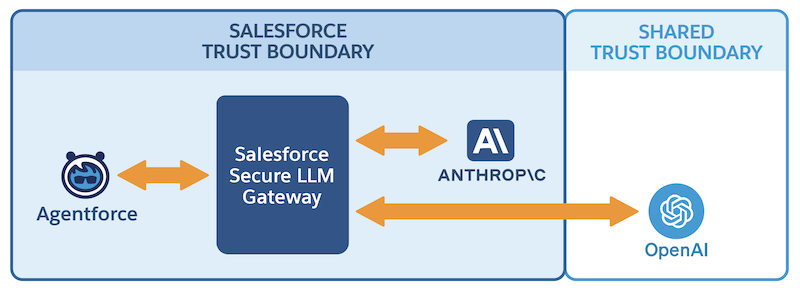
Salesforce Trust Boundary
The Salesforce-managed instance of Anthropic is the first LLM provider that’s fully contained within the Salesforce trust boundary. All LLM traffic remains within the Salesforce VPC enabling a highly secure network architecture.
Limitations for the AWS-Hosted Option
The model performance and latency are better for the Salesforce Default option than the AWS-Hosted option. For benchmark comparisons, see artificialanalysis.ai.
Best Practices for the AWS-Hosted Option
Consider these best practices if you select the AWS-Hosted option.
- If you previously created any custom actions or subagents for Agentforce, test them after switching the model option. You may need to adjust some prompts to perform as expected with Anthropic.
- Compared to OpenAI, Anthropic tends to be more sensitive to the nuances in the input payload. Anthropic returns more accurate and reliable responses if the prompts are clear, concise, and thorough.
Use these resources for examples and detailed guidance.
