
Subagent Classification and Routing
Learn more about the Agent Router and how to customize it to control how your agent selects subagents in a conversation.
Required Editions
| Available in: Lightning Experience |
| Available in: Enterprise, Performance, Unlimited, and Developer Editions. Required add-on licenses vary by agent type. |

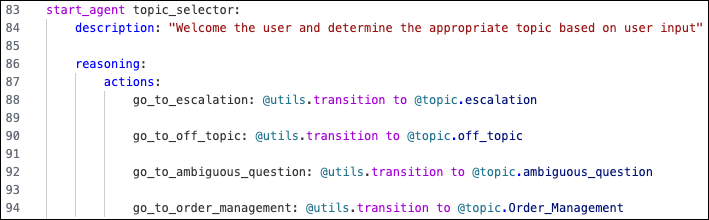
When you create an agent, a special subagent called the Agent Router is added to your agent and is defined as the starting subagent for every agent conversation. By default, the agent uses this subagent for subagent classification, which is the process of selecting the most relevant subagent based on what the user wants to do and the jobs that the agent can do. Transitions to all of the subagents in your agent are added to the Agent Router’s reasoning actions, which makes them available in the agent conversation. The agent compares the recent conversation history, including the user’s most recent message, to the names and descriptions of all of the subagents in the Agent Router’s reasoning actions to select the best match.
You can edit the Agent Router just like any other subagent, so you can customize its reasoning instructions and actions to set initial variables and add logic to control your subagent classification and routing.
- Add conditions, actions, and variables to drive classification to particular subagents.
- Exclude a subagent from classification based on filters (Make this action available when:).
- Remove references to a subagent if you want the subagent to be accessible only via transitions from other subagents.
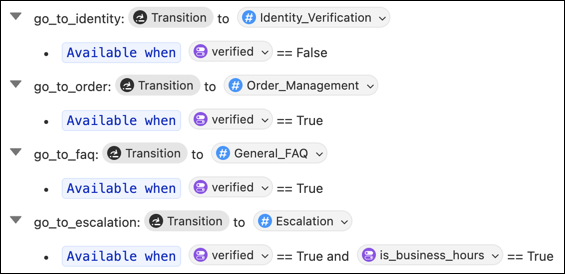
You can use filters and variables to control access and routing to subagents. For example, you can add filters based on a variable to ensure that certain subagents are available only to verified customers. In this example, conversations are routed based on the verified variable in reasoning actions. The Order Management, General FAQ, and Escalation subagents are available only when the customer is verified (verified equals True). If the customer isn’t verified (verified equals False), the conversation is routed to the Identify Verification subagent.
By default, the Agent Router is defined as the starting subagent in your agent’s Agent Script. In other words, this is the subagent that uses the ‘start_agent’ prefix instead of the ‘subagent’ prefix.
However, you can define another subagent as the starting subagent instead. You can choose to use the Agent Router to move to subagent classification later in the conversation, or you can remove the Agent Router from your agent altogether if you want to control subagent routing differently.
Subagent Classification and Routing
From April 2026, agents created with the Agentforce Employee agent and Agentforce Service agent default templates in the new Agentforce Builder use the Salesforce-owned HyperClassifier model for subagent classification. The HyperClassifier model outperforms standard LLMs in speed and precision, particularly when following complex instructions or adhering to negative instructions.
This start_agent block in Agent Script configures
HyperClassifier for subagent
classification.
start_agent agent_router:
    description: "Welcome the user and determine the appropriate topic/subagent based on user input"
    model_config:
       model: "model://sfdc_ai__DefaultEinsteinHyperClassifier"
If you remove model_config, your agent defaults for subagent
classification to the model option selection for Agentforce in Setup.
For more details, see Configure Models in Agent Script in the Agentforce Developer Guide.
