
Legacy Agentforce Analytics
Legacy Agentforce Analytics uses Data 360 to help you gain insights into how your agents are performing. The insights in your customizable dashboard and reports can help you determine whether you want to change anything to drive adoption or adjust subagents and actions to improve user satisfaction.
Required Editions
| Available in: Lightning Experience |
| Available in: Enterprise, Performance, Unlimited, and Developer Editions. Required add-on licenses vary by agent type. |


- Agentforce Analytics is scheduled for retirement starting May 2026. We recommend using Agent Analytics instead.
- Agentforce Analytics stores and processes data using Data 360. It consumes credits used for billing based on your usage of the feature. To stop processing Data 360 credits and unlock the Data 360 objects, turn off Agentforce Analytics in the Einstein Feedback and Monitoring Setup. You can then remove the Data 360 objects.
- Some Agentforce Analytics features include user feedback. To use all the features, turn on Feedback in the Einstein Feedback and Monitoring Setup.
- Agentforce Analytics isn't available in Data Cloud One companion orgs or in sandbox environments.
- Agentforce Analytics is not supported in Government Cloud organizations.
- Make sure your org uses the standard Salesforce CRM Connector so Data 360 can ingest the data from your org.
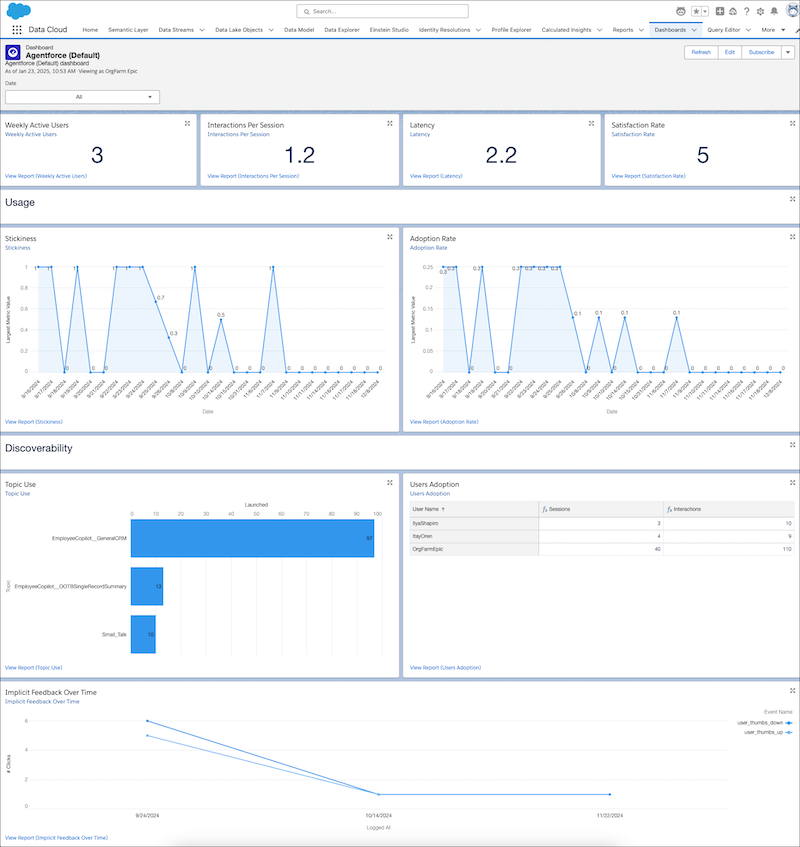
Found in the Agentforce (Default) folder in the Dashboard tab, the reports on the dashboard provide a variety of data points, including adoption, feedback, and usage analysis. You can click the charts or linked reports to drill deeper into the results. You can modify the reports and dashboards or create your own to suit your org’s needs. But be sure to clone the report and modify the clone, not the original, to avoid breaking the analytics processes.
- Utterance Analysis
Utterance Analysis lets you quickly see how Agentforce (Default) users are using agents, what they’re requesting, and whether the agent was able to handle these requests. These customizable reports can help you refine your subagents and actions so that your agents respond more effectively and accurately. - Agentforce Analytics Reports
Agentforce Analytics is based on Data 360 reports that can help you gain insight into the performance of your agents. The reports show you who’s using your agents, how successful they are, and what your adoption level is, among other things. - Legacy Agentforce Analytics Data Cloud Objects
Agentforce Analytics creates dashboards and reports built on Data Cloud objects. - Legacy Agentforce Analytics Troubleshooting
If you’re not seeing the information you expect in your reports and dashboards, check these possible solutions.
