
You are here:
Einstein Lead Scoring
Use AI to score your leads by how well they fit your company’s successful conversion patterns. Let your sales team prioritize their leads by lead score. See which fields influence each lead score most.
Required Editions
| Available in: Lightning Experience and Salesforce Classic |
| Available with Sales Cloud Einstein, which is available in Performance and Unlimited Editions, and available for an extra cost in Enterprise Edition |
Einstein Lead Scoring uses data science and machine learning to discover your business’s patterns of lead conversion. Based on your patterns, Einstein predicts which of your current leads to prioritize. By using machine learning, Einstein Lead Scoring provides a simpler, faster, and more accurate solution than traditional rules-based lead scoring approaches.
Einstein analyzes your past leads to determine which current leads have the most in common with leads that have previously converted. By default, Einstein scores your leads using most lead fields. If your admin is certain a field doesn’t affect lead quality, they can tell Einstein not to include the field.
Einstein also creates internal categories for certain lead text fields that can contain different values with similar meaning. For example, different businesses sometimes use different job titles for the same job. Using the lead title, Einstein associates each lead with a Job Rank and a Department. If a lead’s title is CEO, Einstein assigns it the C-level job rank. By associating leads with a smaller list of job ranks and departments, Einstein can find patterns in your data more easily.
Based on its data analysis, Einstein creates a predictive model for your organization. Einstein reanalyzes your lead data every 10 days and refreshes your scores. So if new trends emerge, Einstein won’t miss them.
When you score all leads together without creating segments, and you don’t have enough lead conversion data to build your own predictive model, Einstein uses a global model. The global model uses anonymous data from many Salesforce customers. When you accumulate enough lead data, Einstein builds a scoring model with your data and uses the model with the better results.
Einstein Lead Scoring adds a Lead Score field to leads. The Lead Score lets sales reps prioritize their work by ranking leads according to their similarities to prior converted leads. Leads with higher scores have more in common with leads that have converted in the past.
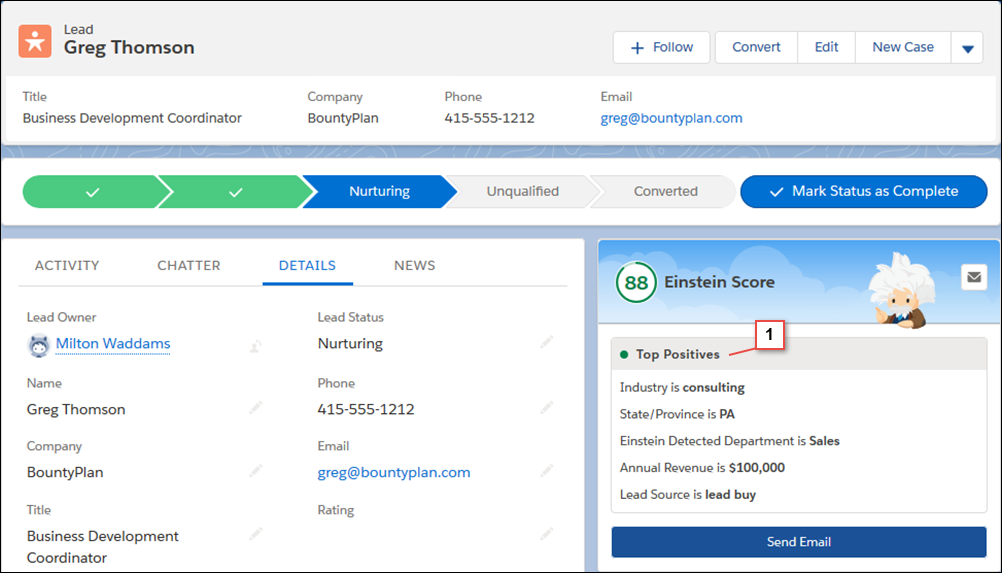
The lead score appears in the Einstein Score component on lead detail pages. The component also shows sales reps which of the lead’s fields had the greatest influence on its score (1). Depending on the lead, fields with positive or negative influences can appear. Fields that aren’t listed in the Einstein Score component still influence the score, but less than the fields listed.
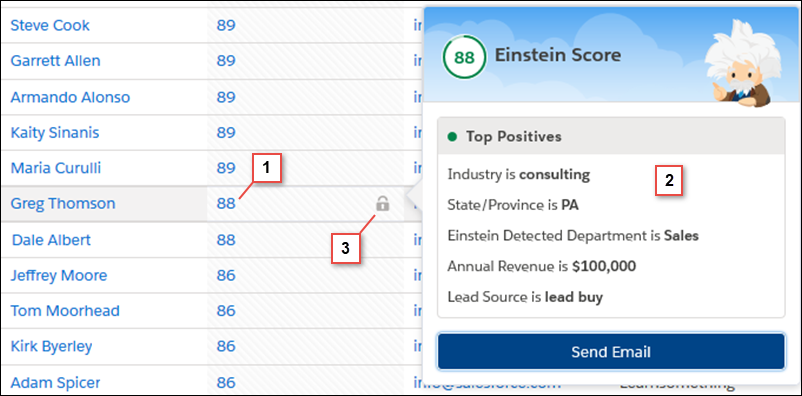
When you or your users add the Einstein Score field to list views, hovering over a score (1) displays the top factors (2) behind the score. When sales reps focus on leads with higher scores, they’re likely to convert more of them to opportunities. The lock (3) indicates that the score is read-only.
Einstein Lead Scoring includes a dashboard with reports that show key lead score metrics for your org.
- Average Lead Score by Lead Source
- Conversion Rate by Lead Score
- Lead Score Distribution: Converted and Lost Opportunities
