Loading
Salesforce now sends email only from verified domains. Read More
Sales Cloud Einstein
Table of Contents
Select Filters

          No results
          No results
          Here are some search tips

          Check the spelling of your keywords.
          Use more general search terms.
          Select fewer filters to broaden your search.

          Search all of Salesforce Help
          Einstein Opportunity Scoring

          Einstein Opportunity Scoring

          Let artificial intelligence help you and your team focus on the right opportunities so you can close more deals. Each opportunity is given a score, from 1 to 99, which is available on opportunity records and list views. If you use forecasts in Salesforce, opportunity scores are also available on the forecasts page. Plus, use scores with reports, Process Builder, and workflows. Einstein Opportunity Scoring is available to users with or without a Sales Cloud Einstein license.

          Required Editions

          Available in: Lightning Experience and Salesforce Classic.
          Available with Sales Cloud Einstein, which is available in Performance and Unlimited Editions, and for an extra cost in Enterprise Edition
          Available to eligible customers for no extra cost in: Enterprise, Performance, and Unlimited Editions

          Watch a Demo: Watch Video DemoEinstein Opportunity Scoring (English only)

          Opportunity scores tell you the likelihood that an opportunity will be won. For each opportunity score, Einstein shows the factors that have contributed the most to the score, both positively and negatively.

          Opportunity Scoring hover card

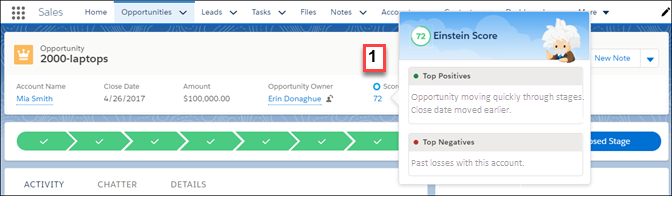
          In Lightning Experience, the score is shown on the compact layout of opportunity records (1) or on the Details tab. Hover over the score to see a list of factors that contribute to the score. For example, a score could be relatively high because the opportunity is moving quickly through the stages compared to other opportunities.

          In Salesforce Classic, the score is shown on the record detail of opportunity records. The contributing factors are shown.

          Opportunity Scoring on list views

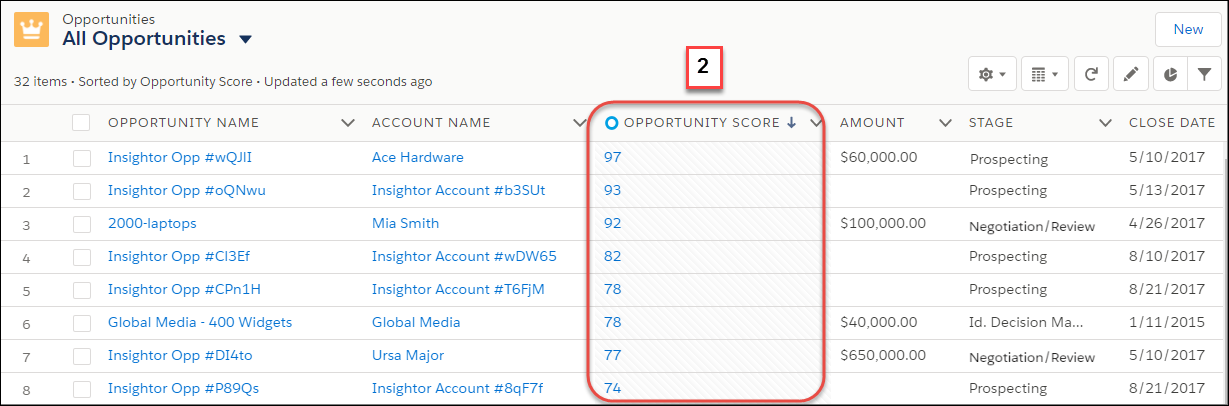
          You can add the Opportunity Score field to any of your opportunity list views (2). If you don’t see the score on public list views, ask your Salesforce admin to add it. In Lightning Experience, hover over the score in the list view to see the factors that contribute to the score. In Salesforce Classic, the contributing factors aren’t available from the list views. Instead, navigate to the opportunity record detail page.

          Opportunity score on forecasts page

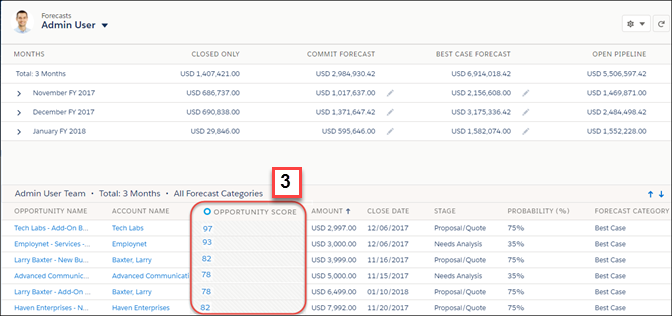
          If you use forecasts, admins can add opportunity scores to the opportunity list on the forecasts page (3).

           
          Loading
          Salesforce Help | Article