
You are here:
About Retrieval Augmented Generation
Learn how Retrieval Augmented Generation (RAG) in Data 360 enhances your Agentforce and Einstein generative AI solutions with knowledge.
RAG In Action
When you submit a large language model (LLM) prompt, RAG in Data 360:
- Retrieves relevant information from a knowledge store containing structured and unstructured content
- Augments the prompt by combining this information with the original prompt
- Generates a prompt response
Overview of RAG In Data 360
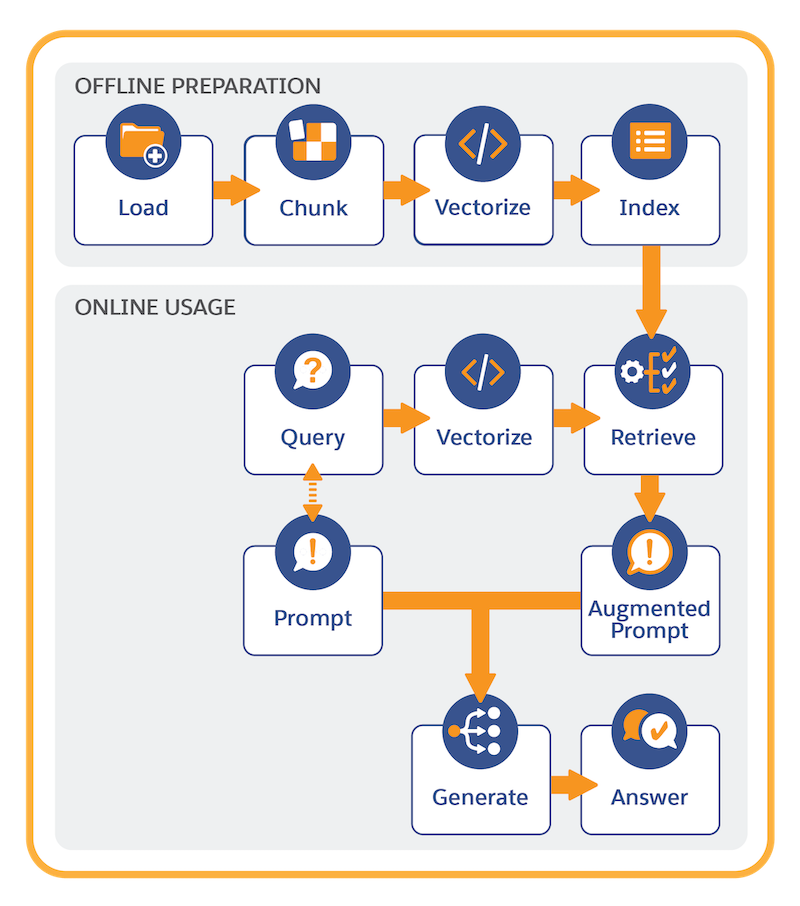
It’s helpful to think of RAG in two main parts: offline preparation and online usage.
Quick Start for Offline Preparation
The fastest way to set up your RAG solution is to Create a Data Library, either in Agentforce Builder or Setup. When you create an Agentforce Data Library library, you automatically create all the elements needed for a working RAG-powered solution. Salesforce uses default settings for all of the components: vector data store, search index, retriever, prompt template, and standard action. If you want, you can then customize these elements to fine-tune RAG solutions for your use cases.
Advanced Setup for Offline Preparation
To implement RAG in Data 360, start by connecting structured and unstructured data that RAG uses to ground LLM prompts. Data 360 uses a search index to manage structured and unstructured content in a search-optimized way. Content can be ingested from a variety of sources and file types. Some examples of unstructured content used with RAG include service replies, cases, RFP responses, knowledge articles, FAQs, emails, and meeting notes.
Offline preparation involves these steps:
- Connect your unstructured data.
- Create a search index configuration to chunk and vectorize the content.
Chunking breaks the text into smaller units, reflecting passages of the original content, such as sentences or paragraphs. Vectorization converts chunks into numeric representations of the text that capture semantic similarities.
- Store and manage the search index in Data 360.
To learn more, see Search for AI, Automation, and Analytics.
Retrievers serve as the bridge between search indexes and prompt templates. Retrievers further refine the search criteria and retrieve the most relevant information used to augment prompts. To support a variety of use cases, you create custom retrievers in AI Models (formerly Einstein Studio). To learn more, see Retrieve Data.
Online Usage
The final piece of the RAG implementation puzzle is to add a call to a retriever in a prompt template. For a given prompt template, the prompt designer can customize retriever query and results settings to populate the prompt with the most relevant information. To learn more, see Ground with Knowledge Using Retrieval Augmented Generation.
Each time a prompt template with a retriever is run, this sequence occurs:
- The prompt template invokes the retriever with a dynamic query.
- The query is vectorized (converted to numeric representations). Vectorization enables search to find semantic matches in the search index (which is already vectorized).
- The query retrieves the relevant context from the indexed data in the search index.
- The original prompt is populated with the information retrieved from the search index.
- The prompt is submitted to the LLM, which generates and returns the prompt response.
Many LLMs were trained generally across the Internet on static and publicly available content. RAG adds information to a prompt that's accurate, up-to-date, and not available as part of the LLM's trained knowledge. It’s like supplementing the LLM’s capabilities by providing relevant information retrieved from a knowledge store that contains the latest, best version of the facts. With RAG, prompt template users can bring proprietary data to the LLM without retraining and fine-tuning the model, resulting in generated responses that are more pertinent to their context and use case.
