
Einstein Trust Layer: Response Journey
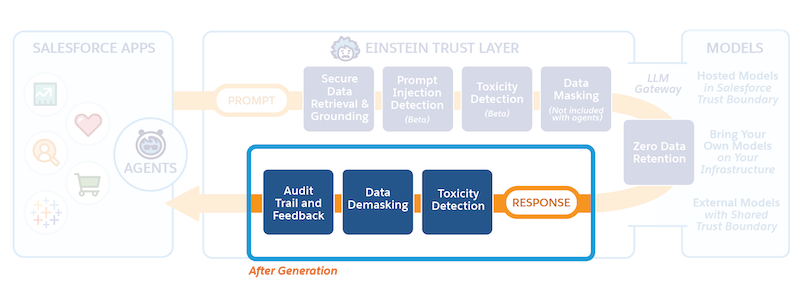
When the generated response is returned from the large language model, the Einstein Trust Layer applies certain policies and processes to make sure the response is safe and useful.
Required Editions
| Available in: Enterprise, Performance, and Unlimited Editions with an Einstein for Sales, Einstein for Platform, Einstein for Service, Einstein 1 Service, or Einstein GPT Service add-on. To purchase add-ons, contact your Salesforce account executive. |
Response Journey
Toxicity Detection
Toxicity detection in responses: The generated responses are scanned for toxicity. The detection process includes a toxicity confidence score, which reflects the probability of the response including harmful or inappropriate content. The toxicity score and the categories are stored in Data 360.
Data Demasking
The placeholders we created for masking the data during the prompt journey is now replaced with the actual data. The relationship between the original entities and their respective placeholders is used to rehydrate the response so the response is useful and meaningful when sent back.

Citations
The response can include citations if relevant. Citations link AI-generated responses to the original source used to generate the response. Use citations to see what information was used by the large language model (LLM) to generate the response and verify the validity of the source data. Citations help you identify any potential inaccuracies or hallucinations in the generated responses, increasing your confidence in using AI tools.
Feedback and Audit
When a response is presented in Salesforce, you can accept, modify, or reject the response. You can also provide explicit feedback. Your explicit feedback on the responses is captured as part of the audit and feedback data (audit trail) and stored in Data 360. Depending on the AI feature, your implicit actions on the response can also be captured and stored in Data 360.
Audit Trail also includes the original prompt, masked prompt, scores logged during toxicity detection, the original output from the LLM, and the demasked output.
Audit and feedback data are stored in your instance of Data 360. You have control over how long that data is stored in your instance of Data 360. Additionally, audit and feedback data are stored by Salesforce for 30 days for compliance purposes.
