
Toxicity Detection
Einstein Trust Layer uses machine learning (ML) models to identify and flag toxic content in prompts and responses.
Required Editions
| Available in: Enterprise, Performance, and Unlimited Editions with an Einstein for Sales, Einstein for Platform, Einstein for Service, Einstein 1 Service, or Einstein GPT Service add-on. To purchase add-ons, contact your Salesforce account executive. |
Customer-facing outputs from your AI applications represent your company’s brand and voice. AI can sometimes generate toxic or harmful content that can lead to reputation harm to your company. Toxicity in responses can also be influenced by prompts, so it’s also important to detect toxicity in prompts as well as in responses. Toxicity in prompts can come from untrusted sources such as public chat interactions and third-party web content.

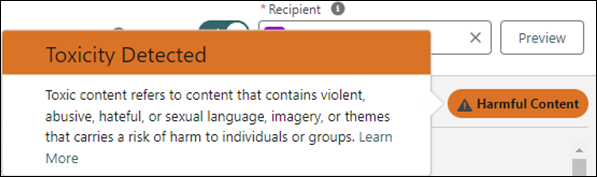
When toxicity is detected in prompts or responses, you see a notification or a warning in the Salesforce AI features at run time. For example, you see toxicity warnings in copilot or prompt builder if toxic content is detected in the generated response from the LLM.
Toxicity Warning in Prompt Builder

Toxicity Categories
Einstein toxicity detection models recognize these categories:
| Category | Type of Content |
|---|---|
| Violence | Content that depicts, references, or incites behavior intended to cause physical harm to people, animals, or property |
| Sexual | Content that depicts, references, or solicits material, behavior, or language containing sexual language, imagery, or themes, including consensual and nonconsensual sexual content, illegal and legal sexual acts and behaviors, and sexually suggestive and flirtatious content |
| Profanity | Content that includes inflammatory, offensive, obscene, vulgar, or irreverent language, gestures, and expletives |
| Hate | Content that depicts, references, or incites behavior or language intended to cause psychological harm to a person or group on the basis of identity or other distinguishing personal traits |
| Physical | Content that depicts, references, encourages, or enables the use, acquisition, or distribution of illicit substances, nonprescription medication, and other substances that have a physiological or psychological effect when consumed or, behavior intended to cause physical harm, self-harm, or death |
Toxicity Scoring
Each category of toxic content is rated to indicate the likelihood of that type of toxic language in the text. Additionally, the Einstein Trust Layer gives an overall toxicity score that reflects the combination of all detected categories.
The scores range from 0 to 1, with 1 being the most toxic. The scores are logged in an audit trail and stored in Data 360. The Trust Layer prebuilt reports and dashboards visualize toxicity trends in features and time. You can also create custom reports in Data 360.
