
Enable Prompt Builder
Enable Einstein in your organization and assign users the appropriate permission set to use Prompt Builder.
Required Editions
| User Permissions Needed | |
|---|---|
| To create and manage prompt templates in Prompt Builder: | Prompt Template Manager permission set
OR Customize Application permission set |
| To run prompt templates using generative AI features: | Prompt Template User permission set
OR Customize Application permission set |
| User Permissions Needed | |
|---|---|
| To create and manage prompt templates in Prompt Builder: | Prompt Template Manager permission set |
| To access and run prompt templates outside Prompt Builder | Prompt Template User permission set |

Note If you’re working from a scratch org, add Prompt Builder to your definition file before
enabling Einstein. See
Scratch Org Features.
- Follow Set Up Einstein Generative AI.
-
(Optional) To use prompt templates with sales emails, activate Sales Emails.
- From Setup, in the Quick Find box, enter Einstein Sales, and then select Einstein for Sales.
- Enable Sales Emails. It can take a few minutes before the feature is ready to use.
- Assign the Prompt Template Manager permission set to users that need to create and manage
prompt templates in Prompt Builder.
- From Setup, in the Quick Find box, enter Permission Sets, and then select Permission Sets.
- From the Permission Sets list view, click Prompt Template Manager.
- From the Prompt Template Manager detail page, click Manage Assignments and Add Assignments.
- Select the checkboxes next to the names of the users, including yourself, that you want assigned to the permission set, and click Next. To add a user to the Prompt Template Manager permission set, the user must have access to Setup.
- Click Assign.
Assign the separate Prompt Template User permission set for end users that need to access and run prompt templates. - Refresh the page so that Prompt Builder is now visible in Setup.
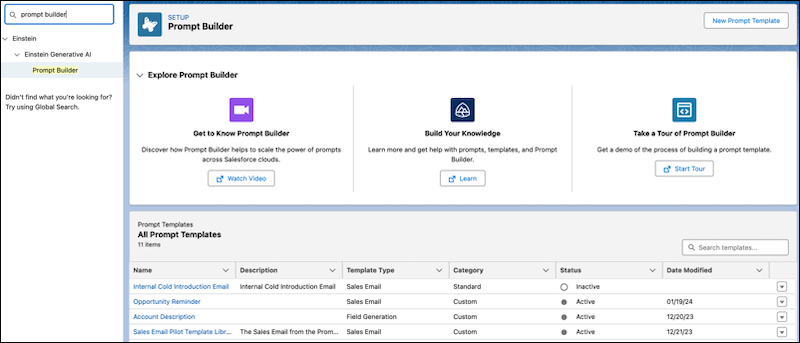
- To open Prompt Builder from Setup, in the Quick Find box, enter Prompt
Builder, and then select Prompt Builder.
See Also
Did this article solve your issue?
Let us know so we can improve!
