
Add Citations to Prompt Template Responses
Add citations to your prompt templates so that your users can compare and verify the generated information with the source information. Sources include content used by agent actions, knowledge articles, and web pages.
Required Editions
| Available in: Lightning Experience |
| Available in: Enterprise, Performance, and Unlimited Editions with the Einstein for Platform, or Einstein or Agentforce for Sales or Service add-on, or Agentforce Foundations |
| User Permissions Needed | |
|---|---|
| To create and manage prompt templates in Prompt Builder: | Prompt Template Manager permission set
OR Customize Application permission set |
| To create and manage retrievers: | Data Cloud permission set |
| To run prompts with Einstein Search: | Data Cloud User permission set |
A citation links an AI-generated response to the original source of information, such as retrieved knowledge, that was used to generate the response. To learn more, see Build Trust in AI Responses with Citations.

- In Prompt Builder, create or edit a prompt template.
- In the Prompt Template Workspace, click where you want to insert the retriever.
- Type @ or click Insert Resource, click Retrievers, and click Configure Retrievers +.
- Select the retriever you want to add to the prompt template.
-
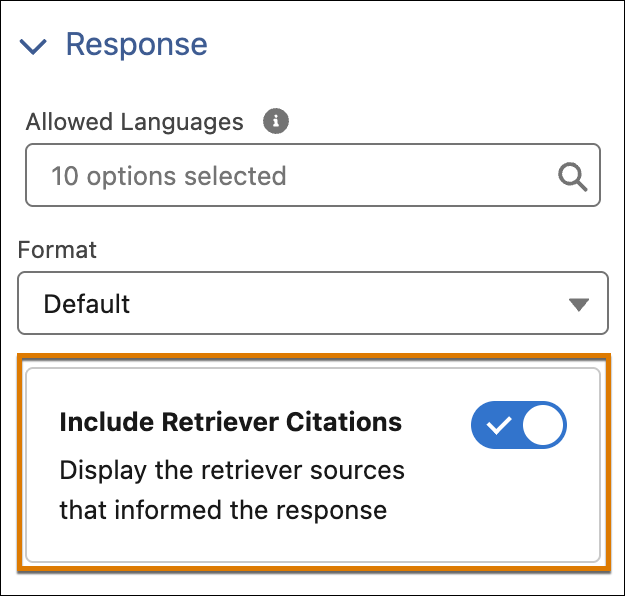
In the Response section of the Details tab on the Template Settings panel, turn
on citations.
- Change other template settings, if you want.
- Click Apply and Insert.
- Save your work.
- Test your changes. Preview the prompt template and review the LLM-generated response.
When you invoke the prompt template, citations show up in the LLM response. Sources shows a numbered, clickable list of original sources used to generate the response. The inline numbers refer to the source number in the list.
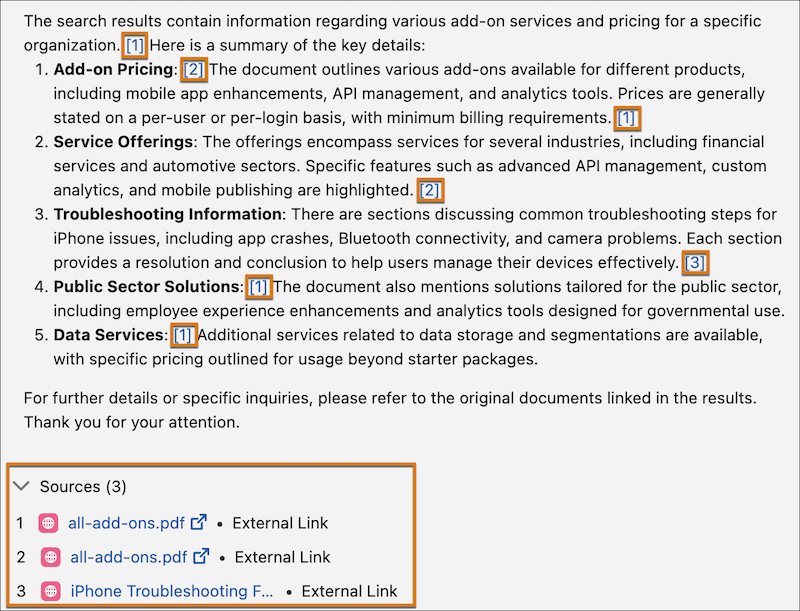
If you embed a retriever that supports images in citations, then - in your prompt responses - it's possible to see citations with links to images. Support for images requires a search index that has image processing enabled. For details, see Get Trusted AI Responses with Retriever Citations.
